

Äänen muuntaminen kuvaksi on nykyaikaisten tekoälytyökalujen ansiosta helpompaa kuin koskaan. Prosessi on yksinkertainen: ensin ääni muutetaan tekstiksi puheentunnistuksen avulla (transkriptio) ja sitten teksti viedään visuaaliseen muotoon, kuten tyyliteltyyn kuvaan, kuvatekstikorttiin tai lainausmuotoon. VOMOn kaltaisten työkalujen avulla voit suorittaa koko työnkulun muutamassa minuutissa - muokkaus- tai suunnittelutaitoja ei tarvita.

Mitä tarkoittaa äänen muuntaminen kuvaksi?
Äänen muuntaminen kuvaksi tarkoittaa puhuttujen sanojen muuttamista luettavaksi tekstiksi ja sen muotoilemista staattiseksi visuaaliseksi tulosteeksi - tekstityskortin, muistiinpanokuvan tai Instagram-lainaustyylisen grafiikan tapaan.
Tämä muoto on erityisen hyödyllinen, kun:
- Haluat jakaa äänisisältöä alustoilla, jotka tukevat vain kuvia.
- Tarvitset visuaalisia muistiinpanoja nauhoitetuista kokouksista, haastatteluista tai äänitallenteista.
- Haluat arkistoitavan ja haettavissa olevan visuaalisen tallenteen.
Toisin kuin kuvakaappaukset tai käsin kirjoitettu transkriptio, tekoälyautomaatio tekee tästä työnkulusta nopean ja tarkan.
Paras työkalu muuntaa äänen kuvaksi automaattisesti
Vaikka on olemassa manuaalisia menetelmiä, tehokkain ratkaisu on käyttää tekoälyllä toimivaa transkriptiotyökalua, joka tukee tekstistä kuvaan -muotoilua.
VOMO erottuu edukseen, koska se:
✔ Muuntaa puheen tekstiksi suurella tarkkuudella
✔ Tukee useita kieliä
✔ Toimii tallenteiden ja live-äänen kanssa
✔ Käyttäjät voivat viedä lopullisen transkriptin kuvatiedostona.
✔ Ei vaadi muokkausta tai graafista suunnittelua.
VOMO automatisoi prosessin alusta loppuun riippumatta siitä, käytätkö pitkiä luentoja vai lyhyitä äänimuistioita.
Askel askeleelta: Kuinka muuntaa ääni kuvaksi käyttämällä tekoälyä?
Seuraa näitä ohjeita, jotta voit muuntaa äänitiedostosi puhtaaksi, jaettavaksi kuvaksi:
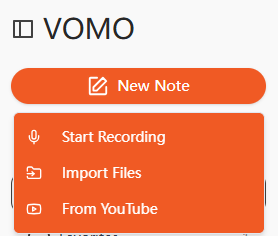
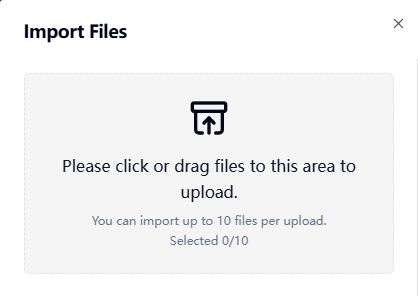
Vaihe 1: Lataa äänitiedosto
Avaa transkriptiotyökalu ja lataa tuettu ääniformaatti, kuten MP3, M4A, AAC tai WAV.
Useimmat työkalut mahdollistavat myös mikrofonitallennuksen, jos haluat tehdä transkriptiota livenä.
Vaihe 2: Äänen transkribointi tekstiksi
Työkalu muuntaa automaattisesti puhutun sisällön muokattavaksi tekstiksi. Tässä vaiheessa puheentunnistus käsittelee kieltä ja muotoilee sen luettaviksi lauseiksi.
Tämä prosessi on samanlainen mutta ei identtinen kuin kääntäminen ääni tekstiksi, paitsi että lopputulos on pelkän tekstin sijasta visuaalinen.
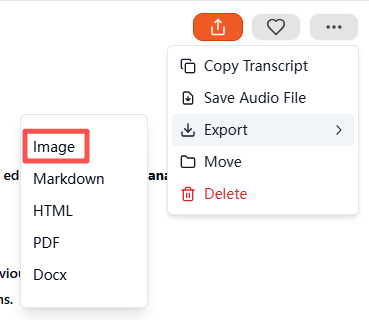
Vaihe 3: Vie teksti kuvana
Kun transkriptio on valmis, siirry vientiasetuksiin ja valitse Kuva tulostusmuodoksi. Vahvistuksen jälkeen työkalu luo ja lataa automaattisesti pakatun ZIP-tiedoston. Kansiosta löydät lopullisen kuvan, joka sisältää transkriptoidun tekstin - valmiina tallennettavaksi, arkistoitavaksi tai jaettavaksi missä tahansa.
Lopullinen viety kuva on nyt valmis tallennettavaksi, arkistoitavaksi tai jaettavaksi.
Tuetut tiedostotyypit ääni-kuvaksi-muunnosta varten
Kaikki työkalut eivät tue kaikkia mediamuotoja. Alla on lueteltu yleisimmät syöttötyypit:
| Mediatyyppi | Muodot |
|---|---|
| Audio | MP3, M4A, AAC, WAV JA OGG |
| Video (valinnainen) | MP4, MOV, MKV, AVI, FLV, FLV |
Jos lataat nauhoitettua kuvamateriaalia erillisen äänen sijasta, työkalu poimii puhutun sisällön silti ensin. Tämä on samanlaista kuin video tekstiksi, paitsi lopullisen visuaalisen viennin yhteydessä.
Äänen muuntaminen kuvaksi: tärkeimmät käyttötapaukset
Tämä työnkulku hyödyttää monia käyttäjäryhmiä:
| Käyttötapaus | Esimerkki |
|---|---|
| Opiskelumuistiinpanot | Luentotallenteet muunnetaan visuaalisiksi muistikorteiksi. |
| Sosiaalinen media | Podcast-sitaatit muotoiltuna jaettaviksi kuviksi |
| Kokouspöytäkirjat | Liiketoimintakeskustelun tilannekuvat dokumentointia varten |
| Saavutettavuus | Kuulovammaisten tukisisältö |
| Sisältömarkkinointi | Ääni-ideoiden muuntaminen brändättyjen visuaalisten kuvien muotoon |
Kuvat välittyvät nopeasti, ja ne voidaan arkistoida tai jakaa paljon helpommin kuin raaka ääni.
Vinkkejä laadukkaan äänen muuntamiseen kuvaksi
Kirjoitustarkkuuden ja lopullisen luettavuuden parantaminen:
- Käytä selkeää ääntä, jossa on mahdollisimman vähän taustamelua
- Puhu tasaista tahtia
- Valitse luettavat fontit ja välit
- Korosta keskeisiä ajatuksia tai aikaleimoja
Siisti ja kiiltävä visuaalinen ilme parantaa ymmärrettävyyttä ja sitoutumista.
Lopulliset ajatukset
Äänen muuntaminen kuvaksi on fiksu tapa säilyttää puhuttu sisältö visuaalisesti miellyttävässä, jaettavassa muodossa. VOMOn kaltaisilla työkaluilla voit transkriboida äänen, tarkentaa tekstiä automaattisesti tekoälyn avulla ja viedä sen puhtaana grafiikkana muutamassa minuutissa - täydellistä tuottavuuteen, koulutukseen, sisältömarkkinointiin ja saavutettavuuteen.




