


MOV-videon muuntaminen kuvaksi edellyttää äänen poistamista, puhutun sisällön siirtämistä tekstiksi ja tekstin viemistä visuaaliseen kuvaformaattiin, kuten PNG- tai JPG-muotoon. Käyttämällä tekoälytyökaluja, kuten VOMO, tämä prosessi on nopea, tarkka ja aloittelijoille sopiva. Sen sijaan, että luot käsin kuvakaappauksia tai kirjoitat kuvatekstejä, voit luoda kiillotettuja, jaettavissa olevia visuaalisia transkriptejä suoraan MOV-tiedostoista.

Mitä tarkoittaa MOV:n muuntaminen kuvaksi?
MOV-muuntamisessa kuvaksi ei ole kyse staattisten videokuvien tallentamisesta. Siihen sisältyy:
- Ääniraidan poimiminen MOV-tiedostosta
- Puheen transkribointi tekstiksi (video tekstiksi)
- Muotoillun tekstin vieminen visuaalisena kuvana
Tämä työnkulku sopii erinomaisesti opiskelumuistiinpanojen, sosiaalisen median sisällön, kokousyhteenvetojen tai videosisällön lainausten luomiseen. Tekoäly varmistaa tarkkuuden, selkeyden ja luettavuuden, toisin kuin manuaaliset menetelmät, jotka ovat aikaa vieviä ja virhealttiita.
Miksi AI-työkalut ovat välttämättömiä MOV-kuvaksi muuntamisessa
Videon manuaalinen muuntaminen kuvaksi sisältää useita vaiheita: äänen poisto, transkriptio, muotoilu ja vienti. Tekoälytyökalut yksinkertaistavat tätä prosessia:
- Puhuttujen sanojen automaattinen muuntaminen tekstiksi
- Yhteenveto videon pääkohdista
- Transkriptioiden muotoilu visuaalisesti miellyttäviin ulkoasuihin
- Lopputuloksen vieminen kuvana
VOMO on erityisen tehokas aloittelijoille, sillä se tarjoaa täydellisen kokonaisratkaisun minimaalisella manuaalisella työmäärällä.
Vaihe 1: Lataa MOV-tiedostosi
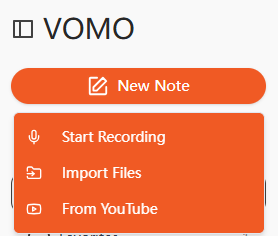
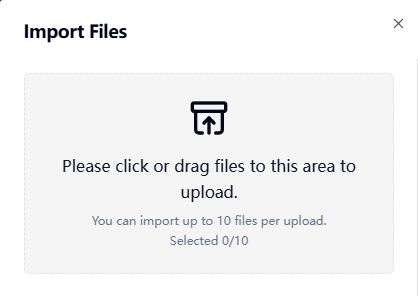
Aloita lataamalla MOV-videosi tekoälyn transkriptioalustalle. Monet työkalut tukevat raahaa ja pudota -latausta tai tuontia URL-osoitteista, kuten YouTubesta tai Google Drivesta. Selkeän äänen varmistaminen parantaa transkription tarkkuus.
Vaihe 2: Transkriboi MOV-video
Tekoäly analysoi videon äänen ja muuntaa sen luettavaksi tekstiksi. Tämä prosessi suorittaa tehokkaasti ääni tekstiksi, tuottamalla jäsenneltyjä ja muokattavia pöytäkirjoja. Jotkin kehittyneet tekoälyalustat myös tiivistävät keskeiset kohdat automaattisesti, mikä säästää aikaa manuaaliseen muokkaukseen.
Vaihe 3: Vie transkriptio kuvana
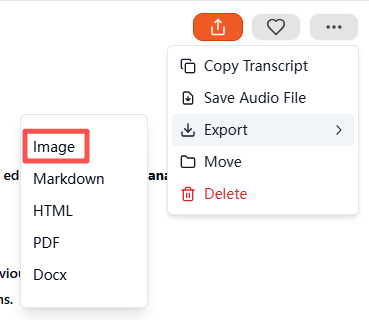
Kun transkriptio on valmis, valitse Kuva vientimuotona. Tekoälytyökalu luo pakatun ZIP-tiedoston, joka sisältää visuaalisen transkriptin. Kukin kuva edustaa osaa tekstistä puhtaassa, luettavassa muodossa, joka on valmis tallennettavaksi, jaettavaksi tai arkistoitavaksi. Tämä vaihe takaa ammattimaiset, visuaalisesti miellyttävät tulokset pienellä vaivalla.
Tuetut MOV- ja muut tiedostomuodot
Useimmat Tekoälyn transkriptio työkalut tukevat useita formaatteja:
| Mediatyyppi | Tuetut formaatit |
|---|---|
| Video | MOV, MP4, MKV, AVI, FLV, FLV |
| Audio | MP3, WAV, M4A, AAC, AAC |
Voit myös muuntaa äänitiedostoja suoraan kuviksi käyttämällä samaa työnkulkua, jos se on tarpeen.
Parhaat AI-työkalut MOV-kuvaksi muuntamiseen
Suositeltavia tekoälytyökaluja ovat mm:
- VOMO - All-in-one tekoälyn transkriptio ja kuvien vienti
- Descript - Edistynyt videoeditointi ja transkriptio
- Otter AI - Yhteistyöhön perustuva transkriptio ja muistiinpanojen tekeminen
- Notta AI - Monikielinen tuki visuaalisella viennillä
- Veed.io - Yksinkertaistettu muotoilu sosiaalista mediaa varten
VOMO on erityisen tehokas automaattisen yhteenvedon, kuvien viennin ja aloittelijoille suunnatun käyttöliittymän ansiosta.
Käytännön käyttötapaukset MOV-kuvaksi muuntamisessa
MOV-videoiden muuntaminen visuaalisiksi tekstikuviksi on monipuolista ja hyödyllistä:
| Käyttötapaus | Esimerkki |
|---|---|
| Koulutus | Luentomuistiinpanot, kurssin kohokohdat |
| Liiketoiminta | Kokousnauhoitukset, haastattelujen yhteenvedot |
| Sisällön luominen | Sosiaalisen median lainaukset, podcastin kohokohdat |
| Saavutettavuus | Visuaaliset transkriptiot kuulovammaisille käyttäjille |
| Tutkimus | Aikaleimattuja muistiinpanoja videolähteistä |
Visuaalisia transkriptejä on helpompi jakaa, tallentaa ja lukea kuin raakavideotiedostoja tai pelkkiä tekstidokumentteja.
Vinkkejä korkealaatuiseen MOV-kuvaksi muuntamiseen
Tarkkojen ja selkeiden tulosten varmistamiseksi:
- Tallenna videoita hiljaisissa ympäristöissä
- Puhu selkeästi ja tasaiseen tahtiin
- Käytä korkealaatuisia mikrofoneja nauhoituksissa
- Tarkista tekoälyn luomat yhteenvedot keskeisten kohtien osalta.
- Korosta olennaiset lausekkeet tai aikaleimat ennen vientiä.
Näiden vaiheiden noudattaminen takaa ammattimaiset, luettavat ja visuaalisesti miellyttävät kuvakirjoitukset.
Päätelmä
MOV:n muuntaminen kuvaksi vuonna 2025 on helppoa tekoälyn transkriptiotyökaluilla. Lataamalla videon, luomalla transkriptin ja viemällä sen kuvana alustat, kuten esim. VOMO säästää aikaa ja tuottaa ammattimaista, jaettavaa sisältöä. Olipa kyse sitten koulutuksesta, liiketoiminnasta tai sisällön luomisesta, tekoälyohjatun MOV-kuvaksi-muunnoksen avulla on helppo muuttaa videosisältö kiillotetuiksi visuaalisiksi asiakirjoiksi.




