如何将 AVI 转换为图像:最佳工具和技巧

立即将音频转化为文本

99% 精确 - 超快 - 易用

How to Convert AVI to Image

Converting an AVI video to an image involves extracting the audio, transcribing the spoken content into text, and exporting the text as a visual image format like PNG or JPG. Using AI-powered tools like VOMO, this process becomes fast and accurate. Instead of manually creating screenshots or typing captions, you can generate polished, shareable visual transcripts directly from your AVI videos.

VOMO 将视频转换为文本

What It Means to Convert AVI to Image

Converting AVI to image is more than just capturing video frames. It involves:

  • Extracting audio from the AVI file
  • Transcribing speech into text (视频转文本)
  • Exporting the text as a visually formatted image

This workflow is perfect for creating lecture notes, meeting summaries, social media content, or quotes from videos. AI tools ensure high accuracy and readability, eliminating the need for time-consuming manual methods.


Why Use AI Tools for AVI-to-Image Conversion

Manual transcription and formatting are inefficient. AI simplifies the process by:

  • Automatically transcribing spoken words
  • Summarizing key points from the video
  • Formatting the transcript for visual clarity
  • Exporting the final result as an image

VOMO is an excellent solution, providing an all-in-one workflow suitable for beginners and professionals alike.


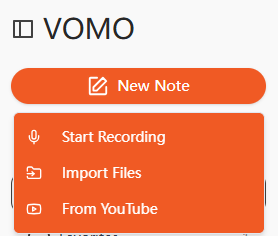
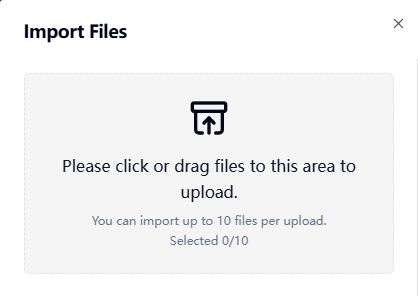
Step 1: Upload Your AVI File

Step 1: Upload Your AVI File
uploading your AVI video to an AI transcription platform

Begin by uploading your AVI video to an AI transcription platform. Many tools support drag-and-drop uploads or importing from URLs like YouTube or Google Drive. Clear audio ensures higher transcription accuracy.


Step 2: Transcribe the AVI Video

The AI will process the video’s audio track and convert spoken content into readable text. This step is effectively performing 音频转文本, producing structured, editable text that can be formatted for visual output. Advanced AI tools can also summarize key points automatically, reducing the need for manual editing.


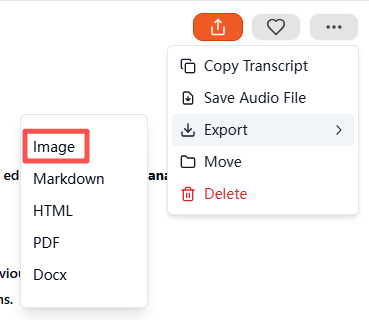
Step 3: Export the Transcript as an Image

Step 3: Export the Transcript as an Image

After the transcription is complete, select Image as the output format. The tool will generate a compressed ZIP file containing the visual transcript. Each image represents a section of your video transcript, ready to save, archive, or share. This method produces professional, easy-to-read visual transcripts with minimal effort.


Supported AVI and Other File Formats

Most AI transcription tools support multiple media types:

Media Type支持的格式
视频AVI, MP4, MOV, MKV, FLV
音频MP3, WAV, M4A, AAC

Audio files can also be converted directly to images using the same workflow if needed.


Top AI Tools for AVI-to-Image Conversion

Recommended AI tools include:

  • VOMO – Full-featured AI transcription with image export
  • Descript – Video editing with advanced transcription
  • Otter AI – Collaborative transcription and note-taking
  • Notta AI – Multi-language support with visual export
  • Veed.io – Simplified formatting for social media and presentations

VOMO stands out for automatic summarization, high accuracy, and ZIP export of image transcripts.


Practical Use Cases for AVI-to-Image Conversion

Converting AVI content into visual transcripts is highly versatile:

使用案例示例
教育Lecture summaries, study notes
商业Meeting recordings, interviews
内容创作Podcast quotes, tutorial highlights
无障碍环境Visual transcripts for hearing-impaired users
研究Timestamped notes from video research

Visual transcripts are easy to share, store, and consume compared to raw video or plain text.


Tips for High-Quality AVI-to-Image Conversion

For the best results:

  • Use clear audio recordings with minimal background noise
  • Speak at a consistent pace
  • Use high-quality microphones for recordings
  • Review AI-generated summaries for accuracy
  • Highlight key points or timestamps for clarity

Following these steps ensures professional, readable, and visually appealing image transcripts.


结论

Converting AVI to image is now straightforward with AI transcription tools. By uploading a video, generating a transcript, and exporting it as an image, tools like VOMO save time and produce visually appealing, shareable content. Whether for education, business, or content creation, AI-driven AVI-to-image conversion is the most efficient way to repurpose your video content into professional visual documents.

vomo 徽标
20250727 103817 22
解锁即时 Al 会议笔记
左麦穗

100,000 多名用户的信任

5 星级
右麦穗

无需信用卡