-
-
🎁
年度專業版 $79.99 $99.99
截止日期:12月31日

How to Convert MOV Files into a HTML Transcript

立即將音訊轉換為文字

99% 精確 - 超快 - 易於使用

How to Convert MOV Files into a HTML Transcript

Converting MOV files into an HTML transcript involves extracting the spoken content from a MOV video, transcribing it using AI, and exporting it as an editable HTML document. You upload your MOV video, the system automatically transcribes the speech, and outputs structured HTML that can be edited, styled, and published online quickly.

VOMO simplifies this process, allowing you to upload MOV files directly and generate accurate transcripts with AI. The platform exports clean, web-ready HTML, making it ideal for lectures, interviews, webinars, and presentations without any manual formatting.

VOMO 將視訊轉換為文字

What Is an HTML Transcript for MOV Videos?

An HTML transcript is a written version of the spoken content in a MOV video, formatted using HTML elements such as headings, paragraphs, and lists. Unlike PDFs or plain text files, HTML transcripts are optimized for web use and easy editing.

Transcription tools rely on audio to text technology to analyze the audio track within MOV files. They detect words, punctuation, and paragraph breaks to produce content that is readable, searchable, and ready for web publication.

Why Convert MOV Files into HTML Transcripts?

Turning MOV videos into HTML transcripts provides several benefits:

  • Improves SEO by making spoken content searchable
  • Enhances accessibility for users who prefer reading
  • Allows easy reuse of video content in blogs and websites
  • Provides flexible formatting and styling options
  • Helps organize video content efficiently

HTML transcripts ensure that MOV videos reach a wider audience and are more valuable online.

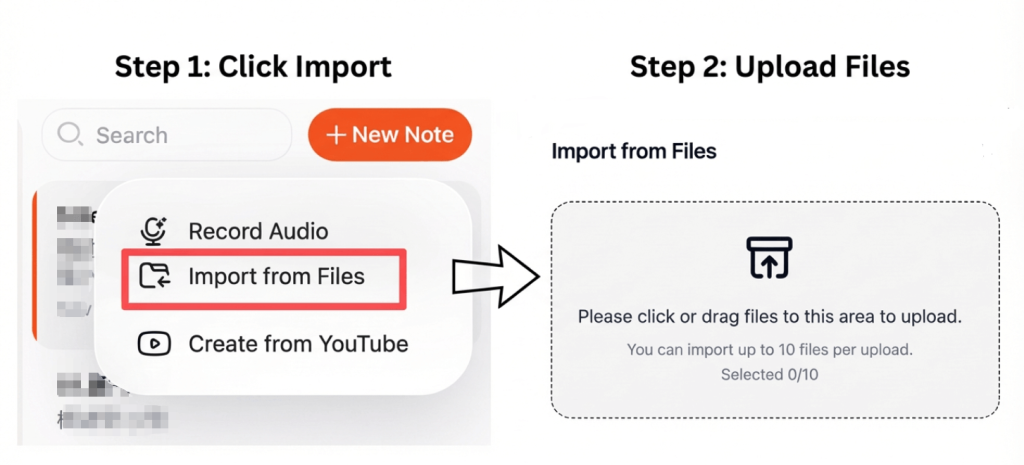
步驟 1:將您的 MOV 檔案上傳至轉錄工具

vomo 上傳音訊檔案 (1)

Choose a transcription platform that supports MOV files. Most AI tools allow direct uploads from your device or cloud storage.

為了達到最佳效果:

  • Ensure audio is clear and consistent
  • 將背景噪音降至最低
  • 請選擇正確的語言與口音
  • 避免講者同時發言

High-quality input audio leads to more accurate HTML transcripts.

Step 2: Convert MOV Video Speech into Text Automatically

Once uploaded, the transcription tool extracts the audio track from the MOV video and converts spoken language into text. Advanced tools automatically add punctuation, structure paragraphs, and identify multiple speakers.

This process is also referred to as video to text conversion and typically takes only a few minutes, even for long MOV videos.

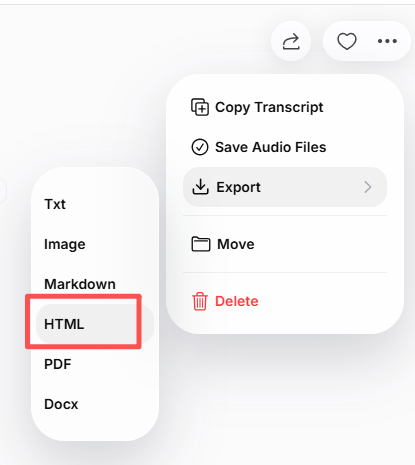
Step 3: Export the MOV Transcript as an HTML Document

audio to html

After reviewing the transcript, you can export it as an HTML document. Most tools allow you to:

  • Edit text before exporting
  • Add headings and structured sections
  • Include timestamps or speaker labels
  • Ensure clean and readable HTML code

The resulting HTML file can be used directly in CMS platforms, website builders, or code editors.

Common Use Cases for MOV to HTML Transcripts

MOV to HTML transcripts are commonly used for:

  • Publishing video transcripts on blogs or websites
  • Turning lectures and webinars into readable content
  • Creating searchable archives of interviews
  • Improving accessibility for all users
  • Reusing content across different platforms

HTML transcripts make MOV videos more versatile and easier to share.

Tips to Improve MOV Transcription Accuracy

要達到最佳效果:

  • 使用清晰、高品質的錄音
  • Avoid background noise and overlapping speech
  • Review and proofread the transcript
  • Organize content with headings and proper paragraphing
  • Clean up formatting before publishing

These steps ensure a polished, accurate HTML transcript.

總結

Converting MOV files into an HTML transcript is a fast and efficient way to turn video content into editable, web-ready text. By uploading your MOV video, letting AI handle transcription, and exporting clean HTML, you can enhance accessibility, boost SEO, and make your content more usable.

This workflow saves time and allows MOV videos to be published, indexed, and shared easily online.

vomo 標誌
20250727 103817 22
解鎖即時 Al 會議筆記
左麥穗

受 100,000+ 位使用者信賴

五星級
右邊的麥穗

無需信用卡