

ينطوي تحويل فيديو AVI إلى صورة على استخراج الصوت، ونسخ المحتوى المنطوق إلى نص، وتصدير النص بتنسيق صورة مرئية مثل PNG أو JPG. باستخدام أدوات مدعومة بالذكاء الاصطناعي مثل فومو, ، تصبح هذه العملية سريعة ودقيقة. فبدلاً من إنشاء لقطات شاشة يدويًا أو كتابة التسميات التوضيحية يدويًا، يمكنك إنشاء نصوص مرئية مصقولة وقابلة للمشاركة مباشرةً من مقاطع فيديو AVI الخاصة بك.

ما المقصود بتحويل AVI إلى صورة
تحويل AVI إلى صورة هو أكثر من مجرد التقاط إطارات الفيديو. فهو يتضمن:
- استخراج الصوت من ملف AVI
- تحويل الكلام إلى نص (تحويل الفيديو إلى نص)
- تصدير النص كصورة منسقة بصرياً
يُعد سير العمل هذا مثاليًا لإنشاء ملاحظات المحاضرات أو ملخصات الاجتماعات أو محتوى الوسائط الاجتماعية أو الاقتباسات من مقاطع الفيديو. تضمن أدوات الذكاء الاصطناعي دقة عالية وقابلية قراءة عالية، مما يلغي الحاجة إلى الطرق اليدوية التي تستغرق وقتاً طويلاً.
لماذا استخدام أدوات الذكاء الاصطناعي لتحويل AVI إلى صورة
النسخ والتنسيق اليدوي غير فعالين. ويبسط الذكاء الاصطناعي العملية من خلال:
- نسخ الكلمات المنطوقة تلقائياً
- تلخيص النقاط الرئيسية من الفيديو
- تنسيق النص لوضوح الرؤية
- تصدير النتيجة النهائية كصورة
فومو حل ممتاز، حيث يوفر سير عمل شامل مناسب للمبتدئين والمحترفين على حد سواء.
الخطوة 1: قم بتحميل ملف AVI الخاص بك
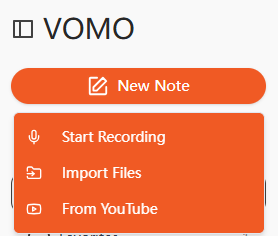
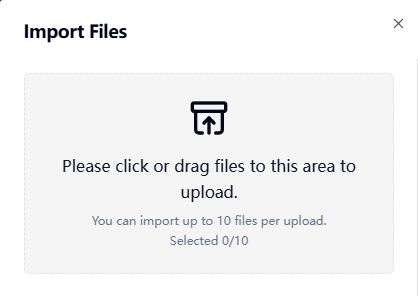
ابدأ بتحميل فيديو AVI الخاص بك إلى منصة نسخ بالذكاء الاصطناعي. تدعم العديد من الأدوات عمليات التحميل بالسحب والإفلات أو الاستيراد من عناوين URL مثل YouTube أو Google Drive. صوت واضح يضمن صوتاً أعلى دقة النسخ.
الخطوة 2: نسخ فيديو AVI
سيقوم الذكاء الاصطناعي بمعالجة المسار الصوتي للفيديو وتحويل المحتوى المنطوق إلى نص مقروء. تقوم هذه الخطوة بفعالية بأداء تحويل الصوت إلى نص, إنتاج نص منظم وقابل للتحرير يمكن تنسيقه للإخراج المرئي. يمكن لأدوات الذكاء الاصطناعي المتقدمة أيضًا تلخيص النقاط الرئيسية تلقائيًا، مما يقلل من الحاجة إلى التحرير اليدوي.
الخطوة 3: تصدير النسخة كصورة
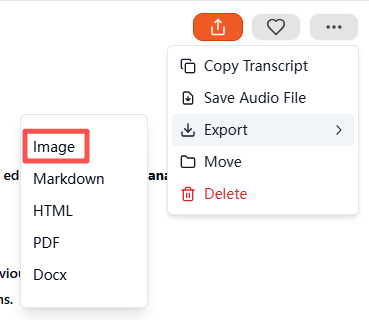
بعد اكتمال النسخ، حدد الصورة كتنسيق الإخراج. ستقوم الأداة بإنشاء ملف ZIP مضغوط يحتوي على النص المرئي. تمثل كل صورة قسمًا من نص الفيديو الخاص بك، وهي جاهزة للحفظ أو الأرشفة أو المشاركة. تنتج هذه الطريقة نصوصاً مرئية احترافية سهلة القراءة بأقل جهد ممكن.
تنسيقات ملفات AVI المدعومة وتنسيقات الملفات الأخرى
معظم النسخ بالذكاء الاصطناعي أدوات تدعم أنواع وسائط متعددة:
| نوع الوسائط | التنسيقات المدعومة |
|---|---|
| فيديو | AVI، mp4، mp4، mov، mkv، flv |
| الصوت | mp3، wav، m4a، aac، mp3، wav، m4a، aac |
يمكن أيضًا تحويل ملفات الصوت مباشرة إلى صور باستخدام سير العمل نفسه إذا لزم الأمر.
أفضل أدوات الذكاء الاصطناعي لتحويل AVI إلى صورة
تتضمن أدوات الذكاء الاصطناعي الموصى بها ما يلي:
- فومو - نسخ كامل الميزات بالذكاء الاصطناعي مع تصدير الصور
- الوصف - تحرير الفيديو مع النسخ المتقدم
- Otter AI - التدوين التعاوني وتدوين الملاحظات
- نوتا للذكاء الاصطناعي - دعم متعدد اللغات مع التصدير المرئي
- فيد.io - تنسيق مبسط لوسائل التواصل الاجتماعي والعروض التقديمية
يتميّز VOMO بالتلخيص التلقائي والدقة العالية وتصدير النصوص المصوّرة على شكل حرف ZIP.
حالات الاستخدام العملية لتحويل AVI إلى صورة
تحويل محتوى AVI إلى نصوص مرئية متعدد الاستخدامات للغاية:
| حالة الاستخدام | مثال على ذلك |
|---|---|
| التعليم | ملخصات المحاضرات والمذكرات الدراسية |
| الأعمال التجارية | تسجيلات الاجتماعات والمقابلات |
| إنشاء المحتوى | اقتباسات البودكاست، أبرز الملامح الرئيسية للبرنامج التعليمي |
| إمكانية الوصول | النصوص المرئية للمستخدمين ضعاف السمع |
| الأبحاث | ملاحظات ذات طابع زمني من بحث الفيديو |
من السهل مشاركة النصوص المرئية وتخزينها واستهلاكها مقارنةً بالفيديو الخام أو النص العادي.
نصائح لتحويل AVI إلى صور عالية الجودة
للحصول على أفضل النتائج:
- استخدم تسجيلات صوتية واضحة مع الحد الأدنى من الضوضاء في الخلفية
- التحدث بوتيرة ثابتة
- استخدم ميكروفونات عالية الجودة للتسجيلات
- مراجعة الملخصات التي تم إنشاؤها بواسطة الذكاء الاصطناعي للتأكد من دقتها
- قم بتمييز النقاط الرئيسية أو الطوابع الزمنية للتوضيح
يضمن اتباع هذه الخطوات الحصول على نصوص مصورة احترافية ومقروءة وجذابة بصرياً.
الخاتمة
أصبح الآن تحويل AVI إلى صورة أمراً سهلاً ومباشراً باستخدام أدوات النسخ بالذكاء الاصطناعي. من خلال تحميل مقطع فيديو، وإنشاء نص، وتصديره كصورة، يمكن لأدوات مثل فومو توفير الوقت وإنتاج محتوى جذاب بصريًا وقابل للمشاركة. سواء للتعليم أو الأعمال التجارية أو إنشاء المحتوى، فإن تحويل AVI إلى صورة باستخدام الذكاء الاصطناعي هو الطريقة الأكثر فعالية لإعادة توظيف محتوى الفيديو الخاص بك إلى مستندات مرئية احترافية.




