


تحويل MP3 إلى TXT يعني تحويل الكلام من ملف الصوت إلى نص قابل للقراءة. بفضل أدوات النسخ الصوتي بالذكاء الاصطناعي المتوفرة اليوم، أصبحت هذه العملية سريعة ودقيقة: ما عليك سوى تحميل تسجيل MP3 الخاص بك، وترك الذكاء الاصطناعي يعالج التعرف على الكلام، وتصدير النص الناتج. سواء كنت تقوم بتسجيل ملاحظات الاجتماع،, المذكرات الصوتية, ، أو المحاضرات، فإن هذه الطريقة تلغي الحاجة إلى الكتابة اليدوية وتعزز الإنتاجية.
من بين العديد من الخيارات،, فومو يتميز بجودة النسخ الموثوقة وسهولة الاستخدام — حتى التسجيلات الطويلة أو التي تضم عدة متحدثين يتم تحويلها إلى نص واضح دون عناء.

فهم تحويل MP3 إلى TXT
تخزن ملفات MP3 بيانات صوتية مضغوطة، مما يجعلها مثالية للتسجيلات الصوتية المحمولة. لتحويل MP3 إلى TXT، يستخدم برنامج النسخ الصوتي بالذكاء الاصطناعي التعرّف التلقائي على الكلام (ASR) تقنية لتحليل الأنماط اللفظية، وعزل الإشارات اللغوية، وإنشاء نصوص مزودة بعلامات ترقيم صحيحة.
تم تصميم محركات ASR للتعلم من ملايين عينات الكلام، مما يضمن دقة ملحوظة عبر النغمات واللهجات. تنطبق نفس العملية عند التحويل تحويل الصوت إلى نص, ، حيث يحول أي مادة صوتية فقط إلى تنسيقات نصية رقمية منظمة جاهزة للتحرير والمشاركة.
لماذا تحويل ملفات MP3 إلى TXT؟
يوفر تحويل تسجيلات MP3 إلى نص مزايا كبيرة للتواصل وإمكانية الوصول:
- يحافظ على المعلومات المنطوقة قابلة للبحث ومنظمة
- يحسن إمكانية الوصول للجمهور من ذوي الإعاقة السمعية
- يبسط عملية إنشاء المحتوى للمدونات والملاحظات والوثائق
- يسمح بفهرسة الكلمات المفتاحية لتسهيل استرجاع المحتوى
نصيحة: تتعامل العديد من أدوات النسخ الاحترافية أيضًا مع تحويل الفيديو إلى نص التحويل. إذا كانت تسجيلاتك تتضمن مقاطع مرئية (مثل ملفات MP4 أو MOV)، فإن العملية تستخرج الحوار من مقاطع الفيديو وتحوّله إلى تسميات توضيحية أو ملخصات مكتوبة.
الخطوة 1: قم بتحميل ملف MP3 الخاص بك

ابدأ باختيار أداة أو تطبيق نسخ صوتي ذكي ذو سمعة طيبة يدعم تحميل ملفات MP3. تقبل معظم المنصات الملفات مباشرة من جهازك أو خدمات التخزين السحابية مثل Google Drive أو Dropbox أو OneDrive.
للحصول على أفضل النتائج، استخدم تسجيلات صوتية واضحة وقم بإزالة الضوضاء الخلفية الزائدة — فالصوت النقي يحسن الجودة. دقة النسخ بشكل كبير.
الخطوة 2: إنشاء النص تلقائيًا
بمجرد تحميل ملف MP3 الخاص بك، يقوم الذكاء الاصطناعي بتحليل محتواه الصوتي ويبدأ في نسخه تحويل الكلام إلى نص. في غضون ثوانٍ ، سترى مسودة نسخة مكتوبة تحتوي على الجمل والنبرة وعلامات الترقيم المستنتجة.
يمكن لمحركات النسخ المتقدمة اكتشاف متحدثين متعددين ووضع علامات على المقاطع وإزالة الكلمات الزائدة تلقائيًا، مما ينتج عنه نص مصقول جاهز للمراجعة.
الخطوة 3: تصدير أو تنزيل ملف TXT الخاص بك
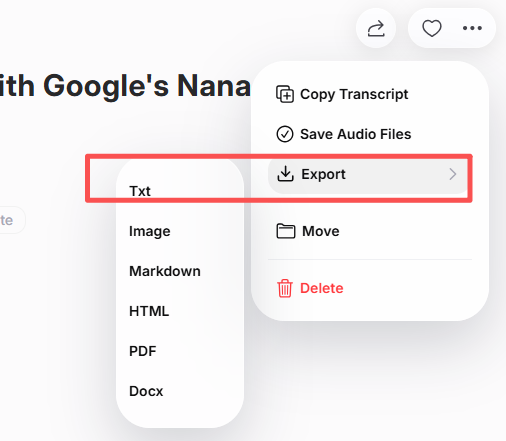
بعد تدقيق النص، قم بتصديره بتنسيق TXT. تتيح العديد من الأدوات خيارات أخرى مثل DOCX أو PDF.
تتيح أيضًا أنظمة النسخ المتصلة بالسحابة إمكانية المشاركة المباشرة مع الزملاء أو الفرق، بحيث يمكنك التوزيع الفوري ملاحظات الاجتماع, أو مواد دراسية أو نصوص تدوين صوتي.
أفضل الأدوات عبر الإنترنت وخارج الإنترنت لتحويل MP3 إلى TXT
تتوفر أدوات نسخ نصية على شبكة الإنترنت وأدوات قابلة للتنزيل. فيما يلي قائمة مختصرة بالخيارات الموثوقة:
| الأداة | الميزة الرئيسية | مثالي لـ |
|---|---|---|
| فومو | نسخ سريع + تصدير متعدد التنسيقات | المهنيون والمبدعون |
| Otter AI | التعاون في الوقت الفعلي والملخصات | الفرق والاجتماعات |
| الوصف | تحرير الصوت/الفيديو المدمج | مقدمو البودكاست ومحررو المحتوى |
| Notta AI | دعم متعدد اللغات عبر جميع التنسيقات | المستخدمون العالميون |
| Whisper (استنادًا إلى OpenAI) | دقة ملائمة للمطورين | الخبراء الفنيون |
توفر كل منصة أداءً قويًا — تتفوق VOMO في التحويل السريع عبر الإنترنت، بينما تناسب Whisper و Descript المستخدمين الذين يفضلون سير العمل دون اتصال بالإنترنت.
نصائح للحصول على نسخة عالية الجودة من MP3 إلى TXT
لتحقيق أقصى قدر من الدقة في النسخ وقابلية القراءة:
- سجل في بيئات هادئة مع الحد الأدنى من الأصوات الخلفية
- تحدث بوضوح وحافظ على إيقاع ثابت
- استخدم إعداد ميكروفون موثوق به للحصول على تسجيل صوتي واضح
- تحقق جيدًا من ملصقات السماعات والطوابع الزمنية قبل التصدير
- تدقيق لغوي لتصحيح المصطلحات أو الأسماء الخاصة بالمجال
هذه التحسينات الصغيرة تعزز الوضوح بشكل كبير وتقلل من أعمال التحرير اللاحقة.
الخاتمة
أصبح تحويل MP3 إلى TXT سريعًا وسهلاً بفضل تقنية الذكاء الاصطناعي. من خلال تحميل ملفك، والسماح للنظام بإنشاء نسخة مكتوبة، وتصدير نص منقح، يمكنك تحويل الكلمات المنطوقة إلى معلومات منظمة وسهلة الوصول.
سواء كنت تدير محاضرات أو اجتماعات عمل أو بودكاست،, MP3 إلى TXT يعمل النسخ على تبسيط سير العمل وتحسين إمكانية الوصول وتحويل المحتوى الصوتي إلى نص رقمي قوي وقابل لإعادة الاستخدام.




