

يعني تحويل الفيديو إلى صورة تحويل المحتوى المنطوق للفيديو إلى نص قابل للقراءة ثم تصديره بتنسيق صورة مرئية، مثل PNG أو JPG. باستخدام أدوات الذكاء الاصطناعي مثل فومو, ، تصبح هذه العملية سلسة: يتم تحليل الفيديو تلقائيًا، ويتم تحويل الكلام إلى نص، ويتم تصدير النص كصورة. يؤدي ذلك إلى الاستغناء عن التسميات التوضيحية اليدوية أو تصوير الشاشة، مما يوفر الوقت مع ضمان الدقة.

ما الذي يعنيه تحويل الفيديو إلى صورة؟
إن تحويل الفيديو إلى صورة هو أكثر من مجرد استخراج الإطارات؛ فهو يتضمن:
- تحويل الكلمات المنطوقة في الفيديو إلى نص (تحويل الفيديو إلى نص)
- تلخيص النقاط الرئيسية تلقائياً
- تصدير النص المنسق كصورة ثابتة
هذا النهج مثالي لإنشاء صور مرئية قابلة للمشاركة من المحاضرات أو البودكاست أو المقابلات أو أي محتوى فيديو. على عكس طرق لقطات الشاشة التقليدية، يضمن النسخ المستند إلى الذكاء الاصطناعي أن يكون النص دقيقًا ونظيفًا وقابلًا للقراءة.
لماذا استخدام الذكاء الاصطناعي لتحويل الفيديو إلى صور؟
يستغرق النسخ والتنسيق اليدوي وقتاً طويلاً. تعمل أدوات الذكاء الاصطناعي على تبسيط سير العمل من خلال:
- تحويل المسارات الصوتية تلقائياً إلى نص
- دعم لغات متعددة
- تنسيق النص من أجل الوضوح البصري
- تصدير النصوص النهائية كصور
وهذا يجعل من الذكاء الاصطناعي الخيار الأسرع والأكثر موثوقية وملائمًا للمبتدئين. أدوات مثل فومو تبسيط كل خطوة، من الاستخراج إلى الإخراج المرئي النهائي.
الخطوة 1: قم بتحميل ملف الفيديو الخاص بك
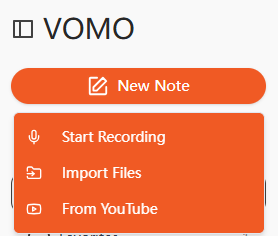
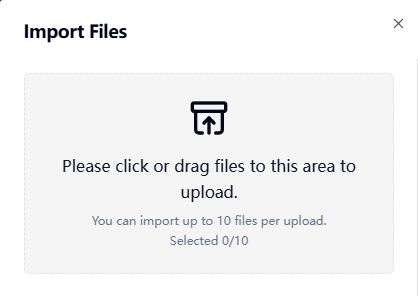
ابدأ بتحميل ملف الفيديو الخاص بك إلى النسخ بالذكاء الاصطناعي أداة. تدعم معظم المنصات التنسيقات الشائعة مثل MP4 و MOV و MKV و AVI و FLV. تسمح بعض الأدوات أيضًا بالتحميل المستند إلى عنوان URL من من منصات مثل YouTube أو Google Drive، مما يتيح الاستخراج المباشر من المحتوى عبر الإنترنت.
الخطوة 2: تحويل الفيديو إلى نص
سيقوم الذكاء الاصطناعي بمعالجة الصوت من الفيديو الخاص بك وإنشاء نص مكتوب. تعمل هذه الخطوة بشكل أساسي على تنفيذ تحويل الفيديو إلى نص, وتحويل الكلام إلى جمل مقروءة ومنظمة. تقوم أدوات الذكاء الاصطناعي عالية الجودة أيضًا بتلخيص النقاط الرئيسية تلقائيًا وإزالة كلمات الحشو، مما يوفر وقت تحرير إضافي.
الخطوة 3: تصدير النسخة كصورة
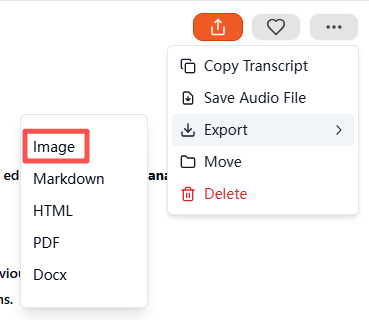
بمجرد أن يصبح النص جاهزاً، انتقل إلى إعدادات التصدير وحدد الصورة كتنسيق الإخراج. بعد التأكيد، ستقوم الأداة بإنشاء وتنزيل ملف مضغوط مضغوط ZIP يحتوي على النص المرئي. ويمثل كل ملف داخل المجلد النص المنسوخ كصورة منسقة بدقة، وجاهزة للأرشفة أو المشاركة أو استخدام وسائل التواصل الاجتماعي.
تنسيقات الفيديو والصوت المدعومة
تقبل معظم منصات النسخ بالذكاء الاصطناعي مجموعة متنوعة من تنسيقات الإدخال:
| نوع الوسائط | التنسيقات المدعومة |
|---|---|
| فيديو | mp4 و mov و mkv و avi و flv |
| الصوت | mp3، wav، m4a، aac، mp3، wav، m4a، aac |
يمكنك أيضًا استخدام الملفات الصوتية مباشرةً للنسخ (تحويل الصوت إلى نص) وتصديرها كصور باستخدام العملية نفسها.
أفضل أدوات الذكاء الاصطناعي لتحويل الفيديو إلى صورة
تتضمن بعض الأدوات الموصى بها ما يلي:
- فومو - حل الكل في واحد للنسخ وتصدير الصور
- وصف - يقدم تحرير فيديو متقدم + تصدير النصوص - تحرير فيديو متقدم + تصدير النصوص
- Otter AI - النسخ الدقيق والملاحظات التعاونية
- Notta AI - يدعم العديد من اللغات وخيارات التصدير
- فيد.io - تنسيق مرئي سهل للمشاركة الاجتماعية
من بين هؤلاء, فومو تتميز بالتلخيص الآلي، والدقة العالية، وتصدير النصوص المصورة بتنسيق ZIP.
أهم حالات الاستخدام لنسخ الفيديو إلى صورة
يعد تحويل محتوى الفيديو إلى صور نصية مرئية مفيداً في:
| حالة الاستخدام | مثال على ذلك |
|---|---|
| التعليم | ملخصات المحاضرات وملاحظات الدورة التدريبية عبر الإنترنت |
| الأعمال التجارية | سجلات الاجتماعات والمقابلات |
| إنشاء المحتوى | اقتباسات بودكاست، محتوى وسائل التواصل الاجتماعي |
| إمكانية الوصول | النصوص المرئية لضعاف السمع |
| الأبحاث | ملاحظات ذات طابع زمني لأبحاث الفيديو |
من السهل تخزين النصوص المرئية ومشاركتها واستهلاكها مقارنةً بالفيديو الخام أو الملفات النصية فقط.
نصائح لنسخ الفيديو إلى صور عالية الجودة
لضمان دقة النسخ الدقيق للذكاء الاصطناعي والإخراج المرئي النظيف:
- تسجيل مقاطع فيديو بأقل قدر من الضوضاء في الخلفية
- تحدث بوضوح وبخطى ثابتة
- استخدم ميكروفونات عالية الجودة إن أمكن
- تحقق من تنسيق النص النهائي قبل التصدير
- قم بتمييز العبارات الرئيسية أو الطوابع الزمنية للتوضيح
يضمن لك اتباع هذه الخطوات الحصول على نسخ مصورة احترافية ومقروءة للغاية.
الخاتمة
أصبح الآن تحويل الفيديو إلى صورة أمرًا بسيطًا وسريعًا بفضل تقنية الذكاء الاصطناعي. من خلال تحميل مقطع فيديو، وتحويل تحويل الكلام إلى نص, وتصديرها كصورة، وأدوات مثل فومو توفير الوقت وإنشاء محتوى جذاب بصريًا وقابل للمشاركة. سواءً للتعليم أو الأعمال أو وسائل التواصل الاجتماعي، فإن تحويل الفيديو إلى صور بالاعتماد على الذكاء الاصطناعي يجعل المحتوى الخاص بك متاحاً ومنظماً وجاهزاً لأي منصة.




