Converting AVI to TXT means transforming the spoken words in your AVI video file into editable, searchable text. With modern AI transcription tools, the process is fast, precise, and fully automated — simply upload the file, let the system detect speech, and export your transcript in minutes.
Among the most trusted options, VOMO is frequently praised for its simple interface and accurate transcription, making it a preferred solution for handling AVI files smoothly.

Understanding AVI-to-TXT Conversion
AVI (Audio Video Interleave) is a versatile multimedia format that stores both audio and video data. When you convert AVI to TXT, AI transcription engines use Automaattinen puheentunnistus (ASR) to analyze the audio track, recognize speech, and output structured text.
This approach turns dialogue into readable sentences, filters noise, and adds punctuation automatically — saving hours of manual work while ensuring consistent formatting. It follows the same principles used in ääni tekstiksi conversion, where standalone sound recordings are processed and converted into plain text.
Why Convert AVI Videos to TXT?
AVI‑to‑TXT transcription offers a range of benefits that enhance accessibility, content organization, and productivity:
- Allows quick text search through long video discussions
- Simplifies captioning and subtitling for media use
- Makes archived video content more accessible
- Enables easy documentation and content repurposing
- Supports users with hearing impairments
Vinkki: Many AI‑based tools provide unified workflows for multiple formats, allowing video tekstiksi conversion from AVI, MP4, MKV, and other files with the same one‑click process.
Step 1: Upload Your AVI File

Start by selecting an AI‑powered transcription platform capable of handling large AVI files. Upload your video directly from local storage or import it via a URL if supported. Most platforms accept other common types, such as MOV, MP4, and FLV.
Before uploading, check that your video’s audio track is clear and balanced — clean, well‑recorded sound produces more accurate results after transcription.
Step 2: Generate the Transcript with AI
Once your AVI file is uploaded, the AI begins analyzing the audio layer. The transcription engine processes dialogue in real time, translating spoken language into text line by line.
Advanced transcription services automatically detect multiple speakers, insert timestamps, and summarize sections. Within minutes, your video’s content becomes a searchable, editable transcript.
Step 3: Export or Download Your TXT File
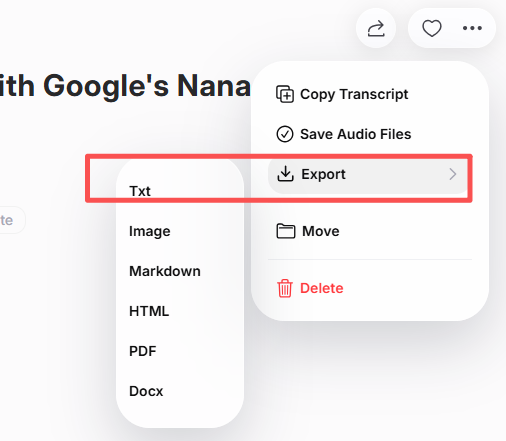
After checking your transcript for clarity, you can export it in multiple formats such as TXT, DOCX, or PDF. Some transcription tools directly integrate with cloud storage, letting you store or share your transcript seamlessly.
This step turns your AVI’s spoken content into practical, portable text that can be reused for reports, captions, or educational notes.
Best Tools to Convert AVI to TXT
Choosing the right AI transcription software depends on accuracy and export flexibility. Below are top options widely used by professionals and content creators:
| Työkalu | Tärkein ominaisuus | Ihanteellinen |
|---|---|---|
| VOMO | Real‑time transcription + multi‑format export | Educators & professionals |
| Otter AI | Smart summaries and collaborative notes | Meetings & webinars |
| Kuvaus | Combines video editing + transcription | Sisällöntuottajat |
| Notta AI | Multilingual support with fast export | Global teams |
| Whisper (OpenAI‑based) | Open‑source, high accuracy | Developers & researchers |
Each platform supports AVI format and ensures consistent results when converting video speech into editable text.
Tips for Accurate AVI-to-TXT Transcription
To achieve highly precise output and minimize editing time:
- Use videos recorded with clear, noise‑free audio
- Avoid overlapping speech when possible
- Choose the correct language or dialect setting in your AI tool
- Review proper names, timestamps, and technical terms before saving
- Proofread the final transcript for grammar and context
These simple practices greatly improve accuracy and readability, especially for professional projects or public distribution.
Päätelmä
Converting AVI to TXT has become effortless with today’s intelligent transcription platforms. By uploading your video, generating AI‑based text, and exporting the result, you gain rapid access to editable transcripts that enhance accessibility and productivity.
Whether for research, business documentation, or media production, AVI‑to‑TXT transcription turns spoken information into organized, usable content — helping your videos work smarter in any digital workflow.