

Réponse courte : Non-Gemini n'est pas en mesure de fournir une transcription mot à mot. de vidéos YouTube. Gemini peut se connecter à un lien YouTube que vous lui fournissez et générer une vidéo. résumé du contenu de la vidéomais il ne produit pas de transcription ou de traduction ligne par ligne.
Si vous avez besoin d'une transcription d'une vidéo YouTube vidéo, il est préférable d'utiliser un outil de transcription spécialisé comme VOMO.

Mes résultats de test de la capacité de Gemini à transcrire des vidéos YouTube
J'ai moi-même testé Gemini 2.5 Flash. J'ai fourni un lien YouTube et j'ai demandé à Gemini de le transcrire, mais il n'a généré qu'un résumé.
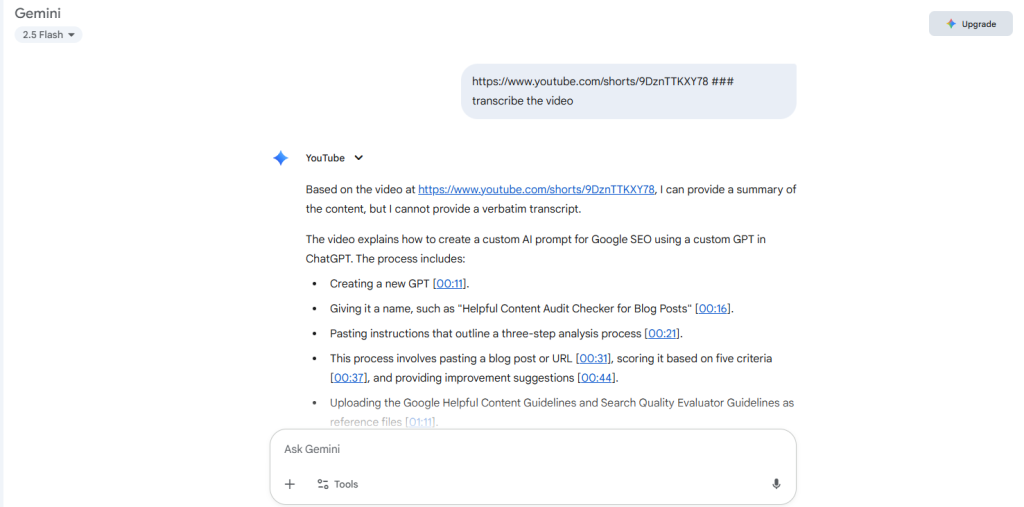
Que se passe-t-il lorsque vous donnez un lien YouTube aux Gémeaux ?
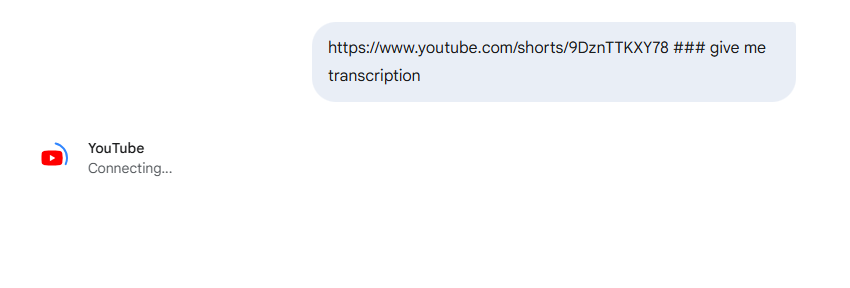
Lorsque vous collez un lien YouTube dans Gemini, ce dernier affiche un "Connecter YouTube" pendant qu'il récupère la vidéo.
Une fois la connexion établie, Gemini analyse le contenu et fournit un rapport d'analyse. résumé structuréLes résultats de l'enquête sont présentés sous forme de tableaux, y compris les thèmes clés, les faits marquants et les moments importants. Cependant, le résultat est pas une transcription directe; il s'agit plutôt d'une vue d'ensemble, conçue pour vous aider à comprendre rapidement le contenu de la vidéo.
Mon expérience - Les résumés de Gemini sont bien meilleurs avec une transcription complète
En testant Gemini pour les résumés YouTube, j'ai remarqué quelque chose d'intéressant. La qualité des résumés changeait de manière significative en fonction de la manière dont je fournissais le contenu.
Au début, j'ai simplement collé un lien YouTube dans Gemini et je lui ai demandé de résumer la vidéo. Gemini s'est connecté avec succès à la vidéo et a produit un résumé des points clés. Cependant, les résultats semblaient souvent un peu superficiels. Il manquait parfois des détails importants et la structure du résumé n'était pas toujours très claire.
J'ai alors essayé une approche différente.
Au lieu de donner à Gemini le lien de la vidéo, j'ai copié l'intégralité de la transcription de YouTube et j'ai collé le texte intégral directement dans Gemini. La différence a été immédiatement perceptible.
Les résumés sont devenus :
- Plus de détails
- Mieux structuré
- Une organisation plus logique
- Plus fidèle au contenu réel de la vidéo
Lorsque Gemini reçoit la transcription brute, il peut analyser directement le texte complet plutôt que de s'appuyer sur une interprétation de haut niveau de la vidéo. Pour les longues conférences, les entretiens ou les podcasts, cela permet d'obtenir des informations plus approfondies et des résumés plus utiles.
Que se passe-t-il lorsque vous demandez aux Gémeaux de “regarder” une vidéo sur YouTube ?
Au cours de mes tests, j'ai également expérimenté des messages-guides tels que :
“Regardez cette vidéo et dites-moi quels en sont les points essentiels.”
Gemini a parfois produit des résultats très détaillés. Dans certains cas, il a même généré des réponses avec des horodatages qui semblaient correspondre à des sections de la vidéo.
À première vue, on peut avoir l'impression que Gemini est en train de transcrire la vidéo.
Cependant, après avoir comparé les résultats avec les chiffres réels de l'Union européenne, il s'avère que les résultats de l'Union européenne sont très différents. Transcription sur YouTube, J'ai remarqué que Gemini ne fournissait pas de transcription complète, mot à mot. Il générait plutôt une description du contenu de la vidéo, souvent structurée comme un résumé de type documentaire.
Par exemple, la réponse peut être la suivante :
- Description des thèmes abordés
- Points clés de la vidéo
- Horodatage des différentes sections
Si ce format peut être utile, il n'en reste pas moins différent d'une véritable transcription où chaque mot prononcé est capturé.
Pourquoi la transcription permet-elle d'obtenir de meilleurs résultats ?
Après avoir effectué plusieurs tests, j'ai constaté que le fait de donner à Gemini la transcription complète permettait d'obtenir de bien meilleurs résultats pour les tâches plus approfondies.
Lorsque Gemini analyse directement la transcription, il peut.. :
- Comprendre la structure de la conversation
- Identifier les thèmes et les transitions entre les sujets
- Regrouper les idées connexes
- Générer des résumés et des notes plus clairs
En revanche, lorsque seul un lien YouTube est fourni, Gemini doit interpréter la vidéo à un niveau plus élevé, ce qui conduit parfois à des résumés plus généraux.
Pour des tâches telles que :
- étudier les cours
- résumer les podcasts
- extraire des informations de la recherche
- création de notes structurées
Le fait de coller la transcription complète dans Gemini a toujours produit les meilleurs résultats lors de mes tests.
Un flux de travail plus rapide pour utiliser Gemini avec les transcriptions de YouTube
Comme il peut être fastidieux de copier manuellement des transcriptions à partir de YouTube, j'ai fini par mettre en place un petit flux de travail pour accélérer le processus.
L'idée est simple :
- Extraire la transcription complète de la vidéo YouTube
- Coller la transcription dans Gemini
- Demandez à Gemini de résumer, d'analyser ou de réorganiser le contenu.
Ce flux de travail combine les points forts des deux systèmes :
- Les transcriptions fournissent un contexte complet
- Gemini offre des fonctions puissantes de raisonnement et de synthèse
Pour les vidéos longues telles que les conférences, les interviews ou les podcasts, cette méthode permet d'obtenir des résumés beaucoup plus détaillés qu'en utilisant uniquement un lien.
Limites : Pourquoi Gemini n'offre pas de transcription intégrale
Le Gemini n'est pas conçu comme un classique de l'audio au texte moteur. Au lieu d'extraire chaque mot prononcé, il se concentre sur la compréhension du contexte et la synthèse du sens. Il est donc idéal pour une compréhension rapide, mais pas pour les tâches nécessitant une précision mot à mot.
Utilisation de Gemini pour les résumés de vidéos YouTube
Lorsque vous fournissez un lien YouTube :
- Gemini se connecte à la vidéo.
- Il traite le contenu et identifie les points principaux.
- Vous recevez un résumé concis au lieu d'une transcription.
Cette fonction est utile pour les conférences, les tutoriels ou les discussions de longue haleine, lorsque vous souhaitez avoir une vue d'ensemble sans avoir à regarder la vidéo dans son intégralité.
Quand vous avez plutôt besoin d'une transcription
Si vous avez besoin d'une de la vidéo au texte transcription, la meilleure approche est la suivante :
- Utilisez un outil de transcription comme VOMO pour générer la transcription de votre vidéo YouTube.
- Collez cette transcription dans Gemini.
- Demandez aux Gémeaux de le résumer, de l'analyser ou de le traduire.
Ce flux de travail combine les points forts des deux outils : la précision de la transcription + Le raisonnement et la synthèse des Gémeaux.
Réflexions finales
Les Gémeaux sont puissants pour résumer le contenu de YouTube et la rendre plus facile à assimiler, mais il ne peut pas transcrire ou traduire directement les vidéos mot à mot. Pour des transcriptions précises, vous aurez toujours besoin d'une service de transcription puis Gemini peut vous aider à transformer ce texte en résumés, en idées et en notes structurées.
