


Turning a MOV video into a formatted Word transcript is fast and easy with modern AI transcription tools. Simply upload your MOV file, let the system convert the audio into text, and export the results as an editable Word document. This approach saves time, improves accuracy, and produces a professional transcript suitable for meetings, lectures, interviews, or content archiving.
Des outils comme VOMO simplify the process by automatically converting video speech into clean, editable Word documents in just a few clicks.

What Does It Mean to Turn a MOV Video into a Word Transcript?
Converting a MOV file into a Word transcript means extracting spoken content from the video and transforming it into written text that can be edited and formatted in Microsoft Word. MOV files are commonly used for high-quality video recordings, making them ideal for transcription purposes.
The process relies on AI-powered de l'audio au texte technology, which detects speech, applies punctuation, and structures the transcript into readable paragraphs ready for Word editing.
Why Convert MOV Videos into Word Documents?
Turning MOV videos into Word transcripts offers multiple benefits:
- Gain de temps considérable par rapport à la transcription manuelle
- Creates searchable, editable text from video content
- Improves accessibility for reading and sharing
- Enables easy reuse for reports, blogs, or training
- Helps archive important spoken content efficiently
Word transcripts provide a versatile format for both professional and academic use.
Step 1: Upload Your MOV File to a Transcription Tool
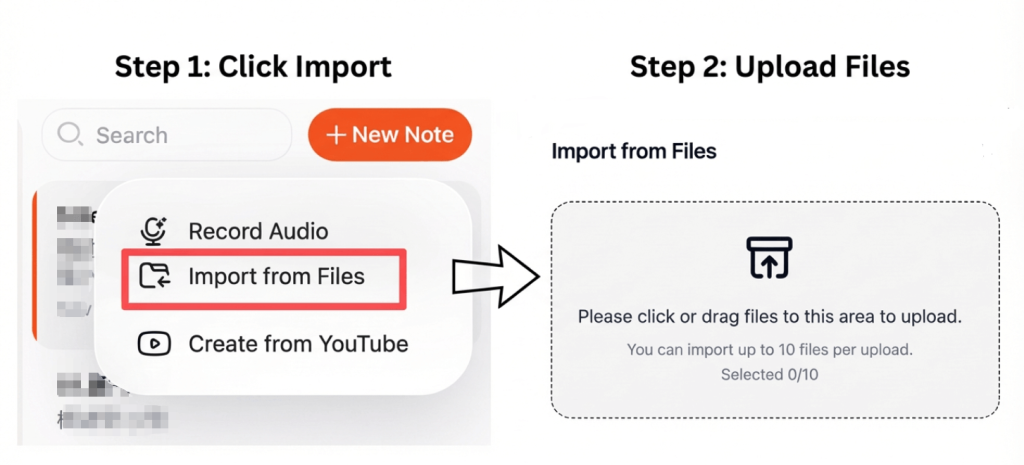
Choose a transcription tool that supports MOV uploads. Most modern platforms allow you to upload files from your device or directly from cloud storage services.
Pour des résultats optimaux :
- Use videos with clear and high-quality audio
- Réduire les bruits de fond
- Ensure speakers are clearly audible
High-quality input ensures higher transcription accuracy.
Step 2: Convert the MOV Video into Text Automatically
After uploading, the transcription tool analyzes the audio track and converts spoken content into text using de la vidéo au texte technologie.
Advanced platforms can:
- Détecter les orateurs multiples
- Ajouter automatiquement la ponctuation
- Organize content into readable sections
- Highlight timestamps if needed
The transcription process typically completes in just a few minutes, even for lengthy videos.
Step 3: Export the Transcript as a Formatted Word Document
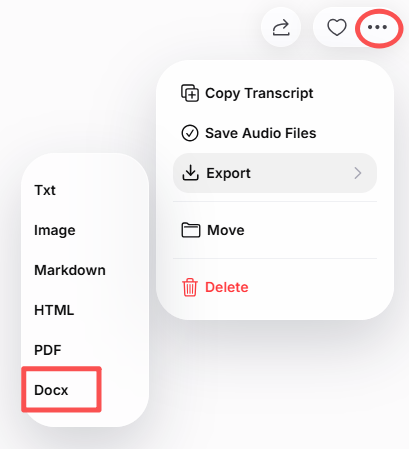
Once the transcription is complete, review the text and make any necessary edits. Then export the result as a Word (.docx) file.
With a Word transcript, you can:
- Edit and format text easily
- Add headings, bullet points, or speaker labels
- Share the document with colleagues
- Store it for future reference
Some tools also allow exporting in PDF or TXT formats for additional flexibility.
Best Tools to Convert MOV to Word
Here are some reliable platforms for converting MOV videos into Word documents:
- VOMO – Accurate transcription with clean Word export
- Loutre AI – Idéal pour les réunions et les conférences
- Notta – Supports multiple languages
- Description – Perfect for content creators
- Open-source transcription tools – Convient aux développeurs et aux chercheurs
These tools leverage advanced de l'audio au texte algorithms to produce highly accurate and editable transcripts.
Tips for Producing High-Quality Transcripts
To get the best results from your MOV-to-Word workflow:
- Enregistrer dans un environnement calme
- Speak clearly at a steady pace
- Avoid overlapping conversations
- Sélectionnez les paramètres de langue et d'accent appropriés.
- Proofread the transcript before final export
Even small improvements in audio clarity can greatly enhance transcription accuracy.
Conclusion
Turning a MOV video into a formatted Word transcript is fast, efficient, and practical. By uploading your video, letting AI handle the transcription, and exporting it as a Word document, you can create a clean, editable, and searchable transcript in minutes.
Whether for meetings, lectures, or professional content, this method makes video content easier to manage, edit, and share.




