


WAVをTXTに変換するとは、音声ファイルであるWAVファイルの話し言葉を、読み取り可能で編集可能なテキストに変換することを意味します。現代の AIトランスクリプション ツールがこれを自動的に処理します——録音ファイルをアップロードし、システムに音声を分析させ、文字起こしをダウンロードするだけです。この方法は精度が高く時間を節約し、生の音声ファイルで必要となる手間のかかる手入力作業を不要にします。.
一般的な解決策の中では、, VOMO そのクリーンなインターフェースと一貫性が評価されており、あらゆる長さのWAV録音に対して迅速かつ極めて正確な変換を提供します。.

WAVからTXTへの変換について
WAVファイルは非圧縮オーディオを保存するため、クリアな音質をキャプチャするのに理想的です。これをテキストに変換するには、AI文字起こしプラットフォームが 自動音声認識 (ASR) 発話された言葉を解読し、句読点を適用し、フォーマットされたテキストを瞬時に生成する。.
ASRは膨大な音声データセットで訓練された深層ニューラルモデルに依存し、あらゆる形態の 音声からテキストへ 処理 — ビジネス、教育、メディア用途に適した、正確で文脈を認識した文字起こしを保証します。.
なぜWAVファイルをTXTに変換するのか?
WAV録音ファイルをテキストに変換することは、コミュニケーションの改善とデータ整理において複数の利点をもたらします:
- 会議、インタビュー、ポッドキャストの検索可能なテキスト版を作成します
- 研究や研修のためのアクセシビリティとドキュメントを改善します
- 字幕表示、字幕作成、またはブログの再利用を可能にします
- 手書きのメモを取るのに比べて時間を節約できる
ヒント プロジェクトに動画記録が含まれる場合、同じAIツールで簡単に処理できます ビデオからテキストへ 変換 — MP4やMOVなどの動画から直接、対話を適切にフォーマットされたテキスト字幕や要約に変換すること。.
ステップ1: WAVファイルをアップロードする

まず、WAV形式の入力に対応した文字起こしソフトウェアまたはAI搭載の音声変換ツールを選択します。ほとんどのツールはMP3、M4A、FLAC形式もサポートしています。ファイルは手動で、またはGoogleドライブやDropboxなどのクラウドストレージからアップロードします。.
録音には背景ノイズを最小限に抑え、明瞭な発話を確保してください。高音質は文字起こしの精度を大幅に向上させます。.
ステップ2: 文字起こしを自動生成する
アップロード後、AIが音声ファイルの分析を開始します。システムは音声を聞き取り、発話内容を検出し、リアルタイムまたは高速バッチ処理により文字列に変換します。.
高度なツールが自動的に不要な言葉を削除し、タイムスタンプを挿入し、複数の話者を認識します。数分以内に、編集可能なデジタル文字起こしファイルが完成し、確認の準備が整います。.
ステップ3: TXTファイルのエクスポートまたはダウンロード
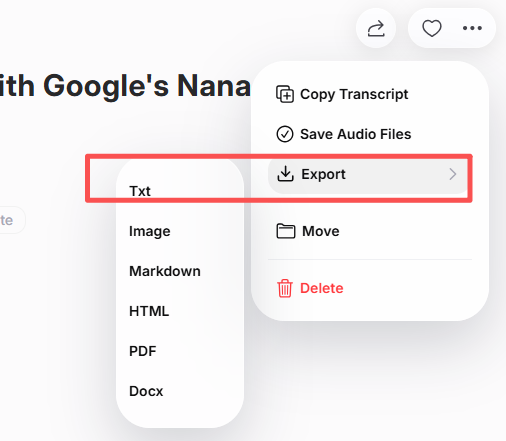
校正と書式設定後、文字起こしデータをTXT、DOCX、またはPDF形式でエクスポートします。多くのプラットフォームは生産性アプリやクラウドドライブと直接連携するため、コンテンツをシームレスに共有またはアーカイブできます。.
この最終ステップにより、明瞭な音声記録が構造化された検索可能なテキストに変換され、会議、研究、出版物など様々な用途に再利用できるようになります。.
WAVをTXTに変換する最高の無料ツール
WAV音声の文字起こしには、無料で正確なツールがいくつか存在します。最も信頼性の高い選択肢は以下の通りです:
| 工具 | 主な特徴 | こんな方に最適 |
|---|---|---|
| VOMO | AI文字起こし + 無料テキストエクスポート | 一般ユーザーと専門家 |
| オッターAI | リアルタイム共同作業と要約 | チームと教育者 |
| 説明 | 音声・動画編集+文字起こし生成 | コンテンツ制作者 |
| ノッタAI | 高速多言語文字起こし | グローバルプロジェクト |
| ウィスパー(OpenAIベース) | 高度なオープンソース音声モデル | 開発者および研究者 |
各プラットフォームは、多様なエクスポート機能と編集機能を備え、WAVからTXTへの変換を迅速かつ効率的に行います。.
正確な文字起こし結果を得るためのヒント
正確性とクリーンなテキスト出力を保証するため:
- ノイズのないクリアな録音を使用してください
- はっきりと、明瞭に話す
- 文字起こしソフトウェアで適切な言語とアクセント設定を選択する
- エクスポート前に技術用語を確認する
- 変換後の成績証明書を読みやすくフォーマットしてください
これらのポイントに従うことで、成績証明書が専門的な基準を満たし、誤りが最小限に抑えられます。.
結論
AI技術により、WAVからTXTへの変換が高速かつ簡単になりました。音声ファイルをアップロードし、ソフトウェアに自動文字起こしを実行させ、最終テキストをエクスポートするだけで、わずか数分で全工程を完了できます。.
教育、面接、あるいは創造的なプロジェクトのためであっても、, WAVからTXTへ 変換により、コンテンツはよりアクセスしやすく、整理され、プラットフォームをまたいだ再利用が可能になります。.




