

MKV 동영상을 이미지로 변환하려면 음성 콘텐츠를 추출하고 텍스트로 변환한 다음 PNG 또는 JPG와 같은 시각적 이미지 형식으로 대본을 내보내야 합니다. 다음과 같은 AI 기반 도구를 사용하면 VOMO, 를 사용하면 이 과정이 빠르고 원활해집니다. 캡션을 수동으로 입력하거나 스크린샷을 찍는 대신 MKV 파일에서 바로 정확한 시각적 형식의 트랜스크립트를 생성할 수 있습니다.

MKV를 이미지로 변환한다는 것의 의미
MKV를 이미지로 변환하는 것은 단순히 비디오 프레임만 캡처하는 것이 아닙니다. 그 의미는
- MKV 파일에서 오디오 추출하기
- 음성을 읽을 수 있는 텍스트로 변환(비디오를 텍스트로 변환)
- 성적증명서를 시각적 형식의 이미지로 내보내기
이 방법은 학습 노트, 소셜 미디어 콘텐츠, 회의 요약 또는 동영상 콘텐츠에서 공유 가능한 인용문을 만드는 데 이상적입니다. 수동 방식과 달리 AI는 정확성, 일관성, 가독성을 보장합니다.
MKV-이미지 변환에 AI 툴이 필수적인 이유
수동 변환에는 오디오 추출, 트랜스크립션, 서식 지정, 이미지 생성 등 여러 단계와 도구가 필요합니다. AI 도구는 이 과정을 간소화합니다:
- 동영상 콘텐츠 자동 트랜스크립션
- 이미지 지원 레이아웃으로 텍스트 서식 지정
- 다양한 비디오 및 오디오 포맷 지원
- 이미지로 빠른 내보내기 허용
VOMO 는 초보자에게 특히 유용하며, 최소한의 수동 입력으로 엔드투엔드 워크플로우를 제공합니다.
1단계: MKV 파일 업로드
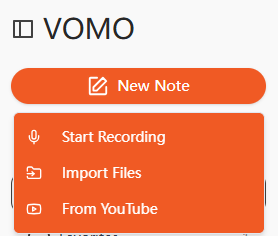
MKV 파일을 업로드하여 시작하세요. AI 전사 플랫폼을 사용하세요. 많은 도구가 드래그 앤 드롭 업로드 또는 YouTube나 Google 드라이브와 같은 온라인 소스에서 가져오기를 지원합니다. 최상의 트랜스크립션 결과를 얻으려면 동영상에 선명한 오디오가 있는지 확인하세요.
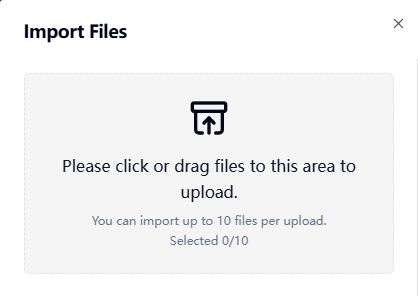
2단계: MKV 비디오 전사하기
AI는 동영상의 오디오 트랙을 처리하고 음성 단어를 텍스트로 변환합니다. 이 프로세스는 다음을 수행하는 것과 유사합니다. 오디오를 텍스트로 변환, 를 사용할 수 있지만 출력은 동영상의 콘텐츠에 연결됩니다. 또한 고급 AI 도구는 자동으로 요점을 요약하여 트랜스크립트를 편집하고 구성하는 시간을 절약할 수 있습니다.
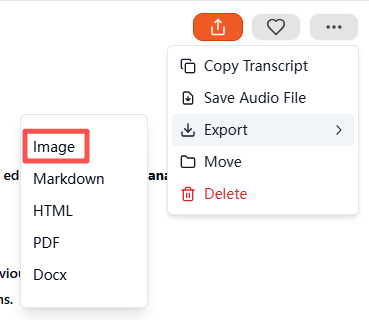
3단계: 트랜스크립트를 이미지로 내보내기
트랜스 크립 션이 완료되면 이미지 내보내기 메뉴에서 출력 형식을 선택합니다. 이 도구는 자동으로 시각적 형식의 대화 내용을 포함하는 압축된 ZIP 파일을 생성합니다. 각 이미지 파일은 저장, 공유 또는 보관할 수 있습니다. 이 단계를 거치면 텍스트 성적표가 전문적이고 쉽게 사용할 수 있는 시각적 문서로 변환됩니다.
지원되는 MKV 및 기타 파일 형식
AI 트랜스크립션 도구는 일반적으로 다양한 형식을 지원합니다:
| 미디어 유형 | 지원되는 형식 |
|---|---|
| 비디오 | MKV, MP4, MOV, AVI, FLV |
| 오디오 | MP3, WAV, M4A, AAC |
필요한 경우 동일한 워크플로우를 사용하여 오디오 파일을 이미지로 직접 변환할 수도 있습니다.
MKV-이미지 변환을 위한 최고의 AI 도구
권장 도구는 다음과 같습니다:
- VOMO - 모든 기능을 갖춘 AI 전사 및 이미지 내보내기
- 설명 - 동영상 편집 및 트랜스크립션 결합
- Otter AI - 협업 노트 및 전사
- Notta AI - 다국어 지원 및 시각적 내보내기
- Veed.io - 간소화된 레이아웃과 소셜 미디어 친화적인 이미지 출력
이 중 VOMO 는 자동 요약, ZIP 이미지 내보내기, 초보자 친화적인 인터페이스가 돋보입니다.
MKV-이미지 변환을 위한 실제 사용 사례
이 방법은 매우 다양한 용도로 사용할 수 있습니다:
| 사용 사례 | 예 |
|---|---|
| 교육 | 녹화된 강의를 학습 노트로 변환 |
| 비즈니스 | 시각적 요약이 포함된 회의 녹화물 보관 |
| 콘텐츠 제작 | 팟캐스트 또는 튜토리얼 인용 이미지 만들기 |
| 접근성 | 청각 장애가 있는 사용자를 위한 시각적 대본 제공 |
| 연구 | 동영상 연구 프로젝트를 위한 타임스탬프 노트 |
시각적 대본은 원시 동영상 파일이나 일반 텍스트보다 공유, 저장, 소비하기가 더 쉽습니다.
정확하고 선명한 MKV-이미지 변환을 위한 팁
최적의 결과를 위해:
- 배경 소음을 최소화한 동영상 사용
- 화자가 명확하고 일정한 속도로 말하도록 하기
- 새 콘텐츠를 녹화하는 경우 고품질 마이크를 사용하세요.
- 자동으로 요약된 핵심 사항 검토
- 내보내기 전에 중요한 문구 강조 표시
이 팁을 따르면 전문적이고 가독성 높은 고품질 이미지 트랜스크립트를 만들 수 있습니다.
결론
이제 AI 기반 트랜스크립션 도구를 사용하면 MKV를 이미지로 변환하는 것이 간단해졌습니다. MKV 파일을 업로드하고 트랜스크립션을 생성한 다음 이미지로 내보내면 다음과 같은 플랫폼에서 사용할 수 있습니다. VOMO 시간을 절약하고, 접근성을 개선하며, 시각적으로 매력적이고 공유 가능한 콘텐츠를 제작할 수 있습니다. 교육, 비즈니스, 콘텐츠 제작 등 어떤 용도로 사용하든 AI 기반 MKV-이미지 변환은 동영상 콘텐츠를 전문적인 시각적 문서로 재가공하는 가장 효율적인 방법입니다.




