

동영상을 이미지로 변환하는 것은 동영상의 음성 콘텐츠를 읽을 수 있는 텍스트로 변환한 다음 PNG나 JPG와 같은 시각적 이미지 형식으로 내보내는 것을 의미합니다. 다음과 같은 AI 도구 사용 VOMO, 를 사용하면 비디오가 자동으로 분석되고 음성이 텍스트로 변환되며 텍스트가 이미지로 내보내지는 등 이 과정이 원활하게 이루어집니다. 따라서 수동 캡션이나 스크린샷을 찍을 필요가 없으므로 시간을 절약하는 동시에 정확성을 보장할 수 있습니다.

비디오를 이미지로 변환하는 것의 의미
비디오를 이미지로 변환하는 것은 단순히 프레임을 추출하는 것 이상의 작업이 필요합니다:
- 동영상에서 음성 단어를 텍스트로 변환하기(비디오를 텍스트로 변환)
- 핵심 사항 자동 요약
- 서식이 지정된 텍스트를 정적 이미지로 내보내기
이 접근 방식은 강의, 팟캐스트, 인터뷰 또는 모든 동영상 콘텐츠에서 공유 가능한 시각 자료를 만드는 데 이상적입니다. 기존의 스크린샷 방식과 달리 AI 기반 트랜스크립션은 텍스트가 정확하고 깔끔하며 가독성을 보장합니다.
비디오-대-이미지 트랜스크립션에 AI를 사용하는 이유
수동 트랜스크립션과 서식 지정은 시간이 많이 걸립니다. AI 도구는 다음과 같이 워크플로를 간소화합니다:
- 오디오 트랙을 텍스트로 자동 변환하기
- 다국어 지원
- 시각적 명확성을 위한 텍스트 서식 지정
- 최종 성적증명서를 이미지로 내보내기
따라서 AI는 가장 빠르고 안정적이며 초보자 친화적인 옵션이 될 수 있습니다. 다음과 같은 도구 VOMO 추출부터 최종 시각적 출력까지 모든 단계를 간소화합니다.
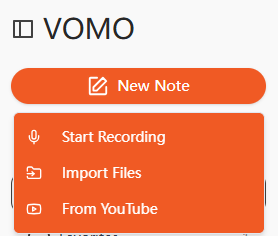
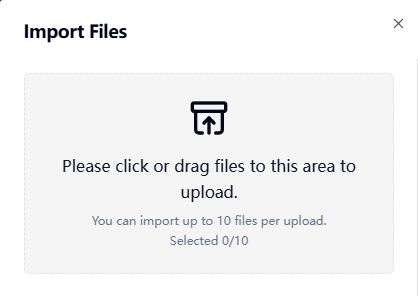
1단계: 동영상 파일 업로드
동영상 파일을 업로드하여 시작하세요. AI 전사 도구를 사용하세요. 대부분의 플랫폼은 MP4, MOV, MKV, AVI, FLV와 같은 인기 있는 형식을 지원합니다. 일부 도구는 YouTube나 Google 드라이브와 같은 플랫폼에서 URL 기반 업로드를 허용하여 온라인 콘텐츠에서 직접 추출할 수도 있습니다.
2단계: 비디오를 텍스트로 변환하기
AI가 비디오의 오디오를 처리하고 서면 트랜스크립트를 생성합니다. 이 단계는 기본적으로 다음을 수행합니다. 비디오를 텍스트로 변환, 를 통해 음성을 읽기 쉽고 구조화된 문장으로 변환합니다. 또한 고품질 AI 도구가 자동으로 요점을 요약하고 불필요한 단어를 제거하여 추가 편집 시간을 절약할 수 있습니다.
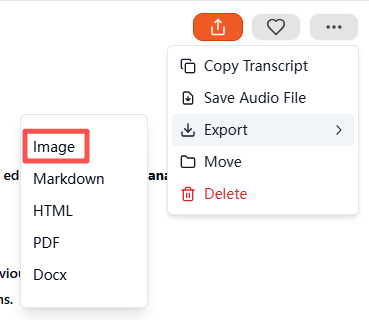
3단계: 트랜스크립트를 이미지로 내보내기
성적표가 준비되면 내보내기 설정으로 이동하여 다음을 선택합니다. 이미지 를 출력 형식으로 선택합니다. 확인을 마치면 도구가 시각적 트랜스크립트가 포함된 압축 ZIP 파일을 생성하고 다운로드합니다. 폴더 안의 각 파일은 필사된 텍스트를 깔끔한 형식의 이미지로 나타내며, 보관, 공유 또는 소셜 미디어에 사용할 수 있습니다.
지원되는 비디오 및 오디오 형식
대부분의 AI 전사 플랫폼은 다양한 입력 형식을 허용합니다:
| 미디어 유형 | 지원되는 형식 |
|---|---|
| 비디오 | MP4, MOV, MKV, AVI, FLV |
| 오디오 | MP3, WAV, M4A, AAC |
오디오 파일을 바로 트랜스크립션에 사용할 수도 있습니다(오디오를 텍스트로 변환)를 클릭하고 동일한 프로세스를 사용하여 이미지로 내보냅니다.
비디오를 이미지로 변환하는 최고의 AI 도구
몇 가지 권장 도구는 다음과 같습니다:
- VOMO - 전사 및 이미지 내보내기를 위한 올인원 솔루션
- 설명 - 고급 동영상 편집 + 대본 내보내기 기능 제공
- Otter AI - 정확한 전사 및 협업 노트
- Notta AI - 다국어 및 내보내기 옵션 지원
- Veed.io - 소셜 공유를 위한 간편한 시각적 서식 지정
이 중 VOMO 는 자동 요약, 높은 정확도, 이미지 대본의 ZIP 내보내기 기능이 돋보입니다.
비디오-대-이미지 트랜스크립션의 주요 사용 사례
동영상 콘텐츠를 시각적 텍스트 이미지로 변환하는 것은 다음과 같은 경우에 유용합니다:
| 사용 사례 | 예 |
|---|---|
| 교육 | 강의 요약, 온라인 강의 노트 |
| 비즈니스 | 회의 기록, 인터뷰 |
| 콘텐츠 제작 | 팟캐스트 인용문, 소셜 미디어 콘텐츠 |
| 접근성 | 청각 장애인을 위한 시각적 대본 |
| 연구 | 동영상 조사를 위한 타임스탬프 노트 |
시각적 대본은 원시 동영상이나 텍스트 전용 파일에 비해 저장, 공유, 소비가 쉽습니다.
고품질 비디오-이미지 트랜스크립션을 위한 팁
정확한 AI 트랜스크립션과 깔끔한 시각적 결과물을 보장합니다:
- 최소한의 배경 소음으로 동영상 녹화
- 명확하고 일정한 속도로 말하기
- 가능하면 고품질 마이크를 사용하세요.
- 내보내기 전에 최종 텍스트 서식을 확인하세요.
- 명확성을 위해 핵심 문구 또는 타임스탬프를 강조 표시합니다.
이 단계를 따르면 전문적이고 가독성이 높은 이미지 대본을 만들 수 있습니다.
결론
이제 AI 기술을 통해 동영상을 이미지로 변환하는 것이 간단하고 빨라졌습니다. 동영상을 업로드하고 음성을 텍스트로 변환, 를 클릭하고 이미지로 내보내면 다음과 같은 도구가 제공됩니다. VOMO 시간을 절약하고 시각적으로 매력적이고 공유 가능한 콘텐츠를 만들 수 있습니다. 교육, 비즈니스, 소셜 미디어 등 어떤 분야에서든 AI 기반 비디오-이미지 트랜스크립션을 사용하면 콘텐츠에 액세스하고 체계적으로 정리하여 모든 플랫폼에서 사용할 수 있습니다.




