


Het converteren van MOV-bestanden naar een HTML-transcript houdt in dat de gesproken inhoud uit een MOV-video wordt gehaald, met behulp van AI wordt getranscribeerd en vervolgens wordt geëxporteerd als een bewerkbaar HTML-document. U uploadt uw MOV-video, het systeem transcribeert automatisch de spraak en genereert gestructureerde HTML-code die snel kan worden bewerkt, opgemaakt en online gepubliceerd.
VOMO vereenvoudigt dit proces, waarmee u MOV-bestanden rechtstreeks kunt uploaden en nauwkeurige transcripties kunt genereren met AI. Het platform exporteert schone, webklare HTML, waardoor het ideaal is voor lezingen, interviews, webinars en presentaties zonder handmatige opmaak.

Wat is een HTML-transcript voor MOV-video's?
Een HTML-transcript is een geschreven versie van de gesproken inhoud in een MOV-video, opgemaakt met behulp van HTML-elementen zoals koppen, alinea's en lijsten. In tegenstelling tot PDF's of platte tekstbestanden zijn HTML-transcripten geoptimaliseerd voor gebruik op het web en eenvoudig te bewerken.
Transcriptietools zijn afhankelijk van audio naar tekst technologie om de audiotrack in MOV-bestanden te analyseren. Ze detecteren woorden, leestekens en alinea-einden om inhoud te produceren die leesbaar en doorzoekbaar is en klaar is voor publicatie op het web.
Waarom MOV-bestanden converteren naar HTML-transcripten?
Het omzetten van MOV-video's naar HTML-transcripten biedt verschillende voordelen:
- Verbetert SEO door gesproken content doorzoekbaar te maken
- Verbetert de toegankelijkheid voor gebruikers die liever lezen
- Maakt eenvoudig hergebruik van videocontent in blogs en websites mogelijk
- Biedt flexibele opmaak- en stijlopties
- Helpt bij het efficiënt organiseren van videocontent
HTML-transcripties zorgen ervoor dat MOV-video's een breder publiek bereiken en online waardevoller zijn.
Stap 1: Upload uw MOV-bestand naar een transcriptietool
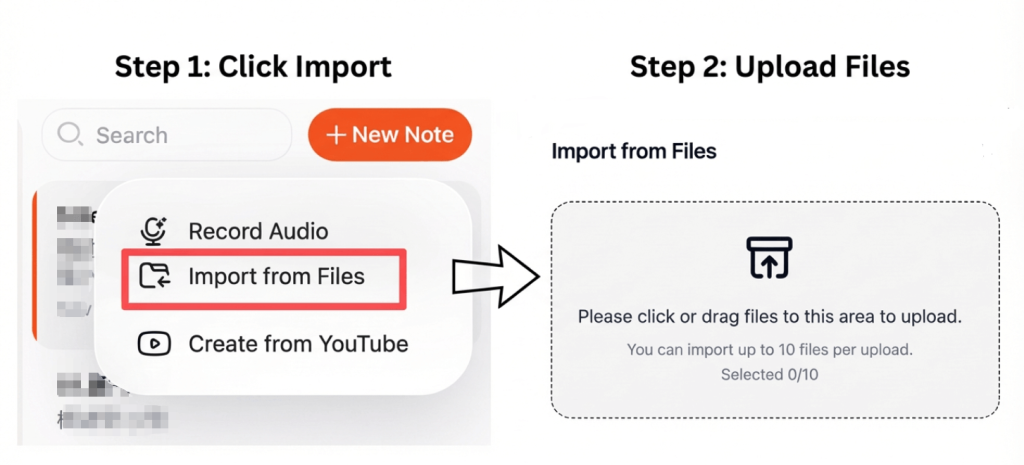
Kies een transcriptieplatform dat MOV-bestanden ondersteunt. De meeste AI-tools maken het mogelijk om bestanden rechtstreeks vanaf uw apparaat of cloudopslag te uploaden.
Voor de beste resultaten:
- Zorg ervoor dat het geluid helder en consistent is.
- Achtergrondgeluid minimaliseren
- Selecteer de juiste taal en het juiste accent
- Vermijd overlappende sprekers
Hoogwaardige audio-input leidt tot nauwkeurigere HTML-transcripties.
Stap 2: MOV-videogesprekken automatisch omzetten naar tekst
Na het uploaden haalt de transcriptietool de audiotrack uit de MOV-video en zet gesproken taal om in tekst. Geavanceerde tools voegen automatisch interpunctie toe, structureren alinea's en identificeren meerdere sprekers.
Dit proces wordt ook wel aangeduid als video naar tekst conversie en duurt doorgaans slechts enkele minuten, zelfs voor lange MOV-video's.
Stap 3: Exporteer het MOV-transcript als een HTML-document
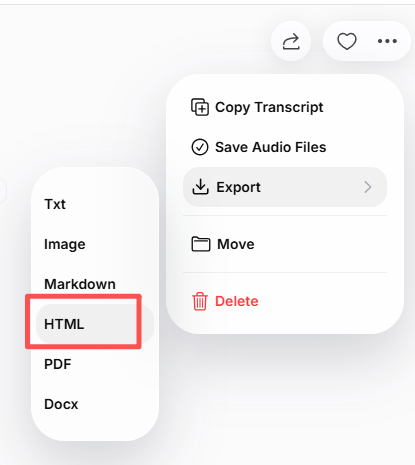
Nadat u het transcript hebt bekeken, kunt u het exporteren als een HTML-document. Met de meeste tools kunt u:
- Tekst bewerken voordat je exporteert
- Voeg kopteksten en gestructureerde secties toe
- Voeg tijdstempels of sprekerslabels toe
- Zorg voor schone en leesbare HTML-code
Het resulterende HTML-bestand kan direct worden gebruikt in CMS-platforms, websitebouwers of code-editors.
Veelvoorkomende gebruikssituaties voor MOV naar HTML-transcripties
MOV naar HTML-transcripties worden vaak gebruikt voor:
- Videotranscripties publiceren op blogs of websites
- Lezingen en webinars omzetten in leesbare content
- Het creëren van doorzoekbare archieven van interviews
- Verbetering van de toegankelijkheid voor alle gebruikers
- Hergebruik van content op verschillende platforms
HTML-transcripties maken MOV-video's veelzijdiger en gemakkelijker te delen.
Tips om de nauwkeurigheid van MOV-transcripties te verbeteren
Voor de beste resultaten:
- Gebruik duidelijke opnames van hoge kwaliteit
- Vermijd achtergrondgeluiden en overlappende spraak
- Controleer en corrigeer het transcript
- Organiseer inhoud met kopjes en de juiste alinea-indeling
- Maak de opmaak schoon voordat je publiceert
Deze stappen zorgen voor een gepolijste, nauwkeurige HTML-transcriptie.
Conclusie
Het converteren van MOV-bestanden naar een HTML-transcript is een snelle en efficiënte manier om videocontent om te zetten in bewerkbare, webklare tekst. Door uw MOV-video te uploaden, de transcriptie door AI te laten uitvoeren en schone HTML te exporteren, kunt u de toegankelijkheid verbeteren, SEO stimuleren en uw content bruikbaarder maken.
Deze workflow bespaart tijd en maakt het mogelijk om MOV-video's eenvoudig online te publiceren, te indexeren en te delen.




