


Ja, Notion kan föra mötesanteckningar med hjälp av dess inbyggda AI-funktioner för att sammanfatta text eller genom att bädda in ljudinspelningar direkt på en sida. De inbyggda transkriberingsfunktionerna är dock ofta begränsade i noggrannhet och saknar avancerade funktioner som automatisk identifiering av talare.
Är du trött på att skriva frenetiskt medan du försöker lyssna? Native Notion-anteckningar saknar ofta sammanhang och talaridentitet. VOMO.ai spelar in med 99%-noggrannhet och identifierar talare automatiskt. Få snygga, strukturerade utskrifter på några sekunder som du kan lägga in direkt i din Notion-arbetsyta.

Notion kan ta mötesanteckningar, men det är komplicerat
Inhemsk kapacitet: Vad Notion's /möte Kommandot gör faktiskt det
Notion erbjuder inbyggda funktioner för att hantera mötesanteckningar, som ofta utlöses genom specifika kommandon eller mallar. Dessa inbyggda verktyg fokuserar dock vanligtvis på textorganisation snarare än ljudintelligens. Även om du kan skriva anteckningar direkt eller bädda in ljudfiler saknar systemet den avancerade automatiserade bearbetning som finns i dedikerade transkriptionsverktyg.
Problemet med “textdump”: Varför sammanfattningar känns ofullständiga
Ett vanligt problem med att använda vanliga anteckningsverktyg är att de ofta resulterar i ostrukturerade textblock. Utan specialiserad AI går du miste om möjligheten att automatiskt identifiera talarnas roller eller ta fram viktiga insikter på ett effektivt sätt. Denna manuella process kan leda till att viktiga detaljer går förlorade i bruset av en “textdump”.”
“Arbetsflödesgapet”: Varför Reddit-användare byter verktyg
Kampen om talarens ID: “Vem sa vad?” i Notion
En av de största smärtpunkterna som diskuteras i produktivitetsgrupper är bristen på talardifferentiering i grundläggande transkription. VOMO tar itu med detta genom att erbjuda upp till 99% noggrannhet med högtalaridentifiering. Detta säkerställer att varje åtgärdspunkt tillskrivs rätt person på ett korrekt sätt, en funktion som ofta saknas i ursprungliga Notion-arbetsflöden.
Mobil kontra stationär dator: Begränsningen med att spela in på språng
Notions mobila upplevelse är kraftfull för läsning, men att fånga ljud i farten kan vara besvärligt. VOMO är däremot utformad för att vara “enkel att använda - bara tryck och kör”. Denna mobila förstahandsstrategi säkerställer att du kan fånga idéer eller möten var som helst utan att navigera i komplexa menyer.
Token-gränser och avbrott: Hantering av möten som tar mer än 3 timmar
Många AI-verktyg har problem med långa inspelningar på grund av begränsningar i kontextfönstret. VOMO AI hanterar specifikt långa inspelningar utan några begränsningar av längden. Detta är kritiskt för kvartalsgenomgångar eller Strategisessioner med djupdykning som överskrider standardtidstak.
Det ultimata arbetsflödet: VOMO (inspelning) + Notion (lagring)
Steg 1: Spela in med 99% noggrannhet med hjälp av VOMO
Börja ditt arbetsflöde med att fånga ljudet där precisionen är som viktigast. VOMO levererar 99%-noggrannhet utan att någon redigering krävs. Genom att använda VOMO som din inspelningsmotor säkerställer du att rådata som matas in i din Notion-databas är felfria.
Steg 2: Använd “Ask AI” för att extrahera åtgärder och beslut
Innan du flyttar data till Notion ska du interagera med dem. Med VOMO kan du “chatta med ditt transkript som ChatGPT” . Du kan be AI:n att identifiera specifika projektrisker eller beslutspunkter och förfina innehållet så att endast information av högt värde hamnar i dina permanenta anteckningar.
Steg 3: Exportera med ett klick till din Notion-databas
När dina anteckningar är klara är det enkelt att dela dem. Du kan dela anteckningar och utskrifter med ett klick, så att du kan flytta färdiga sammanfattningar, handlingsplaner och viktiga diskussionspunkter direkt till din Notion arbetsyta för långtidslagring och åtkomst för teamet.
Djupdykning: Varför VOMO är det bästa “Notion Plugin” som inte är ett
50+ språk: Att bryta barriären med enbart engelska
Globala team tycker ofta att inhemska verktyg är begränsande när det gäller språkstöd. VOMO AI stöder transkribering på över 50 språk, vilket gör det till en viktig följeslagare för internationella affärsmöten som behöver dokumenteras i Notion.
Scenmallar: Auto-matchning Brainstorming vs. Standups
VOMO identifierar och matchar automatiskt scenmallar utan manuella inställningar. Oavsett om det är mötesanteckningar, projektplanering, När du skriver en text eller brainstormar organiserar AI:n innehållet logiskt. Dessa förstrukturerade data är mycket enklare att hantera än råtext när de väl har importerats till Notion.
Obegränsad lagring i molnet: Radera aldrig en inspelning igen
Om du lagrar tunga ljudfiler i Notion kan det ta upp lagringsutrymmet eller göra sidorna långsammare. VOMO erbjuder obegränsad molnlagring, så dina anteckningar kommer aldrig att gå förlorade . Du kan behålla de tunga ljudfilerna i VOMO och samtidigt hålla dina Notion-sidor lätta och textfokuserade.
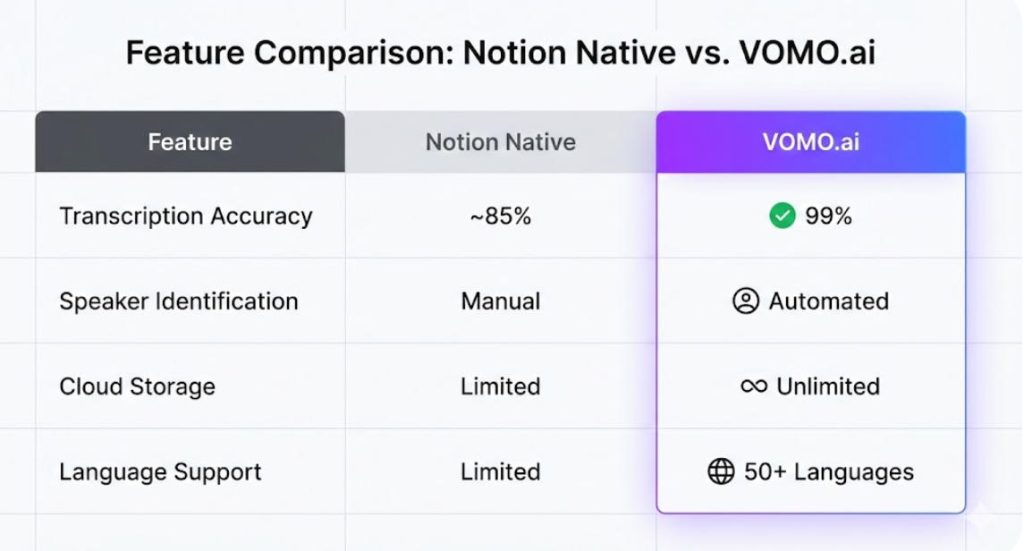
VOMO.ai vs. Notion AI: En uppgörelse funktion för funktion
| Funktion | Notion Native (inbyggd) | VOMO.ai (Pro Integration) |
| Noggrannhet i transkriptionen | Variabel (Standard AI) | 99% Noggrannhet |
| Identifiering av talare | Manuell / Begränsad | Automatiserad och exakt |
| Interaktionsläge | Statisk sammanfattning | “Chatta med transkript” (Ask AI) |
| Lagring i molnet | Begränsad av filstorlek | Obegränsad molnlagring |
| Gränser för inspelning | Plattformsberoende | Obegränsad inspelningslängd |
| Matchning av mallar | Manuellt val | Automatisk matchning av scenmallar |
Noggrannhetstest: 99% Precision vs. Allmän transkription
Den grundläggande skillnaden ligger i motorn. VOMO är byggd för “snabb och tillförlitlig transkribering och diktering av möten med extremt hög noggrannhet”. Denna 99%-precision säkerställer att komplexa tekniska termer fångas upp korrekt, medan generalistiska AI-verktyg hallucinerar ofta eller hör fel på detaljer.
Importera filer: Hantering av YouTube-videor och uppladdningar
Notion hanterar i första hand text och inbäddade länkar. VOMO utökar dina inmatningsalternativ genom att stödja filuppladdningar och YouTube-videoimport för att enkelt generera SmartNotes . Detta gör att du kan omvandla externt videoinnehåll till Notion-klara sammanfattningar direkt.
Prissättning Värde: $10/mo Add-on vs. $1,92/vecka Pro
Kostnadseffektivitet är nyckeln. Medan add-on AI-tjänster kan lägga till, kostar VOMOs Pro-plan (betalas årligen) bara $1.92 / vecka. Denna nivå inkluderar obegränsade transkriptionsminuter , vilket gör det till en mycket kostnadseffektiv lösning för tunga användare jämfört med andra prenumerationsmodeller.
Så här sätter du upp pipelinen “VOMO to Notion” idag
För att uppnå bästa resultat bör du använda VOMO för att hantera det tunga arbetet med bearbetningen. Spela in eller ladda upp ljud för att generera sammanfattningar, använd “Ask AI” för att förfina innehållet och kopiera sedan den strukturerade utdata till dina Notion-sidor. På så sätt får du det bästa av två världar: VOMO:s bearbetningskraft och Notions organisationsstruktur.
Slutsats: Nöj dig inte med röriga anteckningar 2026
Kan Notion ta mötesanteckningar? Ja, men för professionella resultat behöver den hjälp. Genom att para ihop Notion med VOMO övervinner du begränsningarna i fråga om noggrannhet och formatering. Med VOMO:s 99%-noggrannhet, automatiserad identifiering av talare och obegränsad molnlagring omvandlar du dina mötesanteckningar från enkel text till en kraftfull, sökbar kunskapsbas.
