


Konvertering ljud till TXT är processen att omvandla talade ord från inspelningar, poddsändningar, intervjuer eller föreläsningar till skriftlig text. Med modern AI-transkription verktyg kan du omvandla vilken ljudfil som helst till ett exakt textdokument på några minuter. Oavsett om du antecknar mötesanteckningar, innehållsidéer eller undertexter sparar denna metod timmar av manuell inmatning och garanterar professionell noggrannhet.
Bland de tillgängliga verktygen finns, VOMO uppskattas ofta för sin enkelhet och pålitliga transkriptionskvalitet., vilket gör konverteringsprocessen smidig även för långa inspelningar eller inspelningar med flera talare.

Förstå konvertering från ljud till TXT
Konvertering från ljud till TXT bygger på automatisk taligenkänning (ASR), en teknik som lyssnar på ditt ljud och identifierar ord med hjälp av tränade AI-modeller. Systemet upptäcker talmönster, filtrerar bort bakgrundsljud och producerar organiserade meningar som är redo för redigering eller export.
Denna automatisering är idealisk för kreatörer, journalister och lärare, eftersom den eliminerar repetitiva transkriptionsuppgifter samtidigt som kvaliteten och hastigheten förbättras.
Varför konvertera ljud till TXT?
Genom att transkribera ljud kan du göra talat innehåll sökbart, delbart och tillgängligt. Typiska fördelar är bland annat:
- Enklare efterbearbetning för poddsändningar och intervjuer
- Sökbara arkiv med möten eller föreläsningar
- Bättre tillgänglighet för personer med hörselnedsättning
- Snabb referens och återanvändning av innehåll i olika medier
Proffstips: Om du arbetar med ljud som extraherats från videor kan du med de flesta AI-verktyg bearbeta video till text med samma arbetsflöde, omvandla talat innehåll från videokällor till läsbara undertexter eller anteckningar.
Steg 1: Ladda upp din ljudfil

Börja med att välja en AI-transkriptionsplattform eller tal-till-text app. Ladda upp din ljudfil – de flesta tjänster stöder MP3, WAV, M4A, AAC och andra vanliga format. Vissa plattformar låter dig också klistra in en URL för liveinspelningar eller länkar till molnlagring.
Innan du laddar upp filen, se till att ljudkvaliteten är klar och att bakgrundsljudet är minimalt för bästa resultat.
Steg 2: Skapa transkriptet med hjälp av AI
När filen har laddats upp analyserar AI-motorn automatiskt ljudet och producerar en preliminär transkription. Avancerade system känner igen accenter, pauser och fyllnadsord, vilket ger en nästan mänsklig noggrannhet.
Transkriptionen visas vanligtvis i realtid eller efter en kort bearbetning. Granska alla markerade områden där AI-tillförlitligheten är låg – detta hjälper till att finjustera precisionen för den slutliga exporten.
Steg 3: Exportera eller ladda ner TXT-filen
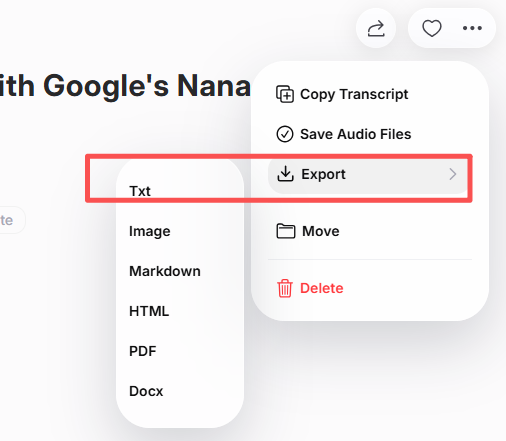
När redigeringen är klar exporterar du transkriptionen som en vanlig TXT-, DOCX- eller PDF-fil. Du kan spara den lokalt eller dela den via samarbetsplattformar för teamarbete. Vissa AI-transkriptionsverktyg stöder automatisk integration med molndrivna enheter eller CMS-system för smidig automatisering av arbetsflödet.
Bästa verktyg för att konvertera ljud till TXT
När du väljer ett transkriptionsverktyg bör du fokusera på noggrannhet, språkstöd och hastighet. Populära lösningar är bland annat:
| Verktyg | Viktig funktion | Bäst för |
|---|---|---|
| VOMO | Transkription i realtid + export i flera format | Professionella och kreatörer |
| Otter AI | Smarta sammanfattningar och gemensamma anteckningar | Affärsmöten |
| Descript | Integrerar redigering + transkription | Produktion av podcast |
| Notta AI | Snabb flerspråkig support | Globala team |
| Whisper (OpenAI-baserad) | Hög noggrannhet och öppen åtkomst | Tekniska användare |
Tips för högre transkriptionsnoggrannhet
- Spela in med en högkvalitativ mikrofon.
- Håll miljön tyst och minska ekot.
- Använd förlustfria format som WAV för exakt ljudinspelning.
- Tala tydligt och undvik överlappande röster.
- Korrekturläs alltid din text innan du exporterar den.
Genom att följa dessa bästa praxis säkerställer du att varje transkription läses naturligt och fångar varje talad detalj med 99%-klarhet.
📚 Relaterad läsning
- Hur man konverterar ljud till PDF: Steg-för-steg-guide
- Hur man transkriberar video till PDF: Steg-för-steg-guide
- Hur man konverterar MP4 till PDF: En nybörjarvänlig guide
- Hur man konverterar MKV till PDF: Steg-för-steg-guide
- Hur man konverterar FLV till PDF: snabba och enkla metoder
- Hur man konverterar AVI till PDF: Bästa verktyg och tekniker
- Hur man konverterar MOV till PDF: Komplett guide för 2025
- Hur man konverterar M4A till PDF: AI-drivna konverteringstips
- Hur man konverterar MP3 till PDF: Enkla online- och offlineverktyg
- Hur man konverterar WAV till PDF: De bästa gratis metoderna förklarade
Slutsats
Att omvandla ljud till TXT är enklare än någonsin med AI-drivna transkriptionsverktyg. Genom att ladda upp din fil, generera automatiserad text, förfina resultatet och exportera det får du snabbt, korrekt och tillgängligt skriftligt innehåll. Från professionella möten till podcastproduktion – detta arbetsflöde ger effektivitet och tydlighet, så att dina talade ord fungerar smartare för dig.




