


Konvertering M4A till TXT innebär att omvandla talat ljud från dina M4A-filer till redigerbar, läsbar text. AI-transkription Verktyg har gjort denna process smidig – ladda bara upp din inspelning, låt systemet bearbeta talet och ladda ner den färdiga transkriptionen på några minuter. Denna metod ger en noggrannhet som överstiger manuell inmatning, vilket sparar tid och förbättrar produktiviteten inom alla branscher.
Bland de ledande lösningarna finns, VOMO är ofta känt för sin precision och användarvänlighet, vilket gör att även långa eller flerhögtalars M4A-inspelningar kan konverteras felfritt till text.

Förstå konvertering från M4A till TXT
M4A är ett populärt ljudformat som används för högkvalitativa inspelningar såsom intervjuer, föreläsningar och poddsändningar. När du konverterar M4A till TXT använder programvaran Automatisk taligenkänning (ASR) att analysera ljudlagret i din fil och omvandla det till strukturerade meningar.
ASR-motorer använder djupinlärningsmodeller för att tolka röstfrekvenser, upptäcka pauser och filtrera bort bakgrundsljud. Samma teknik som ligger bakom ljud till text konvertering driver denna omvandling och ger snabb och mycket noggrann transkription i stor skala.
Varför konvertera M4A-filer till TXT?
Att omvandla M4A till text erbjuder stora fördelar för både yrkesverksamma, studenter och innehållsskapare:
- Gör inspelningar sökbara och lättare att referera till
- Möjliggör snabb redigering och återanvändning av talat material
- Möjliggör tillgänglighet för dem som föredrar eller behöver textformat.
- Förenklar arbetsflöden för textning och dokumentation
Insikt: De flesta AI-transkriptionsplattformar hanterar också video till text konvertering med liknande igenkänningsmodeller – perfekt om du arbetar med multimediaformat som MP4, MOV eller MKV tillsammans med dina M4A-filer.
Steg 1: Ladda upp din M4A-fil

Börja med att välja en AI-transkriptionsplattform som stöder M4A-inmatning. De flesta ledande alternativen accepterar även MP3, WAV, AAC och FLAC. Ladda upp din fil direkt eller importera den från molnlagring (Google Drive, Dropbox eller OneDrive).
Innan du laddar upp, se till att din inspelning är tydlig och fri från överdrivet brus. Bra ljudinspelning hjälper AI att producera en mer exakt transkription med färre korrigeringar senare.
Steg 2: Generera transkriptet automatiskt
När filen har laddats upp bearbetar transkriptionssystemet din ljudfil med hjälp av AI-igenkänningsmodeller. Programvaran lyssnar på hela spåret, identifierar tal och omvandlar det till läsbara meningar – ofta i realtid.
Avancerade plattformar märker automatiskt talare, lägger till tidsstämplar och tar bort fyllnadsord, vilket ger ett rent dokument som är klart att användas.
Steg 3: Exportera eller ladda ner din TXT-fil
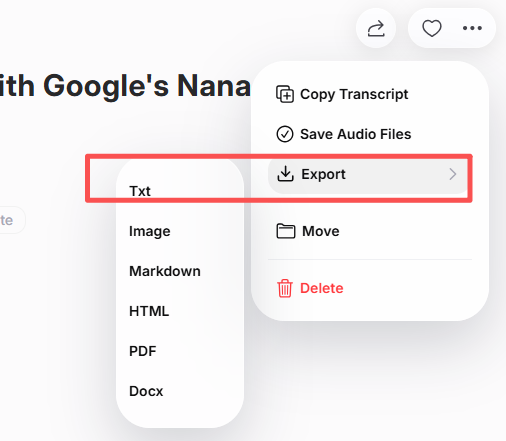
Efter att ha granskat ditt transkript för formatering eller korrekthet, exportera det som en vanlig TXT-fil. Många verktyg tillåter också att spara i DOCX eller PDF för professionellt bruk.
Vissa tjänster integreras direkt med antecknings- eller samarbetsplattformar, vilket gör det enkelt att omedelbart dela mötesprotokoll, podcastmanus eller akademiska anteckningar.
Bästa AI-verktyg för att konvertera M4A till TXT
När du väljer ett transkriptionsverktyg bör du prioritera noggrannhet, språkstöd och exportflexibilitet. Nedan följer några utmärkta alternativ för 2025:
| Verktyg | Viktig funktion | Idealisk för |
|---|---|---|
| VOMO | Snabb transkription + smidiga exportalternativ | Professionella och kreatörer |
| Otter AI | Samarbete i realtid + sammanfattningar | Team och möten |
| Descript | Videoredigering med integrerad transkription | Podcasters och redaktörer |
| Notta AI | Flerspråkiga funktioner | Globala användare |
| Whisper (baserat på OpenAI) | Öppen källkods precision | Utvecklare och forskare |
Varje plattform förenklar M4A-transkription och stöder batchbearbetning för flera ljud uppladdningar.
Tips för korrekt AI-transkription
För att uppnå ett polerat, professionellt resultat:
- Spela in med en mikrofon av hög kvalitet för tydligare röstupptagning.
- Minimera bakgrundsljud och eko
- Håll ett jämnt talhastighet och undvik avbrott
- Välj rätt språk- eller accentinställningar
- Granska ditt transkript innan du exporterar den slutliga versionen.
Dessa steg hjälper till att förfina AI-resultatet och säkerställa att varje del av det talade innehållet översätts till sammanhängande, läsbar text.
Slutsats
Att konvertera M4A till TXT har aldrig varit enklare tack vare AI-drivna transkriptionsverktyg. Genom att ladda upp din ljudfil, låta AI bearbeta talet och exportera den färdiga texten kan du omedelbart omvandla konversationer, intervjuer eller poddar till korrekta skriftliga dokument.
Oavsett om det gäller dokumentation, forskning eller innehållsskapande, M4A till TXT Transkription förbättrar tillgängligheten och effektiviteten – varje röstinspelning omvandlas till återanvändbar, sökbar digital text.




