

从 YouTube 视频中下载音频对于离线收听、研究和内容再利用非常有用。然而,在 2026 年,这一过程仍然比大多数人想象的要复杂。.
在测试了多种工具和工作流程后,最大的挑战不是 是否 您可以提取音频,但 如何轻松、安全、不失质量地实现这一目标.
在本指南中,我们将根据您的目标,介绍最佳方法、常见错误和更明智的替代方法。.
如果您的目标也是下载视觉效果,您可能还想了解 如何保存 YouTube 视频.

真正的工作流程:YouTube → 音频提取 → 格式
无论使用哪种工具,整个过程都遵循相同的结构:
- 复制 YouTube 视频链接
- 提取音频流
- 转换或保存为可用格式
了解这一点有助于在比较工具时避免混淆。.
命令行 vs 在线 vs AI:下载 YouTube 音频的最佳方式是什么?
| 方法 | 工作流程 | 易用性 | 速度 | 音频质量 | 安全 | 可扩展性 | 最适合 | 局限性 |
|---|---|---|---|---|---|---|---|---|
| 命令行 (yt-dlp) | 粘贴 URL → 运行命令 → 提取音频 | ❌ 坚硬 | ⚡ 快速 | ✅ 最高(原始格式) | ✅ 安全(当地) | ✅ 高(批次和播放列表) | 高级用户,批量下载 | 需要技术知识 |
| 在线转换器 | 粘贴 URL → 点击下载 | ✅ 非常容易 | ⚡ 快速 | ⚠️ 介质(通常为压缩介质) | ❌ 风险(广告、恶意软件) | ❌ 低 | 一次性快速下载 | 不稳定、安全问题 |
| 人工智能工具(转录/处理) | 粘贴 URL → 自动处理 → 获取文本/音频见解 | ✅ 非常容易 | ⚡ 非常快 | ⚠️ 不专注于音频文件 | ✅ 安全 | ✅ 高 | 学习、研究、内容再利用 | 非专为 MP3 下载而设计 |
主要收获
- 命令行工具 提供最佳质量和控制,但学习曲线陡峭
- 在线工具 启动速度最快,但存在安全和可靠性风险
- 人工智能工具 转变工作流程,从下载音频→提取见解
专业见解(基于真实工作流程测试)
在实际场景中,最大的区别不是速度,而是 效率和实用性:
- 命令行 = 功能强大但复杂
- 在线工具 = 简单但不可靠
- 人工智能工具 = 最有效的内容理解工具
👉 如果您的目标是聆听,请下载音频
👉 如果您的目标是学习,请跳过下载,直接提取见解
您能从 YouTube 合法下载音频吗?
在选择方法之前,重要的是要了解什么是允许的。.
✔ 法律选择包括
- YouTube Premium(仅限离线播放)
- YouTube 音频库(免版税下载)
- 您拥有或允许使用的内容
🚫 风险:
- 未经许可下载受版权保护的内容可能违反 YouTube 政策
💡 如果您的目标是学习或分析、, 将音频转换为文本 (而不是下载文件)往往是更安全的选择。.
官方方法:YouTube Premium 和 YouTube 音乐
YouTube Premium(最适合离线播放)
🔹 A 付费订阅服务 使用户能够 下载视频以供离线观看但不是单独的音频文件。
🔹 适用于 音乐、播客和教育内容.
🔹 不允许 在 YouTube 应用程序之外导出文件。
YouTube 音乐(最适合下载歌曲)
🔹 如果您需要音乐、 YouTube 音乐高级版 允许 下载歌曲和播放列表 供离线收听。
音频文件保留在应用程序中,并且 不能作为 MP3 输出.
方法 1:命令行工具(最适合高级用户)
yt-dlp 等工具提供了最多的控制功能。.
例如
yt-dlp -x --audio-format mp3 URL
优点
- 可靠性高
- 支持播放列表
- 灵活的格式
缺点
- 需要技术知识
- 不适合初学者
这是最强大但最不易获得的方法。.
方法 2:在线转换器(快速但有风险)
在线工具可实现快速转换:
- 粘贴链接
- 下载 MP3
优点
- 非常简单
- 无需安装
缺点
- 安全风险(广告、恶意软件)
- 经常不可靠
- 质量不一致
从测试结果来看,这种方法是有效的,但不能长期使用。.
方法 3:桌面应用程序(经常使用的最佳平衡方案)
4K Video Downloader 等应用程序提供了一个中间地带。.
优点
- 性能稳定
- 支持播放列表
- 简易用户界面
缺点
- 需要安装
- 仍受 YouTube 限制
这非常适合经常下载内容的用户。.
VOMO AI:下载 YouTube 音频的智能替代方案
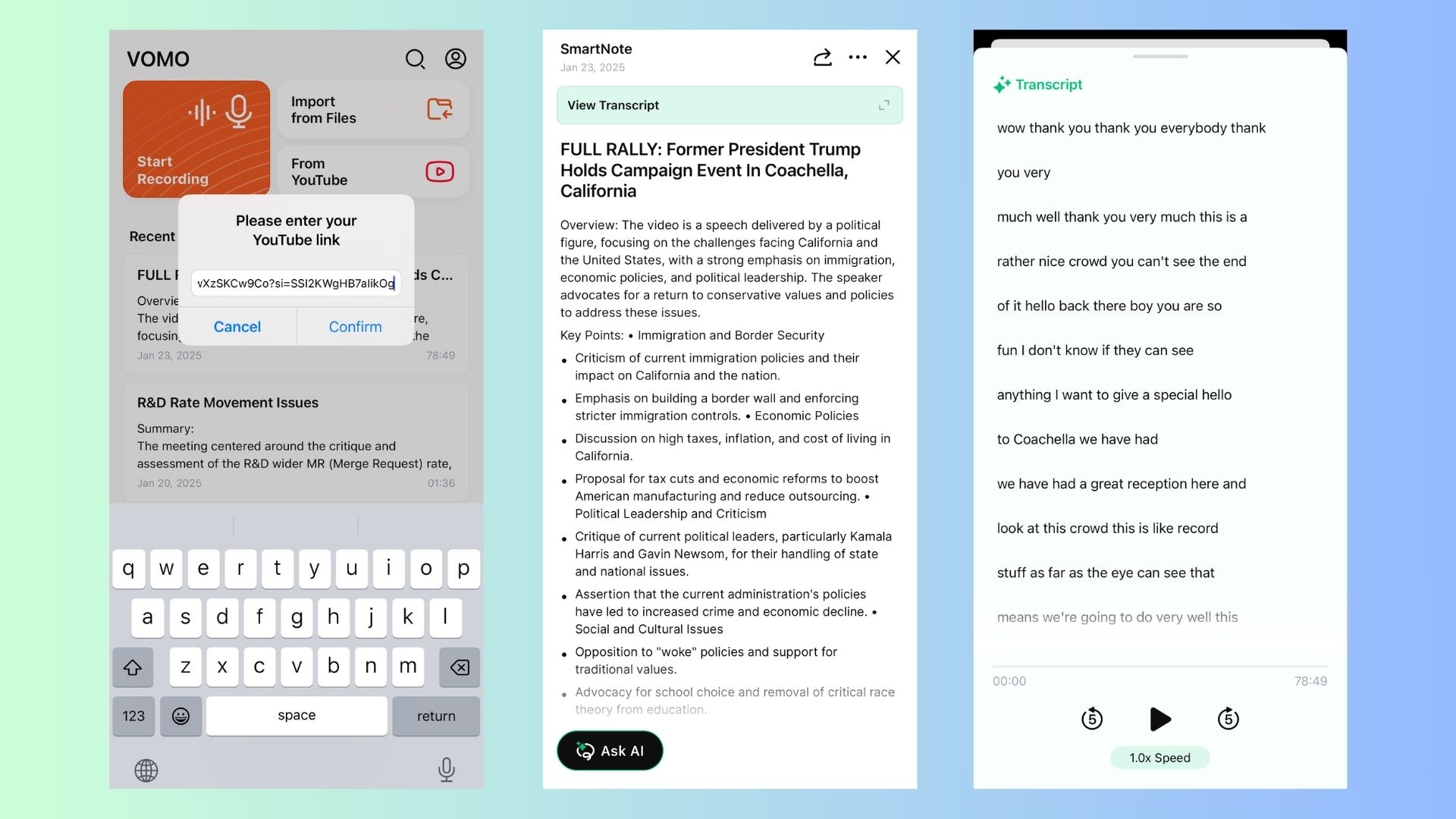
如果您的目标是 从 YouTube 视频中提取见解 而不仅仅是下载 MP3 文件、 VOMO AI 提供合法、高效的替代方案.
为什么使用 VOMO AI 而不是下载音频?
✔ 转录 YouTube 视频 直接从 URL - 无需手动下载。这是最有效的 获取 YouTube 转录 顷刻间
✔ 人工智能驱动的摘要 -无需聆听完整视频,即可提取关键要点,让您 用人工智能在几分钟内总结 YouTube 视频.
✔ 多语言支持 - 誊写和 翻译 YouTube 上的内容 50 多种语言。如果您曾经问过:“有没有能将 YouTube 视频翻译成英语的东西??”,这就是你的解决方案。.
✔ 适用于任何 YouTube 内容 - 访谈、讲座、播客、会议。
✔ 可共享的注释链接 - 即时创建 文本摘要 进行合作。
💡 使用 VOMO AI,您的存储空间将不再杂乱无章地堆满音频文件。 将视频转化为文档 以获得可搜索、可共享的文本。.
🎯想要毫不费力地转录 YouTube 视频? 单击此处,使用 VOMO AI 获取准确的录音誊本和人工智能支持的摘要!
YouTube 的免费音频库(免版税音乐)
如果您正在寻找 背景音乐或音效YouTube提供了一个 合法、免费 下载音频的方式:
🔹 如何访问:
1️⃣ Go to YouTube 工作室.
2️⃣ 点击 "音频图书馆" 从左侧菜单中选择
3️⃣ 浏览和 下载免版税曲目 免费
💡 非常适合需要免费音乐制作视频、播客或演示文稿的创作者。
从 YouTube 提取音频的第三方工具
如果您需要 来自 YouTube 视频的 MP3 文件因此,第三方工具提供了解决方案。不过,下载受版权保护的内容时一定要确保获得许可。
在线 YouTube 音频转换器
1️⃣ Y2Mate (快速免费)
✔ 转换 将 YouTube 视频转换为 MP3 或 MP4.
✔ 无需安装软件。
✔ 步骤: 复制视频 URL → 粘贴到 Y2Mate → 选择 MP3 → 下载.
2️⃣ AISEO (高质量 MP3 转换)
✔ 人工智能驱动 无需注册即可进行 MP3 转换.
✔ 快捷 高质量 音频提取。
✔ 步骤: 粘贴 YouTube 链接 → 转换 → 下载 MP3.
🔗 尝试 AISEO
用于下载 YouTube 音频的桌面应用程序
对于经常下载 YouTube 音频的用户,桌面软件可提供更多功能 控制和质量选项.
3️⃣ 4K 视频下载器 (最适合高质量下载)
✔ 下载 整个播放列表和频道.
✔ 支持 MP3、M4A 和 OGG 格式.
✔ 步骤: 安装应用程序 → 粘贴 YouTube 链接 → 选择 "提取音频" → 下载.
4️⃣ youtube-dl (最适合高级用户)
✔ 命令行工具,用于 下载和提取音频.
✔ 需要 基本技术知识.
✔ 步骤: 运行命令 → youtube-dl -x -audio-format mp3 [YouTube URL].
💡 这些工具很有用,但只能用于 个人、非商业目的 以避免侵犯版权。
最大的错误:转换为 MP3 总是能提高质量
最常见的误解之一是音频质量。.
实际上
- YouTube 音频已被压缩(最大约 256 kbps)
- 转换为 MP3 会进一步降低质量
👉更好的方法:
- 尽可能保留原始格式(M4A / Opus)
MP3 vs M4A vs Opus:您应该选择哪种格式?
测试不同的格式:
- MP3 最佳兼容性
- M4A: 尺寸更小,质量更好。学习 如何将 M4A 文件转录为文本 如果您经常使用这种格式)。
- 作品: 效率最高(支持较少)
👉 建议:
- 使用 M4A 可获得最佳平衡
- 仅在需要兼容性的情况下使用 MP3
为什么大多数工具会随着时间的推移而损坏或停止工作
许多工具变得不可靠的原因是
- YouTube 后台更新
- 法律压力
- 维护问题
这就解释了为什么:
👉 “今天能用 ”的工具日后往往会失效
批量下载:如何从播放列表中提取音频
用于大规模使用:
- 命令行工具支持播放列表
- 有些桌面应用程序允许批量下载,类似于专业人士 批量转录音频文件 以节省时间。
如果您经常使用字幕,那么找到一个可靠的 YouTube 字幕下载器 是批量处理内容的另一个好方法。.
然而
- 设置更加复杂
- 处理时间增加
批处理工作流程功能强大,但对初学者并不友好。.
为什么简单比强大更重要?
在对所有方法进行比较后,最大的区别在于可用性:
- 命令行工具 = 功能强大但复杂
- 在线工具 = 简单但有风险
- 桌面应用程序 = 平衡但有限
👉最佳解决方案取决于您的工作流程,而不仅仅是功能。.
何时应使用转录而不是下载
从实际使用来看,转录在以下情况下效果更好:
- 您需要听课笔记
- 您想从播客中获取见解
- 您正在进行研究或内容分析
与其听一个小时的视频,您可以
👉改为 → 搜索 YouTube 转录 → 总结
法律和道德方面的考虑
下载 YouTube 内容 未经许可 会 违反版权法和 YouTube 服务条款.
✔ 在以下情况下,您可以合法下载音频
✅ 您有一个 订阅 YouTube Premium 或 YouTube Music.
✅ 内容是 永久 (YouTube 音频库)。
✅ 您有 创作者的明确许可.
🚫 您不能合法下载受版权保护的内容 未经许可,不得用于分发、转售或再利用。
💡 VOMO AI 提供 符合道德标准的替代方案 通过提供 文本誊写和摘要 而不是直接下载音频。
何时应使用转录而不是下载
从实际使用来看,转录在以下情况下效果更好:
- 您需要听课笔记
- 您想从播客中获取见解
- 您正在进行研究或内容分析
与其听一个小时的视频,您可以
阅读 → 搜索 → 总结
