

Downloading audio from YouTube videos is useful for offline listening, research, and content repurposing. However, in 2026, the process is still more complicated than most people expect.
After testing multiple tools and workflows, the biggest challenge is not whether you can extract audio—but how to do it easily, safely, and without losing quality.
In this guide, we break down the best methods, common mistakes, and smarter alternatives depending on your goal.
If your goal is downloading visuals as well, you might also want to learn YouTube動画の保存方法.

The Real Workflow: YouTube → Audio Extraction → Format
No matter which tool you use, the process always follows the same structure:
- YouTubeのビデオリンクをコピーする
- Extract the audio stream
- Convert or save it in a usable format
Understanding this helps avoid confusion when comparing tools.
Command Line vs Online vs AI: Which Is the Best Way to Download YouTube Audio?
| 方法 | ワークフロー | 使いやすさ | スピード | オーディオ品質 | 安全性 | スケーラビリティ | 最適 | 制限事項 |
|---|---|---|---|---|---|---|---|---|
| Command Line (yt-dlp) | Paste URL → Run command → Extract audio | ❌ Hard | ⚡ Fast | ✅ Highest (original format) | ✅ Safe (local) | ✅ High (batch & playlists) | Advanced users, bulk downloads | Requires technical knowledge |
| Online Converters | Paste URL → Click download | とても簡単 ✅ とても簡単 | ⚡ Fast | ⚠️ Medium (often compressed) | ❌ Risky (ads, malware) | ❌ 低 | Quick one-time downloads | Unstable, security concerns |
| AI Tools (Transcription / Processing) | Paste URL → Auto process → Get text/audio insights | とても簡単 ✅ とても簡単 | ⚡ Very Fast | ⚠️ Not focused on audio files | ✅ Safe | ✅ 高い | Learning, research, content repurposing | Not designed for MP3 downloads |
要点
- Command line tools provide the best quality and control but have a steep learning curve
- Online tools are the fastest to start but come with safety and reliability risks
- AIツール shift the workflow from downloading audio → extracting insights
Pro Insight (Based on Real Workflow Testing)
In real scenarios, the biggest difference is not speed—it’s efficiency and usability:
- Command line = powerful but complex
- Online tools = simple but unreliable
- AI tools = most efficient for content understanding
👉 If your goal is listening, download audio
👉 If your goal is learning, skip downloads and extract insights directly
Can You Legally Download Audio from YouTube?
Before choosing a method, it’s important to understand what’s allowed.
✔ Legal options include:
- YouTube Premium (offline playback only)
- YouTube Audio Library (royalty-free downloads)
- Content you own or have permission to use
🚫 Risks:
- Downloading copyrighted content without permission may violate YouTube policies
💡 If your goal is learning or analysis, 音声をテキストに変換する (instead of downloading files) is often a safer alternative.
Official Methods: YouTube Premium & YouTube Music
YouTube Premium(オフライン再生に最適)
🔹 A ペイドサブスクリプションサービス を可能にする。 オフライン視聴のためにビデオをダウンロードする但し、個別のオーディオファイルとしてではない。
🔹 以下のような用途に適している。 音楽、ポッドキャスト、教育コンテンツ.
🔹 禁止 YouTubeアプリの外にファイルをエクスポートする。
YouTube Music(曲のダウンロードに最適)
🔹 音楽が必要なら、 YouTube Music Premium 許す 曲とプレイリストのダウンロード をオフラインで聴くことができる。
🔹 音声ファイルはアプリ内に残り MP3としてエクスポートできない.
Method 1: Command-Line Tools (Best for Advanced Users)
Tools like yt-dlp offer the most control.
例
yt-dlp -x --audio-format mp3 URL
長所だ:
- High reliability
- Supports playlists
- Flexible formats
短所だ:
- Requires technical knowledge
- Not beginner-friendly
This is the most powerful—but least accessible—method.
Method 2: Online Converters (Fast but Risky)
Online tools allow quick conversion:
- Paste link
- Download MP3
長所だ:
- Very easy
- No installation
短所だ:
- Security risks (ads, malware)
- Often unreliable
- Quality inconsistencies
From testing, this method works—but is not dependable long term.
Method 3: Desktop Apps (Best Balance for Frequent Use)
Apps like 4K Video Downloader provide a middle ground.
長所だ:
- Stable performance
- Supports playlists
- Easy UI
短所だ:
- Requires installation
- Still limited by YouTube restrictions
This is ideal for users who frequently download content.
VOMO AI: The Smarter Alternative to Downloading YouTube Audio
あなたの目標が YouTube動画からインサイトを抽出 MP3ファイルをダウンロードするよりも、 VOMO AIは合法的かつ効率的な代替手段を提供する.
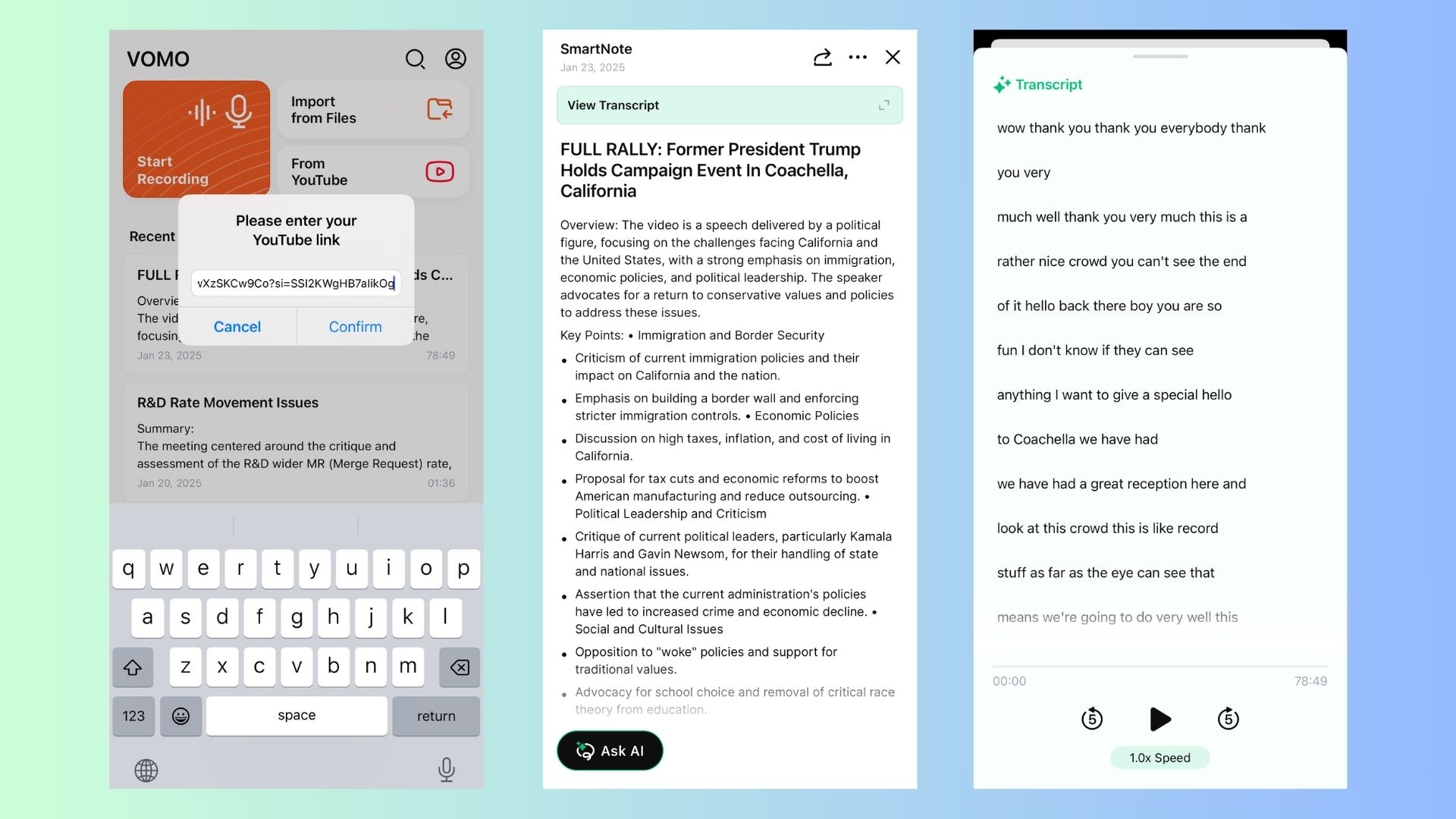
なぜオーディオをダウンロードする代わりにVOMO AIを使うのか?
✔ YouTubeの動画を書き起こす directly from URLs – No need for manual downloads. It’s the most effective way to YouTubeのトランスクリプトを取得する すぐに
✔ AIによる要約 –Extracts key takeaways without listening to full videos, letting you summarize YouTube videos with AI in minutes.
✔ 多言語サポート – Transcribes and translates content on YouTube in 50+ languages. If you’ve ever asked, “is there something that will translate YouTube videos to English?”, this is your solution.
✔ あらゆるYouTubeコンテンツに対応 - インタビュー、講演、ポッドキャスト、ミーティング。
✔ 共有可能なノート・リンク - 瞬時に作成 テキストベースの要約 コラボレーションのために。
💡 IInstead of cluttering your storage with audio files, use VOMO AI to turn video into a document to get searchable, shareable text.
YouTubeの動画を簡単に書き起こしたいですか? VOMO AIで正確なトランスクリプトとAIによる要約を入手するには、こちらをクリックしてください!
YouTube’s Free Audio Library (For Royalty-Free Music)
をお探しなら BGMまたは効果音ユーチューブでは 合法、無料 オーディオをダウンロードする方法:
🔹 アクセス方法
1️⃣ へ YouTubeスタジオ.
2️⃣ クリック 「オーディオ・ライブラリー 左側のメニューから
3️ ⃣ 閲覧と ロイヤリティ・フリーのトラックをダウンロードする 無料で。
💡 ビデオ、ポッドキャスト、プレゼンテーション用に無料の音楽を必要とするクリエイターに最適です。
Third-Party Tools to Extract Audio from YouTube
必要な場合 YouTubeビデオのMP3ファイルサードパーティのツールが解決策を提供します。ただし、著作権で保護されたコンテンツをダウンロードする許可を必ず得てください。
オンラインYouTubeオーディオコンバータ
1️⃣ Y2Mate (高速&無料)
コンバート YouTube動画をMP3またはMP4に変換する.
ソフトウェアのインストールは不要です。
ステップ 動画のURLをコピー → Y2Mateにペースト → MP3を選択 → ダウンロード.
🔗 Y2Mateへ
2️⃣ AISEO (高品質MP3変換)
AI搭載 登録なしでMP3変換.
迅速かつ 高品質 オーディオ抽出。
ステップ YouTubeリンクを貼り付け → 変換 → MP3をダウンロード.
🔗 AISEOを試す
YouTubeオーディオ・ダウンロード用デスクトップ・アプリケーション
YouTubeのオーディオを頻繁にダウンロードするユーザーにとって、デスクトップ・ソフトウェアはより多くのものを提供します。 コントロールと品質オプション.
3️⃣ 4K動画ダウンローダー (高品質ダウンロードに最適)
ダウンロード プレイリストとチャンネル全体.
サポート MP3、M4A、OGGフォーマット.
ステップ アプリをインストール → YouTubeのリンクを貼り付ける → 「音声を抽出」を選択 → ダウンロード.
4️⃣ youtube-dl (上級者に最適)
コマンドラインツール オーディオのダウンロードと抽出.
必要なもの 基礎技術知識.
ステップ コマンドを実行 → youtube-dl -x -audio-format mp3 [YouTube URL]..
💡 これらのツールは便利だが、以下の場合にのみ使用すべきである。 個人的、非営利的な目的 著作権違反を避けるため
The Biggest Mistake: Converting to MP3 Always Improves Quality
One of the most common misunderstandings is audio quality.
In reality:
- YouTube audio is already compressed (~256 kbps max)
- Converting to MP3 can reduce quality further
👉 Better approach:
- Keep original format (M4A / Opus) when possible
MP3 vs M4A vs Opus: Which Format Should You Choose?
From testing different formats:
- MP3: Best compatibility
- M4A: Better quality at smaller size. (Learn how to transcribe M4A files to text if you work with this format often.)
- Opus: Highest efficiency (less widely supported)
👉 Recommendation:
- Use M4A for best balance
- Use MP3 only if compatibility is required
Why Most Tools Break or Stop Working Over Time
Many tools become unreliable due to:
- YouTube backend updates
- Legal pressure
- Maintenance issues
This explains why:
👉 “working today” tools often fail later
Batch Downloading: How to Extract Audio from Playlists
For large-scale usage:
- Command-line tools support playlists
- Some desktop apps allow bulk downloads, similar to how professionals オーディオファイルの一括書き起こし 時間を節約するために。
If you often work with captions, finding a reliable YouTube subtitle downloader is another great way to process content in bulk.
しかしだ:
- Setup is more complex
- Processing time increases
Batch workflows are powerful—but not beginner-friendly.
Why Simplicity Matters More Than Power
After comparing all methods, the biggest difference is usability:
- Command-line tools = powerful but complex
- Online tools = simple but risky
- Desktop apps = balanced but limited
👉 The best solution depends on your workflow, not just features.
When You Should Use Transcription Instead of Downloading
From practical use, transcription is better when:
- You need notes from lectures
- You want to extract insights from podcasts
- You’re doing research or content analysis
Instead of listening to a 1-hour video, you can:
👉 read → YouTubeのトランスクリプトを検索する → summarize
法的および倫理的考察
YouTubeコンテンツのダウンロード 無許可 缶 著作権法およびYouTubeの利用規約に違反する行為.
✔ 以下の場合、合法的にオーディオをダウンロードすることができます:
✅ あなたには YouTube PremiumまたはYouTube Musicのサブスクリプション.
✅ 内容は ロイヤリティフリー (YouTubeオーディオライブラリー)。
✅ あなたは持っている クリエイターの明示的な許可.
🚫 著作権で保護されたコンテンツを合法的にダウンロードすることはできません。 許可なく配布、再販、再利用することを禁じます。
💡 VOMO AIは コンプライアンスに準拠した倫理的な代替案 を提供することで テキストベースのトランスクリプトとサマリー 直接オーディオをダウンロードする代わりに。
When You Should Use Transcription Instead of Downloading
From practical use, transcription is better when:
- You need notes from lectures
- You want to extract insights from podcasts
- You’re doing research or content analysis
Instead of listening to a 1-hour video, you can:
👉 read → search → summarize
