How to Use AI to Take Meeting Notes (Step-by-Step Guide)

立即将音频转化为文本

99% 精确 - 超快 - 易用

how to use ai to take meeting notes (step by step guide)

You can use AI to take 会议纪要 by letting it automatically record conversations, transcribe what’s said, identify key points, and generate structured summaries with decisions and action items. Instead of manually writing everything down, AI handles the capture and organization so you can focus on the discussion itself.

This step-by-step guide explains why 人工智能会议记录 matter, how AI note-taking works, and exactly how to use AI tools to capture accurate, searchable, and actionable meeting notes in real-world work scenarios.

Tools like VOMO build on these benefits by offering built-in AI meeting noter features, including automatic transcription, structured summaries, and dozens of ready-to-use meeting templates that turn conversations into clear, actionable notes with minimal effort.

VOMO 将视频转换为文本

Why Use AI for Meeting Notes Instead of Manual Note-Taking

Traditional note-taking forces you to split attention between 听力和写作, which often leads to missed details or incomplete records. AI meeting notes solve this problem by capturing conversations automatically and turning them into usable documentation.

主要优势包括:

Higher accuracy
人工智能转录 systems can capture conversations word for word, reducing the risk of missed decisions or misunderstood instructions. This is especially useful in fast-paced meetings with multiple speakers.

Real-time summaries and action items
Many AI systems generate structured summaries as the meeting happens, highlighting decisions, deadlines, and next steps without manual effort.

Centralized documentation
All transcripts and summaries are stored digitally, making it easy to search past meetings by topic, project, or date instead of digging through notebooks or chat histories.

改善无障碍环境
Live transcripts help participants who join late, work in different time zones, or prefer reading over listening. They also support inclusive communication for diverse teams.

In practice, teams using AI for meeting notes spend less time on follow-ups and more time executing decisions.

How AI Meeting Note-Taking Works Behind the Scenes

how ai meeting note taking works behind the scenes

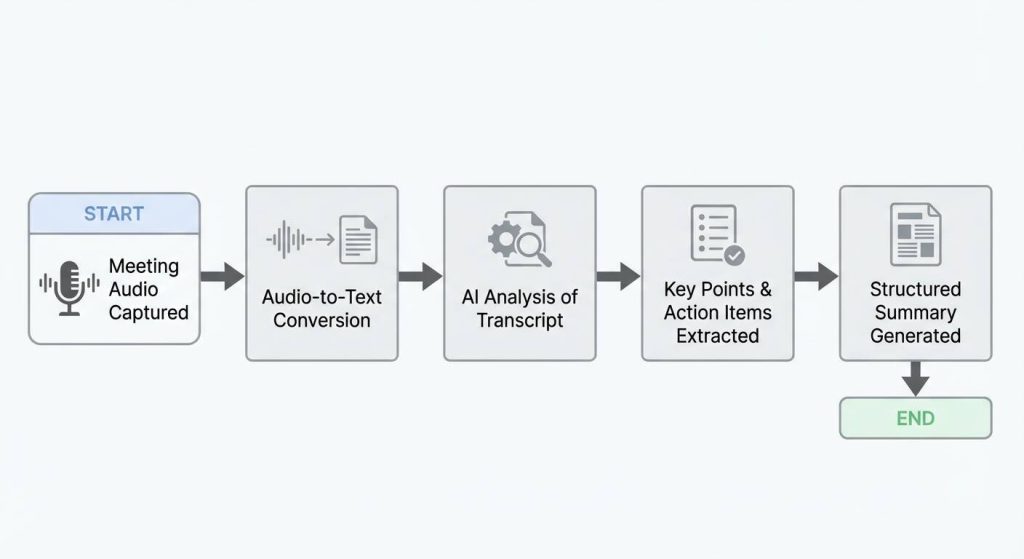
AI meeting note-taking typically follows a simple workflow:

  1. The meeting audio is captured
  2. Speech is converted into text using 音频转文本 加工
  3. Natural language models analyze the transcript
  4. Key points, decisions, and tasks are extracted
  5. A structured summary is generated

This process allows AI to turn raw conversation into organized documentation that mirrors how teams actually work.

Common Methods of Using AI to Take Meeting Notes

Built-In Meeting Transcription

Many conferencing platforms offer automatic transcription during meetings. This provides a basic written record, but transcripts alone are often long and difficult to review without summarization.

AI-Powered Transcription and Summaries

Some AI tools go beyond raw transcripts by organizing content into sections like agenda items, decisions, and action items. This significantly reduces post-meeting cleanup.

Dedicated AI Note-Taking Systems

Dedicated AI meeting note systems are designed to handle the entire workflow, from recording to structured summaries and searchable archives. These are especially helpful for teams that run frequent meetings across multiple projects.

Step-by-Step: How to Use AI to Take Meeting Notes Effectively

step by step how to use ai to take meeting notes effectively

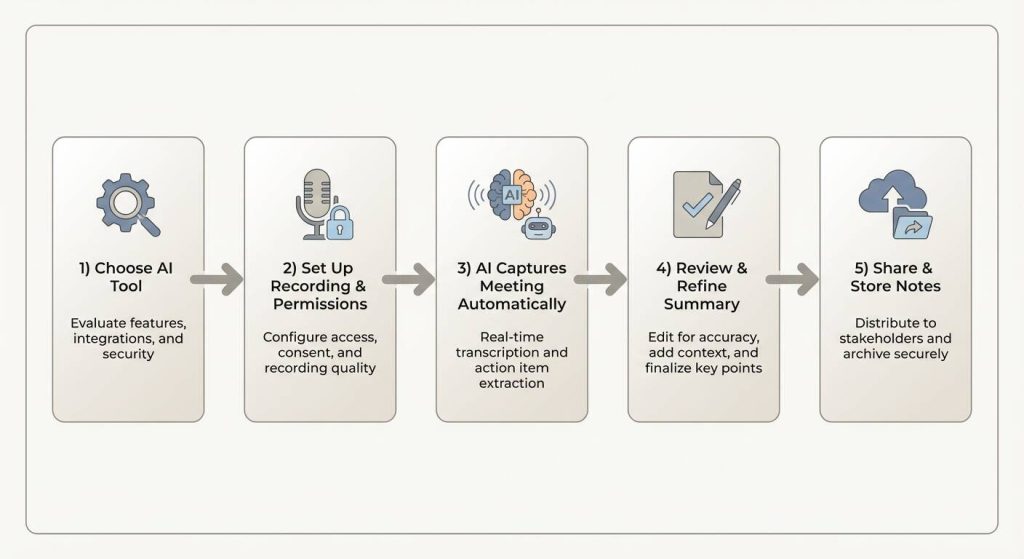
Step 1: Choose an AI Tool That Matches Your Workflow

Look for tools that support real-time transcription, speaker recognition, and automatic summaries. Integration with your calendar and meeting platforms is critical for smooth adoption.

Step 2: Set Up Recording and Permissions

Before the meeting, ensure recording and transcription are enabled and that participants are informed. Clear consent helps avoid compliance issues later.

Step 3: Let AI Capture the Meeting Automatically

Once the meeting starts, the AI listens in the background and generates a live transcript. This frees you to focus on discussion rather than documentation.

Step 4: Review and Refine the AI Summary

meeting notes templates

After the meeting, review the generated notes for clarity and accuracy. AI handles structure well, but human review ensures context is preserved.

Step 5: Share and Store Notes Centrally

Distribute the final notes to stakeholders and store them in a shared workspace. Over time, these notes become a valuable knowledge base.

Using AI Meeting Notes for Video Meetings

AI tools cannot directly understand video content. For video meetings, the conversation must first be converted using 视频转文本 transcription. Once a transcript exists, AI can analyze the discussion, extract insights, and generate organized notes just like any other meeting.

Best Practices for Getting High-Quality AI Meeting Notes

To get the most value from AI note-taking:

  • Use clear agendas to improve structure
  • Encourage speakers to state decisions explicitly
  • Review summaries shortly after meetings
  • Standardize note formats across your team

Teams that follow these practices report better alignment and fewer clarification meetings.

How AI Meeting Notes Improve Long-Term Team Knowledge

人工智能会议记录 are not just records. Over time, they form a searchable archive of decisions, context, and progress.

This helps teams:

  • Track decision history
  • Onboard new members faster
  • Avoid repeating past discussions
  • Support better long-term planning

Consistent AI-generated notes create institutional memory without extra effort.

Final Thoughts on Using AI to Take Meeting Notes

使用 AI to take meeting notes is about working smarter, not documenting more. By automating transcription, summaries, and action items, AI allows teams to stay engaged during meetings while still producing clear, reliable records afterward.

When used consistently, AI meeting notes turn conversations into progress instead of forgotten discussions.

vomo 徽标
20250727 103817 22
解锁即时 Al 会议笔记
左麦穗

100,000 多名用户的信任

5 星级
右麦穗

无需信用卡