


Transcribing a video to TXT means converting the spoken content in a video into a written text file. Modern AI 轉錄 tools automatically extract the audio, recognize speech, and generate a clean text version — all in just minutes. This process is perfect for creating subtitles, searchable archives, and readable summaries without manual effort.
Among popular solutions, VOMO is often praised for its streamlined process and reliable accuracy, ensuring smooth transcription even in multi-speaker recordings.

Understanding Video-to-TXT Conversion
Video-to-TXT transcription uses 自動語音辨識 (ASR), which analyzes the sound layer of a video and translates spoken words into structured sentences. AI models are trained to handle accents, background noise, and pacing, making the generated transcript remarkably close to human-level clarity.
This technology transforms complex multimedia content into accessible text, simplifying note-taking, content editing, and information search for professionals, students, and media producers alike.
Why Transcribe Video to TXT?
Turning video dialogue into text offers multiple advantages:
- Enables quick text search within long footage
- Supports accessibility for hearing-impaired users
- Facilitates repurposing video content into blogs or articles
- Helps organize interviews, lectures, and discussions
提示: If you work mainly with sound recordings, most transcription tools also convert 音訊轉文字 using the same underlying AI process — perfect for transforming podcasts, voice memos, or recorded meetings into readable documents.
步驟 1:上傳您的視訊檔案

Start by uploading your video file to an AI transcription platform. Supported formats usually include MP4, MOV, AVI, MKV, and FLV. Some tools even allow importing directly from online sources like YouTube, Google Drive, or Vimeo.
Before uploading, ensure the file’s 音質 is clear; low noise levels improve transcription fidelity and reduce correction time later.
Step 2: Let AI Generate Your Transcript
Once uploaded, the AI engine detects dialogue and automatically creates a transcript. The process involves extracting audio tracks, identifying speakers, and converting speech into text in seconds.
Higher-end platforms automatically remove filler words, insert timestamps, and summarize sections for concise readability — saving time in post-processing.
Step 3: Export and Download the TXT File
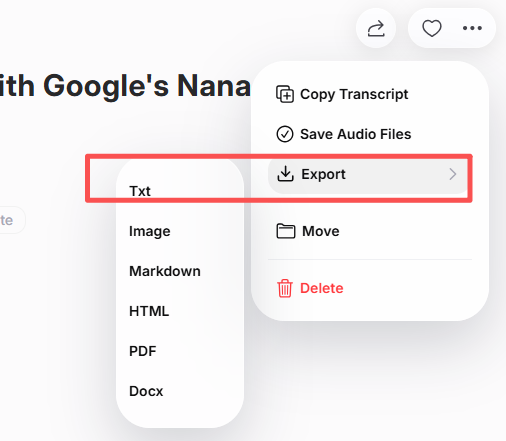
When everything looks good, export your finalized transcript in TXT, DOCX, or PDF format. Most platforms offer direct export or integration with content management systems and cloud storage.
This versatility helps you instantly share transcripts, archive research notes, or prepare documentation without extra formatting steps.
Best Tools for Video-to-TXT Transcription
When choosing an AI transcription platform, focus on quality, customization, and speed. Here are reliable options:
| 工具 | 主要特點 | 最適合 |
|---|---|---|
| VOMO | Simple workflow + multi-format export | Professionals & educators |
| Otter AI | Smart summaries and collaborative notes | 商務會議 |
| 說明 | Integrated video editing + transcript generation | Podcast 製作 |
| Notta AI | Supports multilingual transcription | Global teams |
| Whisper (OpenAI-based) | High accuracy and open framework | Developers & researchers |
Each of these tools supports audio and video transcription, offering selectable export formats for different professional needs.
Tips for High-Quality Video Transcription
Achieve the most accurate results with these tips:
- Record in a quiet environment and use quality equipment
- Avoid overlapping speech and maintain clear pacing
- Use high-resolution videos with crisp sound
- Review the transcript before final export
- Highlight keywords or timestamps for better organization
Small refinements at the recording stage often lead to substantial improvements in transcription clarity and readability.
總結
Transcribing video to TXT is now effortless thanks to advanced AI technology. By uploading your video, generating automated text, editing, and exporting the transcript, you can transform complex spoken content into organized, shareable text in minutes.
Whether for education, research, or content creation, AI‑based 視訊轉文字 transcription saves time, enhances accessibility, and turns your audio‑visual material into valuable readable data.




