


Converting MP3 to TXT means turning speech from your audio file into readable text. Thanks to today’s AI transcription tools, this process is quick and precise: simply upload your MP3 recording, let the AI process speech recognition, and export the resulting transcript. Whether you’re capturing meeting notes, voice memos, or lectures, this method eliminates manual typing and enhances productivity.
Among many options, VOMO stands out for its reliable transcription quality and ease of use — even lengthy or multi‑speaker recordings are converted into clean text effortlessly.

Understanding MP3‑to‑TXT Conversion
MP3 files store compressed audio data, making them ideal for portable sound recordings. To convert MP3 to TXT, AI transcription software uses Automatic Speech Recognition (ASR) technology to analyze verbal patterns, isolate language cues, and generate properly punctuated text.
ASR engines are designed to learn from millions of speech samples, ensuring remarkable precision across tones and accents. This same process applies when converting audio to text, turning any audio‑only material into structured digital text formats ready for editing and sharing.
Why Convert MP3 Files to TXT?
Turning your MP3 recordings into text provides major advantages for communication and accessibility:
- Keeps spoken information searchable and organized
- Improves accessibility for hearing‑impaired audiences
- Simplifies content creation for blogs, notes, and documentation
- Allows keyword indexing for easier content retrieval
Tip: Many professional transcription tools also handle video to text conversion. If your recordings include visual clips (like MP4 or MOV files), the process seamlessly extracts dialogue from videos and transforms it into written captions or summaries.
Step 1: Upload Your MP3 File

Begin by choosing a reputable AI transcription tool or app that supports MP3 uploads. Most platforms accept files directly from your device or cloud storage services such as Google Drive, Dropbox, or OneDrive.
For best results, use clear audio recordings and remove excessive background noise — clean sound improves transcription accuracy dramatically.
Step 2: Generate the Transcript Automatically
Once you upload your MP3, the AI analyzes its audio content and starts transcribing speech to text. Within seconds, you’ll see a draft transcript that captures sentences, tone, and inferred punctuation.
Advanced transcription engines can detect multiple speakers, tag segments, and remove filler words automatically, resulting in polished text ready for review.
Step 3: Export or Download Your TXT File
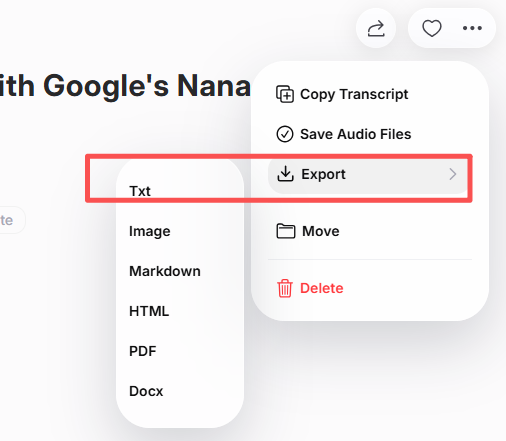
After proofreading your transcript, export it in TXT format. Many tools allow alternative outputs like DOCX or PDF.
Cloud‑connected transcription systems also enable direct sharing with colleagues or teams, so you can instantly distribute meeting notes, study materials, or podcast scripts.
Best Online and Offline Tools to Convert MP3 to TXT
There are both web‑based and downloadable transcription tools available. Here’s a short list of trusted options:
| Tool | Key Feature | Ideal For |
|---|---|---|
| VOMO | Fast transcription + multi‑format export | Professionals & creators |
| Otter AI | Real‑time collaboration & summaries | Teams & meetings |
| Descript | Built‑in audio/video editing | Podcasters & content editors |
| Notta AI | Multilingual support across formats | Global users |
| Whisper (OpenAI‑based) | Developer‑friendly accuracy | Technical experts |
Each platform provides solid performance — VOMO excels in quick online conversion, while Whisper and Descript suit users who prefer offline workflows.
Tips for High‑Quality MP3‑to‑TXT Transcription
To maximize your transcription accuracy and readability:
- Record in quiet environments with minimal background sounds
- Speak clearly and maintain a steady rhythm
- Use a reliable microphone setup for clean audio capture
- Double‑check speaker labels and timestamps before exporting
- Proofread to fix domain‑specific terms or names
These small improvements significantly boost clarity and reduce post‑editing work.
Conclusion
Converting MP3 to TXT has become fast and effortless with AI technology. By uploading your file, letting the system generate a transcript, and exporting polished text, you can transform spoken words into structured, accessible information.
Whether you’re managing lectures, business meetings, or podcasts, MP3‑to‑TXT transcription streamlines workflows, improves accessibility, and turns your audio content into powerful, reusable digital text.
