The easiest way to convert an MP4 video into an image is by using an AI transcription tool that extracts the speech from the video, converts it to text, and then exports that text as an image format such as PNG or JPG. Instead of manually capturing screenshots or typing captions, modern tools like VOMO automate the entire workflow in just a few clicks—making the process fast, accurate, and accessible even for beginners.

What Does It Mean to Convert MP4 to Image?
Converting an MP4 to an image doesn’t mean extracting a single visual frame. Instead, it means taking the spoken content from the MP4 file, turning it into readable text, and exporting that text as a static visual format—similar to a graphic note, caption card, or transcript image.
This method is particularly useful when you need:
- Shareable content for social media
- Study notes from lecture recordings
- Quote cards from speeches or tutorials
- Meeting documentation in visual form
It’s a modern and efficient alternative to screenshotting or manual transcription.
Why Use an AI Tool to Convert MP4 to Image?
Traditional methods require multiple tools—video players, transcription apps, and design editors.
An AI-powered solution simplifies the process because it:
✔ Extracts speech automatically
✔ Transcribes content with high accuracy
✔ Automatically formats the final result
✔ Lets users export directly as an image
✔ Saves time and reduces manual editing
This makes AI the most reliable and beginner-friendly approach.
Step-by-Step: Convert MP4 to Image Using AI
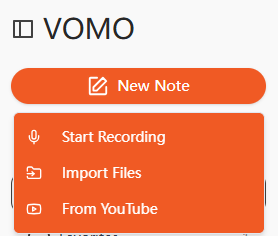
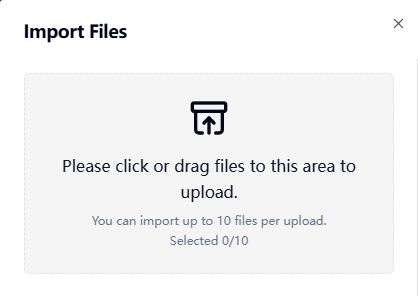
Step 1: Upload Your MP4 File
Start by selecting your MP4 file and uploading it to the transcription platform. Most tools also allow drag-and-drop uploads or URL imports from platforms like YouTube or Google Drive.
Step 2: Convert the Video into Text
The AI will analyze the audio track and convert spoken language into a readable transcript.
This process is similar to performing video tekstiksi, but with an additional visual output step.
Once the transcription is complete, you’ll have a clean text version of your video’s speech.
Step 3: Export as an Image
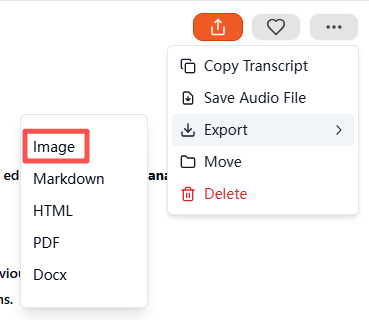
After the transcription is ready, go to the export menu and select Image tulostusmuodoksi.
The system will automatically generate and download a compressed ZIP file containing the visual transcript. The exported results may include multiple layout styles depending on the tool.
Once downloaded, you can unzip the folder to access your finished visual transcript.
Supported File Types for MP4-to-Image Conversion
Most transcription and AI export tools support multiple formats. Below are common compatible inputs:
| Luokka | Tuetut formaatit |
|---|---|
| Video | MP4, MOV, MKV, AVI, FLV |
| Audio (optional) | MP3, WAV, M4A, AAC |
If needed, you can also convert ääni tekstiksi first and then turn that transcript into an image file using the same workflow.
Best Tools to Convert MP4 to Image Automatically
Here are recommended AI tools that support this functionality:
- VOMO (Best all-in-one AI transcription + export)
- Kuvaus
- Otter AI
- Notta AI
- Veed.io
However, VOMO stands out because it supports automatic formatting, downloadable ZIP export, and streamlined transcript-to-image conversion—making it ideal for beginners.
Top Use Cases for MP4-to-Image Conversion
This workflow is beneficial for many industries and content types:
| Tyyppi | Esimerkki |
|---|---|
| Koulutus | Lecture notes, online course highlights |
| Liiketoiminta | Meeting records, interview summaries |
| Sisällön luominen | Podcast clips, creator captions |
| Saavutettavuus | Assistive reading visuals |
| Tutkimus | Timestamp-based transcript snapshots |
Images are portable, easy to archive, and accessible across platforms—much easier to consume than raw video files.
Tips for Accurate MP4-to-Image Conversion
To get the clearest output:
- Use videos recorded in quiet environments
- Speak at a steady pace
- Avoid overlapping voices
- Consider using a high-quality microphone in future recordings
- Double-check formatting and key information before exporting
A clean recording results in a precise and professional visual transcript.
Lopulliset ajatukset
Converting an MP4 to an image is no longer limited to screenshotting—thanks to modern AI transcription technology. With tools like VOMO, you can upload a video, automatically transcribe it, and export the final content as a polished image file in just a few steps. This makes the process ideal for learning, sharing, documenting, and repurposing video content in a visually friendly format.