

Turning audio into an editable Word document is easier than ever. You simply upload your audio file to an AI transcription tool, let it convert speech into text automatically, then export the result as a Word (.docx) file you can edit, format, and share. The entire process takes only a few minutes and requires no manual typing.
With modern speech recognition tool like VOMO.ai, even long recordings like interviews, meetings, or lectures can be accurately converted into clean, editable documents.

What Does Converting Audio to a Word Document Mean?
Converting audio to a Word document means transforming spoken content into written text and saving it in a Microsoft Word–compatible format. This allows you to edit, highlight, comment, and reuse the content easily.
Most tools rely on AI-powered ääni tekstiksi technology, which analyzes speech patterns, identifies words, and structures them into readable paragraphs. The result is a fully editable document instead of a static transcript or audio file.
This process is widely used for:
- Kokousmuistiinpanot
- Interviews and research
- Lectures and classes
- Podcasts and content creation
- Business documentation
Why Convert Audio into an Editable Word File?
There are several practical reasons to turn audio recordings into Word documents:
- Easy editing – Modify content without retyping
- Searchable text – Quickly find keywords or phrases
- Better organization – Add headings, bullet points, or formatting
- Parempi saavutettavuus – Share content with teams or clients
- Time savings – Eliminate hours of manual transcription
Word documents are also ideal for collaboration, making them perfect for academic, business, and professional use.
Vaihe 1: Lataa äänitiedosto transkriptiotyökaluun
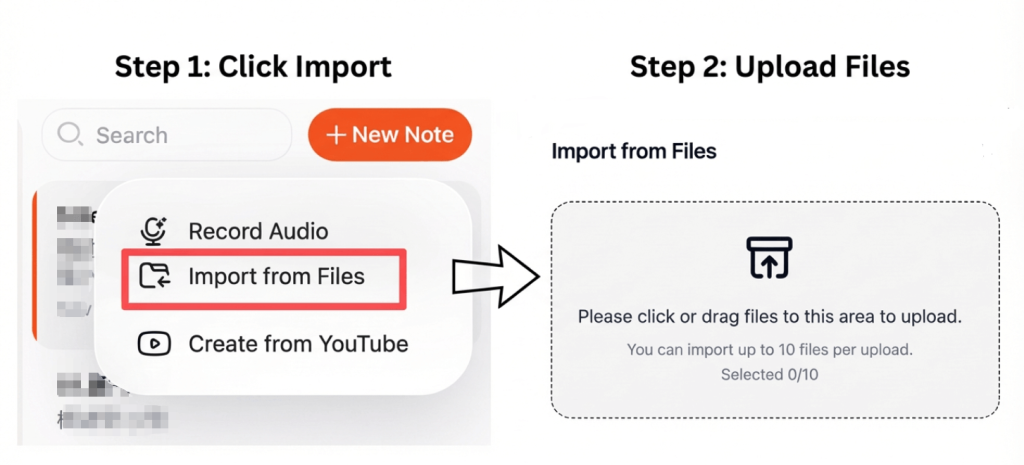
Start by choosing a transcription tool that supports common audio formats such as WAV, MP3, or M4A. Most platforms allow you to upload files directly from your computer or cloud storage.
For best results:
- Käytä selkeää ääntä, jossa on mahdollisimman vähän taustamelua
- Ensure speakers talk at a steady pace
- Choose the correct language setting
High-quality input leads to more accurate transcription output.
Step 2: Convert Audio to Text Automatically
Once uploaded, the system processes the file and converts speech into text using AI-based recognition. Advanced tools can detect punctuation, separate speakers, and format content into readable paragraphs.
Many platforms also support video tekstiksi, allowing you to extract dialogue from videos and convert it into written form using the same workflow.
This step usually takes only a few minutes, even for long recordings.
Step 3: Export the Transcript as a Word Document
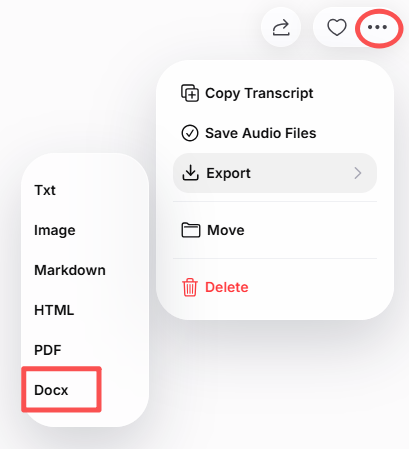
After reviewing the transcript, you can export it as a Word (.docx) file. Most tools allow you to:
- Edit text before downloading
- Add headings or timestamps
- Adjust paragraph spacing
- Include speaker labels
Once exported, the document is fully editable in Microsoft Word, Google Docs, or similar editors.
Best Tools to Turn Audio into Word Documents
Here are some reliable options you can use:
- VOMO – Fast, accurate transcription with clean Word export
- Saukko AI – Popular for meetings and lectures
- Notta – Supports multiple languages
- Kuvaus – Good for content creators
- Open-source transcription tools – Ideal for technical users
Each tool offers different features, but all allow you to convert audio into editable text efficiently.
Tips for Getting the Best Transcription Results
To ensure high accuracy in your Word document:
- Äänitä rauhallisessa ympäristössä
- Use a good microphone
- Speak clearly and naturally
- Choose the correct language and accent
- Review the transcript before exporting
These small steps can significantly improve the final document quality.
Päätelmä
Turning audio into an editable Word document is a fast and practical way to convert spoken content into usable text. By uploading your audio file, letting AI handle the transcription, and exporting the result as a Word document, you can save time and improve productivity.
Whether you’re working with interviews, meetings, lectures, or recordings, this process makes your content searchable, editable, and easy to share—all in just a few clicks.




