

To get notes de réunion from Zoom, you can enable the Compagnon IA to generate automatic summaries, access the Notes tab in your desktop client, or download transcripts from Cloud Recordings in the Zoom web portal. Managing follow-ups manually is exhausting, especially when standard summaries lack the depth needed for complex projects. Missing a single key decision can derail an entire week of work. Fortunately, modern AI tools now bridge the gap between raw audio and truly actionable intelligence.
VOMO captures every detail with 99% précision, ensuring your Zoom meeting notes are professional and error-free from the start. Unlike basic native tools, VOMO automatically transforms your recordings into structured insights with speaker identification and custom templates that adapt to your specific meeting context.

Quick Ways to Get Zoom Meeting Notes (For Hosts)
If you are the meeting host, Zoom provides several built-in methods to capture and retrieve your discussion points. As of 2026, the primary method is via the AI Companion, which must be enabled in your settings prior to the meeting. Understanding what are meeting notes in this digital-first era is key to utilizing these tools effectively.
- Zoom AI Companion: Click “Start Summary” in the meeting toolbar; after the session, a summary is emailed to the host and stored in the “Summaries” section of the web portal.
- In-Meeting Notes: Use the “Notes” button on the bottom toolbar to create or share collaborative notes in real-time.
- Cloud Transcripts: For meetings recorded to the cloud, Zoom generates a VTT transcript file accessible via the “Recordings” tab in your web portal.
How to Get Meeting Notes if You Are Not the Host
Participants often find themselves at a disadvantage if the host forgets to record. However, there are official and unofficial ways to ensure you don’t leave empty-handed, much like how to save meeting notes in Teams for later reference.
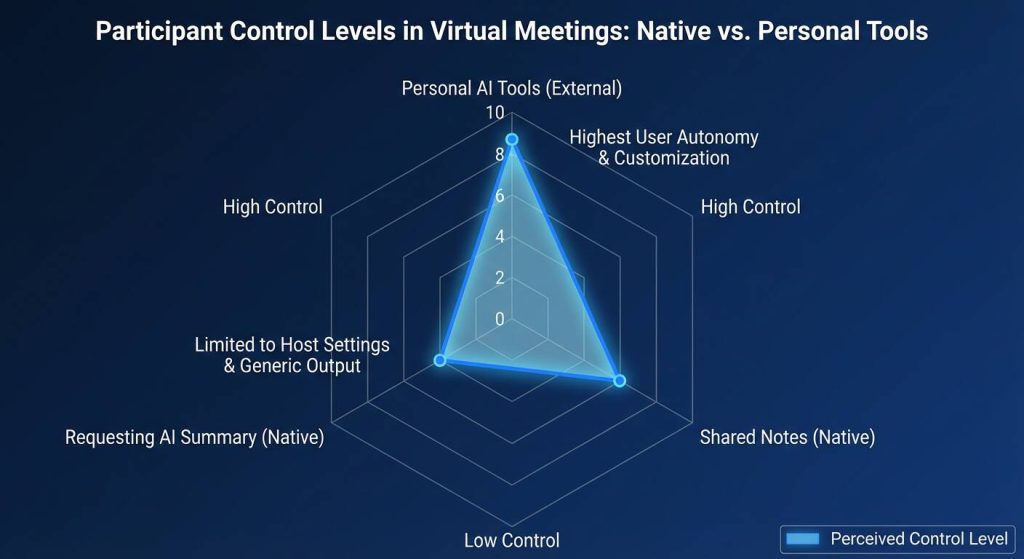
- Requesting Permission: Participants can click the “Summary” button in the meeting controls to prompt the host to activate the AI summary feature.
- Accessing Shared Notes: If the host used the “Notes” feature and shared it with “All Participants,” you can find these under the “Notes” tab in your Zoom desktop client.
- The VOMO Advantage: For those who need 99% accuracy without relying on the host’s settings, VOMO allows you to record or upload the audio directly to get a private, high-fidelity transcript.
Zoom AI Companion vs. VOMO AI: Which One Wins?
While Zoom’s native tools are convenient, they often fall short for high-stakes business environments where every word matters. Learning how to take meeting notes for any type of meeting often requires a tool that adapts to different contexts.
| Fonctionnalité | Zoom AI Companion | VOMO AI |
| Précision de la transcription | Varies by audio quality | 99% Accurate |
| Note Customization | Standard templates | Smart Adaptive Templates |
| Interactive Querying | Basic summary | AI Q&A (Chat with Meeting) |
| Processing Speed | Post-meeting delay | Minutes for Long Audio |
Beyond simple summaries, VOMO automatically detects meeting context to apply the correct formatting, ensuring your action items are ready for distribution instantly.
Troubleshooting: Why Are My Zoom Notes Missing?
If you can’t find your notes, check these common points of failure:
- Host Settings: If the host didn’t click “Start Summary,” no AI notes will be generated.
- Portal Sync: Sometimes summaries take a few minutes to appear in the “Summaries” section of the web portal.
- Local vs. Cloud: Notes created during local recordings may not sync to the cloud automatically.
For a fail-safe workflow, VOMO provides a centralized dashboard for all your recordings, regardless of which platform the meeting was held on, which is why many users follow a how to use AI to take meeting notes step-by-step guide to bridge these gaps.
From Raw Audio to Actionable Insights: The 2026 Workflow
In 2026, simply having a transcript is no longer enough; professional workflows now demand immediate, structured intelligence from every conversation.
Why Traditional Summaries Fail in 2026
Standard meeting summaries often provide a generic overview that misses the “why” behind key decisions. Many built-in tools struggle with technical jargon or fail to distinguish between a brainstorming suggestion and a final executive decision. This gap leads to “meeting amnesia,” where teams spend more time clarifying past notes than executing new tasks.
Using AI Q&A to Query Your Meeting Content
The most significant breakthrough in 2026 is the ability to “chat” with your meeting. Instead of scrolling through pages of text, you can use AI Q&A to ask specific questions like, “What was the budget approved for Phase 2?” or “List the specific objections raised by the legal team”. VOMO integrates this directly into your workflow, allowing AI-generated answers to be inserted into your final notes to deepen team understanding and speed up collaboration.
Final Verdict: Which Method Should You Choose?
Selecting the right method depends on your role and the stakes of the meeting:
- For Casual Internal Syncs: Le Zoom AI Companion is often sufficient for capturing high-level summaries if the host has the correct subscription.
- For High-Stakes Client Meetings: Relying on built-in tools can be risky due to inconsistent accuracy. VOMO is the superior choice here, offering 99% accurate transcription and speaker ID that ensures every stakeholder’s input is correctly attributed.
- For Non-Hosts and Researchers: If you aren’t the host, you may not have access to Zoom’s native summaries. VOMO empowers you to process audio or video recordings independently, turning them into structured notes in minutes without needing host permissions.




