
How to Download Videos from YouTube Safely: What Works and What to Use Instead
To download YouTube videos on an iPhone , the official and most stable method is using YouTube Premium, which allows for native offline viewing within the app at resolutions up to 1080p or 4K. For users who need to save videos directly to the iOS Camera Roll for editing or sharing, the most reliable
The safest way to download YouTube videos on iPhone is to use YouTube's official offline download feature inside the YouTube app. In most cases, that means YouTube Premium or another eligible offline feature available in your region.
But official YouTube downloads usually stay inside the YouTube app. They are for offline viewing, not for saving an MP4 to Photos, editing it, or sharing it outside YouTube.
If you only need the information inside the video, do not download the video at all. Use VOMO's YouTube Transcript toolwhen captions or transcript data are available. If you have a video file you are allowed to process, use Video to Text or MP4 to Text.
Important: only download, record, or process videos you own, have permission to use, or are allowed to use under YouTube's terms and applicable law.
Quick Answer
Open the YouTube app, sign in, open the video, tap Download if available, and watch it later inside the YouTube app's Downloads area.
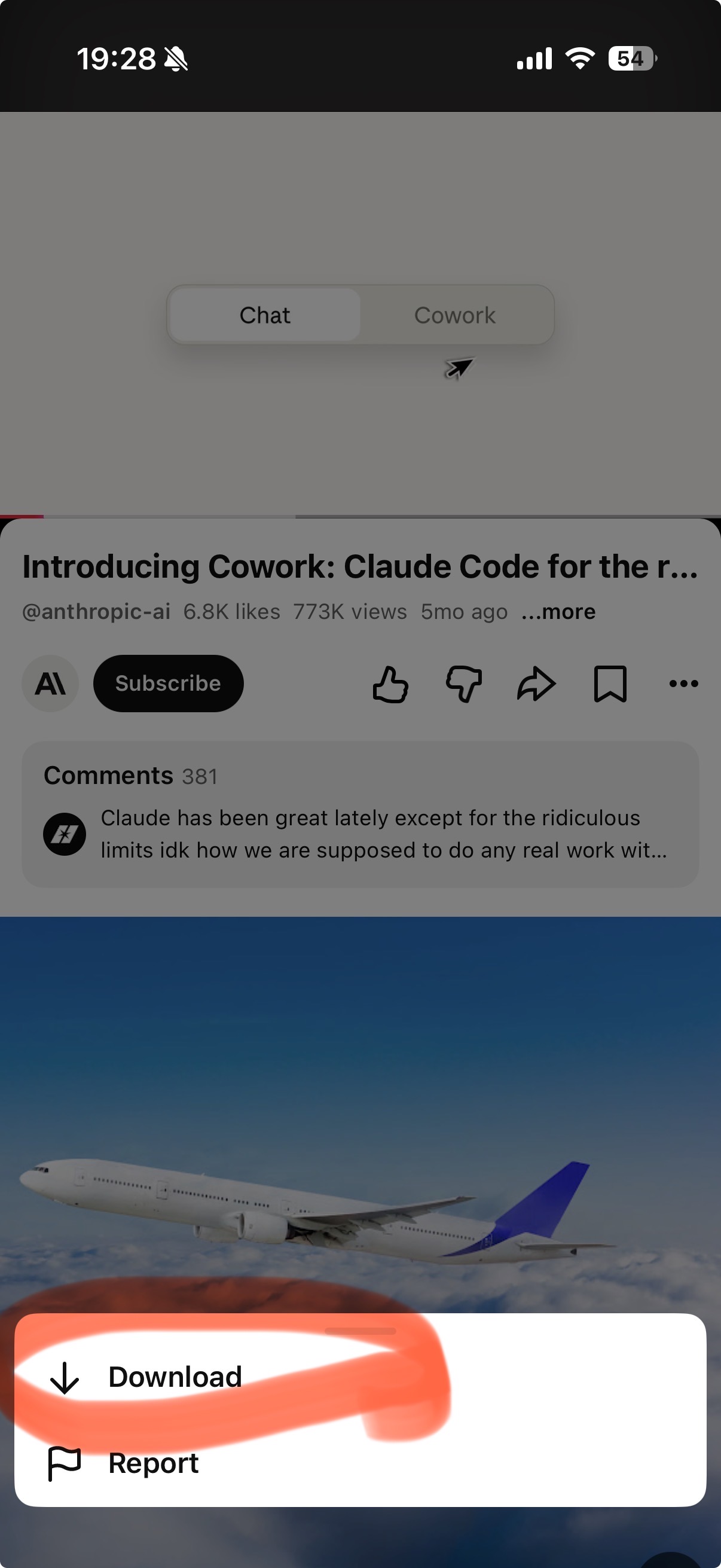
If you want an exportable MP4 file in Photos or Files, YouTube's official offline download feature usually will not do that. Third-party downloader sites and shortcuts can be unreliable, risky, and may violate platform rules or copyright restrictions.
Goal | Best workflow |
|---|---|
Watch offline on iPhone | Use YouTube's official Download button if available |
Save a creator-provided file | Download from the official file link, then find it in Files |
Summarize a YouTube video | |
Work with your own video file | Use the original file or an official creator workflow |
Transcribe an MP4 | Use MP4 to Text |
Save iPhone storage | Use a transcript instead of downloading the video |
Method 1: Use YouTube's Official Offline Download Feature
This is the best option for offline watching.
- Open the YouTube app on your iPhone.
- Sign in.
- Open the video.
- Tap Download if the option is available.
- Choose the available quality.
- Watch later from the YouTube app's Downloads area.
Feature | YouTube official offline download |
|---|---|
Watch offline | Yes, inside the YouTube app |
Save to Photos / Camera Roll | Usually no |
Export as MP4 | No |
Edit in iMovie or CapCut | No, unless you have a separate allowed file |
Share outside YouTube | No |
The key point: YouTube's official download feature is for offline viewing, not file ownership.
Method 2: If You Own the Video, Use the Original File
If the video is yours, the cleanest option is usually not to download it from YouTube. Use the original file from your phone, camera, cloud drive, or editing app.
If you no longer have the original, check whether your creator account offers an official way to download your own uploaded video. Availability can vary by device, app, and account.
If your goal is to turn your own video into text, upload the file to [VOMO Video to Text](/tools/video-to-text). For MP4 files, use [MP4 to Text](/tools/mp4-to-text).
Method 3: Find Files Downloaded from Safari
If you download a video file from a source you are allowed to use, it usually goes to the Files app, not Photos.
- Open the Files app.
- Tap Browse.
- Check Downloads, iCloud Drive, or On My iPhone.
- Open, move, rename, or share the file.
This applies to legitimate downloads from cloud storage, a course portal, your own website, a client file, or a creator-provided download link.
Should You Use Free YouTube Downloader Sites on iPhone?
Be careful. Many free downloader sites come with fake buttons, redirects, unstable results, privacy risks, and copyright or platform-rule issues.
For many users, the better question is: Do you need the video file, or do you need the content inside the video?
If you need the content, use a transcript workflow.
Better Alternative: Get the Transcript Instead
A video download can be slow and storage-heavy. A transcript is lighter, searchable, and easier to use.
With VOMO:
- Paste a YouTube link into VOMO YouTube Transcriptwhen captions or transcript data are available.
- Review the transcript with timestamps.
- Use the editable summary, key takeaways, and action items.
- Ask questions with Ask AI.
- Copy, export, or share the result.
If the YouTube transcript is not available and you have permission to process the video file, use [Video to Text](/tools/video-to-text).
YouTube Download vs VOMO Transcript Workflow
Feature | YouTube download on iPhone | VOMO transcript workflow |
|---|---|---|
Best for | Offline watching | Understanding and using the content |
Storage use | Can be high | Low |
Searchable text | No | Yes |
Timestamps | No | Yes |
Summary | No | Yes |
Key takeaways | No | Yes |
Action items | No | Yes |
Ask AI | No | Yes, with transcript context |
Export/share notes | No | Yes |
Best Workflow by Use Case
Use case | Recommended workflow |
|---|---|
Watch during a flight | YouTube app download if available |
Save a creator-provided file | Download from the official file link, then find it in Files |
Summarize a lecture | YouTube Transcript+ summary + Ask AI |
Pull quotes from an interview | Timestamped transcript, then verify quotes |
Turn a video into notes | VOMO summary, key takeaways, and action items |
Work with your own MP4 | MP4 to Text |
Save storage on iPhone | Use transcript instead of video download |
Prompt Ideas After You Have a Transcript
Summarize this YouTube video. Include:
1. Main topic
2. Key takeaways
3. Action items
4. Important quotes5. Questions I should follow up on
Turn this transcript into study notes. Include:
1. Definitions
2. Main arguments
3. Examples
4. A quiz with answers5. Sections I should review again
FAQ
Can I download YouTube videos on iPhone for free?
Sometimes YouTube may offer offline download options depending on account, region, video, and product availability. Outside official YouTube features, free downloader sites can be risky and may violate rules or rights.
Where do YouTube downloads go on iPhone?
Official YouTube offline downloads stay inside the YouTube app. They do not usually appear as MP4 files in Photos or Files.
How do I find files downloaded from Safari on iPhone?
Open the Files app, tap Browse, and look in Downloads, iCloud Drive, or On My iPhone.
Can I save YouTube videos to Camera Roll?
Not through YouTube's official offline download feature. If you need an editable file, use your original video, an official creator download option, or a creator-provided file link.
What if I only need the video's information?
Use a transcript instead of downloading the video. Start with VOMO YouTube Transcript, then use summary, key takeaways, action items, and Ask AI.
Does VOMO support every YouTube video?
No. YouTube transcript workflows depend on whether usable captions or transcript data are available. If a YouTube link is not supported and you have permission to use the file, upload the video to Video to Text.
Final Recommendation
Use YouTube's official iPhone download feature when you want offline viewing.
Use your original file or an official file source when you need an editable MP4.
Use VOMO when you want the content inside the video:
YouTube link -> VOMO YouTube Transcript-> timestamped transcript -> summary/key takeaways/action items -> Ask AI -> export/share.
VOMO FOR MEETINGS
Transform Your Meetings with VOMO
Experience seamless meeting recording, highly accurate transcription, and intelligent summarization. Let VOMO be your dedicated note-taker while you focus on what matters most.