


Generating an HTML document from an FLV video means extracting the spoken content from the video, converting it into text using AI transcription, and exporting the result as an editable HTML file. You upload the FLV video, the system automatically transcribes the speech, and outputs structured HTML that can be edited, styled, and published online in minutes.
VOMO makes this process straightforward even for older video formats like FLV. You can upload FLV files directly, generate accurate transcripts powered by AI, and export clean HTML that’s ready for websites, blogs, or documentation. It’s especially useful for archived videos, training materials, and recorded presentations.

What Does an HTML Document from an FLV Video Include?
An HTML document generated from an FLV video contains the written version of all spoken content, formatted with HTML elements such as headings, paragraphs, and lists. Unlike plain text files, HTML documents are designed for online publishing and easy editing.
Most transcription tools use audio to text technology to analyze the audio track within the FLV video, recognize speech, and organize it into readable, structured content suitable for both users and search engines.
Why Convert FLV Videos into HTML Documents?
Converting FLV videos into HTML documents provides several important benefits:
- Makes legacy video content searchable
- Improves accessibility for readers and learners
- Enables easy reuse of old video materials
- Allows flexible formatting and web styling
- Supports better SEO and content indexing
HTML documents help bring new value to FLV videos that are no longer widely supported by modern players.
Step 1: Upload Your FLV Video File to a Transcription Tool
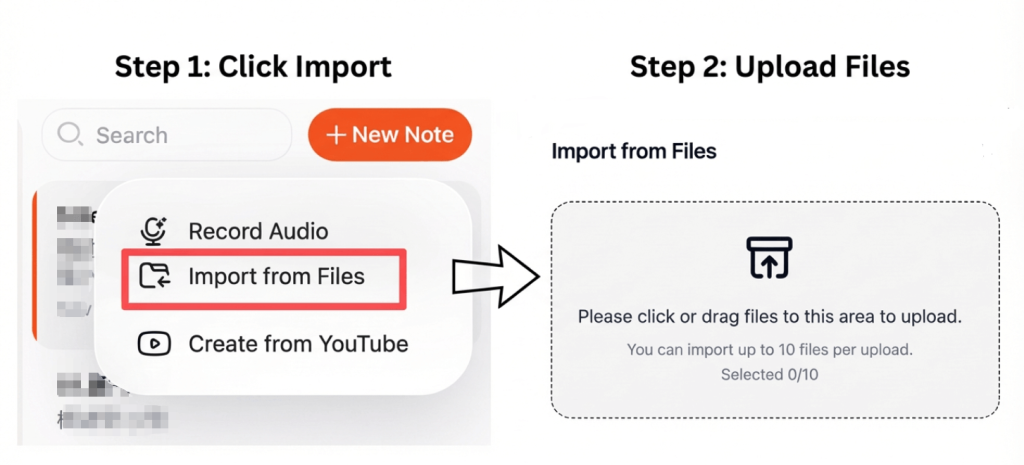
Start by choosing a transcription tool that supports FLV video uploads. Some modern AI tools can process FLV directly without requiring format conversion.
より良い結果を得るために:
- Ensure the audio is clear and consistent
- バックグラウンドノイズを減らす
- Select the correct language settings
- 話者の重複を避ける
Clear audio leads to more accurate transcription output.
Step 2: Convert FLV Video Speech into Text Automatically
Once uploaded, the transcription tool extracts the audio track and converts spoken language into text using AI speech recognition. Advanced tools automatically add punctuation, organize paragraphs, and detect different speakers.
This process is commonly referred to as video to text conversion and usually takes only a few minutes, even for longer FLV videos.
Step 3: Export the FLV Transcript as an HTML Document
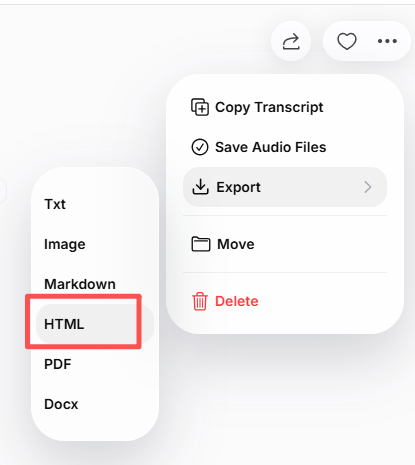
After reviewing the transcript, you can export it as an HTML document. Most tools allow you to:
- Edit the text before export
- Add headings and structured sections
- Include timestamps or speaker labels
- Maintain clean and readable HTML output
The exported HTML document can be edited in any CMS, website builder, or code editor.
Common Use Cases for FLV to HTML Conversion
FLV to HTML conversion is commonly used for:
- Updating archived video libraries
- Publishing transcripts of legacy training videos
- Turning old interviews into blog posts
- Improving accessibility for outdated video formats
- Building searchable content archives
HTML documents help extend the lifespan of FLV video content.
Tips to Improve FLV Transcription Accuracy
To get the best results when transcribing FLV videos:
- Use recordings with clear speech
- バックグラウンドノイズの最小化
- Review and proofread the transcript
- Organize content with clear headings
- Clean up formatting before publishing
These steps help ensure high-quality HTML output.
結論
Generating an HTML document from an FLV video is an effective way to transform legacy video content into editable, web-ready text. By uploading an FLV file, letting AI handle transcription, and exporting the result as HTML, you can improve accessibility, boost SEO, and reuse older video materials more efficiently.
This approach saves time and helps modernize FLV content for today’s web platforms.




