


Transcribing video to PDF means converting spoken dialogue from a video file into written text and exporting it as a structured, shareable PDF document. With modern AIトランスクリプション tools, you simply upload a video, let the system automatically extract and transcribe the speech, then download the finished transcript as a professional PDF — all in just a few minutes.
Among many available options, VOMO stands out for its reliable transcription quality and ease of use. Even long videos or multi-speaker recordings can be converted into clean, well-organized text effortlessly, making PDF export simple and efficient.

What Does Video-to-PDF Transcription Mean?
Video files combine visuals and audio, but the spoken content inside them isn’t searchable or easy to reuse. Transcribing video to PDF involves extracting speech from the video, converting it into text, and formatting that text into a fixed document layout.
AI transcription tools rely on advanced speech recognition models similar to those used in 音声からテキストへ processing. These systems analyze speech patterns, apply punctuation, and organize dialogue into readable paragraphs that can be saved as a PDF for documentation or publishing.
Why Convert Video Files into PDF Documents?
Turning video recordings into PDFs provides practical advantages for many scenarios:
- Creates searchable records of meetings, lectures, and interviews
- Improves accessibility for users who prefer or require text
- Makes it easier to archive, share, or print content
- Supports compliance, training, and academic documentation
- Saves time compared to manual transcription
PDF format is especially useful when content needs to remain consistent across devices and platforms.
Step 1: Upload Your Video File to an AI Transcription Tool

Start by choosing a transcription platform that supports common video formats such as MP4, MOV, AVI, or MKV. Upload your video from your device or import it from cloud storage like Google Drive or Dropbox.
For best accuracy, ensure the video has clear audio with minimal background noise. Good sound quality plays a major role in transcription precision.
Step 2: Automatically Transcribe Video Speech into Text
Once the upload is complete, the AI system begins analyzing the video’s audio track. It detects spoken words, identifies speakers when possible, and converts speech into structured text automatically.
The same technology behind ビデオからテキストへ conversion ensures fast processing and high accuracy, even for long recordings or complex conversations. Many tools also add timestamps and paragraph breaks automatically.
Step 3: Export the Transcript as a PDF File
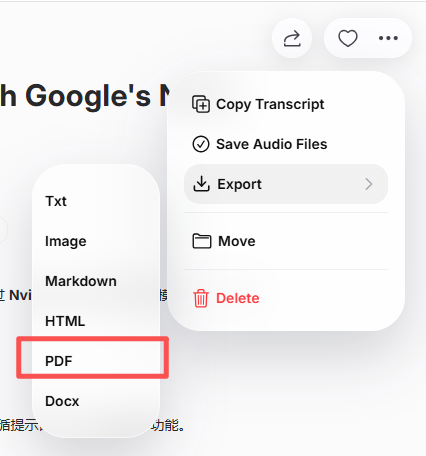
After reviewing and editing the transcript, export it as a PDF. Most platforms allow you to customize formatting, including headings, spacing, timestamps, and speaker labels before downloading.
The final PDF transforms video content into a professional, searchable document suitable for sharing, archiving, or publication.
Best Tools to Transcribe Video to PDF
Several AI tools offer reliable video transcription with PDF export options:
- VOMO – Accurate transcription with clean PDF formatting
- オッターAI – Ideal for meetings, lectures, and collaboration
- 説明 – Combines video editing with transcript generation
- ノッタAI – Fast transcription with multilingual support
- Open-source 海難救助 用具 – Flexible solutions for developers
Each tool varies in features and pricing, but all simplify the video-to-PDF workflow.
Tips for Accurate Video-to-PDF Transcription
To achieve the best transcription results:
- Use videos with clear, well-balanced audio
- 可能な限り、発言が重ならないようにする
- Select the correct language and accent settings
- Review names, technical terms, and formatting
- Adjust layout before exporting the final PDF
Following these tips helps ensure your PDF transcript looks professional and accurate.
結論
Transcribing video to PDF is now fast and effortless thanks to AI-powered transcription technology. By uploading your video, letting the system convert speech into text, and exporting the result as a PDF, you can turn video content into accessible, reusable documents in minutes.
Whether for business, education, research, or content creation, video-to-PDF transcription makes information easier to manage, share, and repurpose across platforms.




