

WAV를 이미지로 변환하는 방법: 최고의 무료 방법 설명
WAV 오디오 파일을 이미지로 변환하려면 음성 콘텐츠를 텍스트로 변환하고 해당 텍스트를 PNG 또는 JPG와 같은 시각적 이미지 형식으로 내보내야 합니다. 다음과 같은 무료 AI 기반 도구 VOMO 는 이 과정을 빠르고 정확하며 초보자 친화적으로 만들어줍니다. 수동으로 메모를 입력하거나 스크린샷을 찍는 대신, WAV 오디오 파일에서 바로 전문적이고 공유 가능한 시각적 트랜스크립트를 생성할 수 있습니다.

WAV를 이미지로 변환한다는 것의 의미
WAV를 이미지로 변환하는 작업은 파형이나 오디오의 정적 시각적 표현을 만드는 것 이상의 의미를 갖습니다. 여기에는 다음이 포함됩니다:
- WAV 파일에서 음성 단어 추출하기
- 오디오를 텍스트로 변환하기(오디오를 텍스트로 변환)
- 형식이 지정된 성적증명서를 이미지로 내보내기
이 방식은 강의 노트, 팟캐스트 하이라이트, 회의 요약 또는 소셜 미디어 인용문에 이상적입니다. AI는 수동 방식에 비해 가독성, 정확성 및 전문적인 프레젠테이션을 보장합니다.
WAV-이미지 변환에 AI 툴이 필수적인 이유
WAV 파일을 이미지로 수동 변환하려면 전사, 서식 지정, 이미지 생성 등 여러 단계를 거쳐야 합니다. AI 도구는 이 과정을 간소화합니다:
- 음성 콘텐츠 자동 전사
- 쉽게 읽을 수 있도록 핵심 사항 요약
- 성적증명서를 시각적으로 매력적인 이미지로 서식 지정하기
- 결과를 PNG 또는 JPG와 같은 이미지 형식으로 내보내기
VOMO 는 가장 효과적인 무료 도구 중 하나로, 온라인 및 오프라인 WAV-이미지 변환 워크플로우를 위한 올인원 솔루션을 제공합니다.
1단계: WAV 파일 업로드
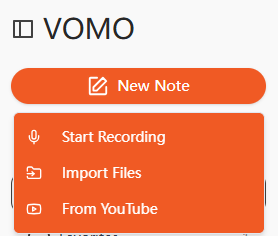
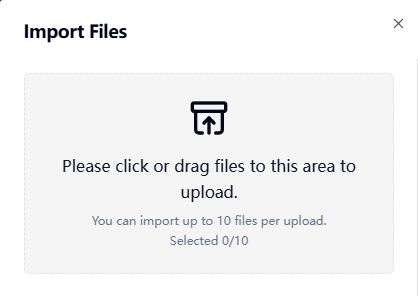
먼저 WAV 오디오를 AI 트랜스크립션 플랫폼에 업로드하세요. 대부분의 도구는 드래그 앤 드롭 업로드, 파일 선택 또는 URL 가져오기를 지원합니다. 지우기 오디오 품질 정확한 필사본을 보장합니다.
2단계: 오디오를 텍스트로 변환
AI가 WAV 파일을 처리하고 음성 단어를 읽을 수 있는 텍스트로 변환합니다. 이는 기본적으로 다음과 같은 작업을 수행합니다. 비디오를 텍스트로 변환 를 시청각 녹화물에 적용하면 구조화되고 편집 가능한 트랜스크립트를 생성할 수 있습니다. 일부 AI 플랫폼은 자동으로 요점을 요약하여 수동 편집 시간을 절약할 수도 있습니다.
3단계: 트랜스크립트를 이미지로 내보내기
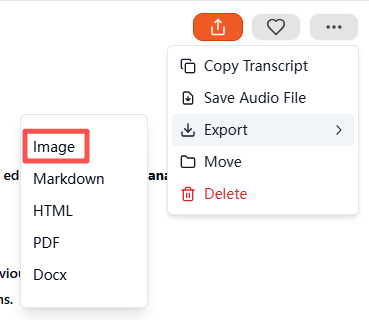
트랜스 크립 션이 완료되면 이미지 을 내보내기 형식으로 지정합니다. 이 도구는 시각적 트랜스크립트가 포함된 압축 ZIP 파일을 생성합니다. 각 이미지에는 깔끔하게 서식이 지정된 텍스트 부분이 포함되어 있어 저장, 공유 또는 보관할 수 있습니다. 따라서 최소한의 노력으로 전문적이고 시각적으로 매력적인 결과를 얻을 수 있습니다.
지원되는 오디오 및 비디오 형식
무료 AI 전사 도구는 일반적으로 여러 형식을 지원합니다:
| 미디어 유형 | 지원되는 형식 |
|---|---|
| 오디오 | WAV, MP3, M4A, AAC |
| 비디오 | MP4, MOV, MKV, AVI, FLV |
오디오 파일과 비디오 파일 모두 동일한 워크플로우를 사용하여 시각적 텍스트 이미지로 변환할 수 있습니다.
WAV-이미지 변환을 위한 최고의 무료 AI 도구
권장 무료 도구는 다음과 같습니다:
- VOMO - 완벽한 전사 및 이미지 내보내기 솔루션
- 설명 - 오디오 녹음 및 편집 기능이 포함된 무료 티어
- Otter AI - 무료 플랜을 통한 협업 트랜스크립션
- Notta AI - 다국어 지원 및 시각적 내보내기
- Veed.io - 무료 버전은 간단한 서식 지정 및 이미지 출력을 지원합니다.
이 중 VOMO 는 자동 요약, ZIP 이미지 내보내기, 초보자 친화적인 인터페이스가 돋보입니다.
WAV에서 이미지로 변환하는 실제 사용 사례
WAV 오디오를 시각적 텍스트 이미지로 변환하는 것은 다음과 같은 경우에 유용합니다:
| 사용 사례 | 예 |
|---|---|
| 교육 | 강의 녹음, 스터디 노트 |
| 비즈니스 | 회의 오디오 요약, 인터뷰 |
| 콘텐츠 제작 | 팟캐스트 하이라이트, 소셜 미디어 비주얼 |
| 접근성 | 청각 장애 사용자를 위한 시각적 대본 |
| 연구 | 오디오 소스의 타임스탬프 메모 |
시각적 대본은 원시 오디오나 일반 텍스트 파일보다 공유, 저장, 소비하기가 더 쉽습니다.
고품질 WAV-이미지 변환을 위한 팁
최상의 결과를 얻으려면:
- 배경 소음을 최소화하여 조용한 환경에서 오디오 녹음하기
- 명확하게 말하고 일관된 속도 유지
- 녹음을 위한 고품질 마이크 사용
- AI가 생성한 요약을 검토하여 정확성 확인
- 내보내기 전에 주요 포인트 또는 타임스탬프 강조 표시하기
이 단계를 따르면 전문적이고 가독성이 뛰어나며 시각적으로 매력적인 이미지 트랜스크립트를 만들 수 있습니다.
결론
무료 AI 트랜스크립션 도구를 사용하면 WAV를 이미지로 변환하는 것이 간단합니다. 오디오 파일을 업로드하고, 트랜스크립트를 생성하고, 이미지로 내보내면 다음과 같은 플랫폼에서 사용할 수 있습니다. VOMO 시간을 절약하고 전문적이고 공유 가능한 콘텐츠를 제작하세요. 교육, 비즈니스, 콘텐츠 제작 등 어떤 분야에서든 AI 기반의 WAV-이미지 변환은 빠르고 효율적이며 시각적으로 매력적인 방식으로 오디오 콘텐츠를 세련된 시각적 문서로 재가공할 수 있는 방법을 제공합니다.




