


Yes, Gemini can help take meeting notes, but not in the same way a dedicated Nota da reunião da AI tool does. Gemini is strong at understanding, summarizing, and restructuring text once meeting content is provided. It can turn raw notes or transcripts into clear summaries, highlight decisions, and organize action items. However, it does not independently record meetings or capture conversations in real time without external inputs.
For teams that want to go beyond text processing, VOMO works as a dedicated AI meeting noter by recording meetings, transcribing conversations, and turning them into structured notes with decisions and action items automatically.

How Gemini Helps With Meeting Notes
Gemini is designed to process and understand text at a high level. When you provide meeting content, it can summarize discussions, extract key takeaways, rewrite notes into a professional format, and organize information by topic or priority. This makes Gemini useful for cleaning up messy notes and creating structured documentation after a meeting.
For teams that already have written notes or transcripts, Gemini can significantly reduce the time spent turning those materials into shareable meeting summaries.
What Gemini Cannot Do on Its Own
Gemini does not natively join meetings, record audio, or listen to conversations as they happen. It also cannot automatically identify speakers or detect decisions in real time. To work with meetings, Gemini needs text input, whether that comes from manual note-taking or tools that convert speech into written form through áudio para texto processamento.
Without this input, Gemini has no access to what was said during the meeting.
Using Gemini With Meeting Transcripts
Gemini becomes much more powerful when paired with transcrições de reuniões. Once you paste a transcript into Gemini, you can ask it to generate summaries, action lists, actas das reuniões, or follow-up emails. It can scan long discussions quickly, identify recurring themes, and surface decisions that might otherwise be overlooked.
This approach works especially well for long meetings, workshops, or multi-team discussions where manual review would take significant time.
Can Gemini Work With Video Meetings?
Gemini cannot directly analyze video files. For video meetings, the spoken content must first be converted into written text. After vídeo para texto conversion generates a transcript, Gemini can process that text like any other document and produce structured meeting notes, summaries, or highlights.
In this setup, Gemini acts as the analysis layer rather than the recording or transcription tool.
Best Use Cases for Gemini Meeting Notes
Gemini works best for internal meetings where speed and clarity matter more than strict formality. Common use cases include team syncs, project updates, planning sessions, and brainstorming meetings. In these scenarios, Gemini helps teams reduce follow-up questions, improve alignment, and ensure key points are documented clearly.
It is especially useful when teams already rely on written documentation and want consistent, well-organized notes.
Limitations for Formal or Board Meetings
Para formal settings such as board meetings, legal sessions, or regulated environments, Gemini should be used with caution. Official meeting minutes often require strict formatting, approval workflows, and compliance standards. While Gemini can assist with drafting or summarizing, human review is essential before notes are finalized or shared externally.
In these cases, Gemini works best as a support tool rather than a final source of record.
Gemini vs Dedicated AI Meeting Note Tools
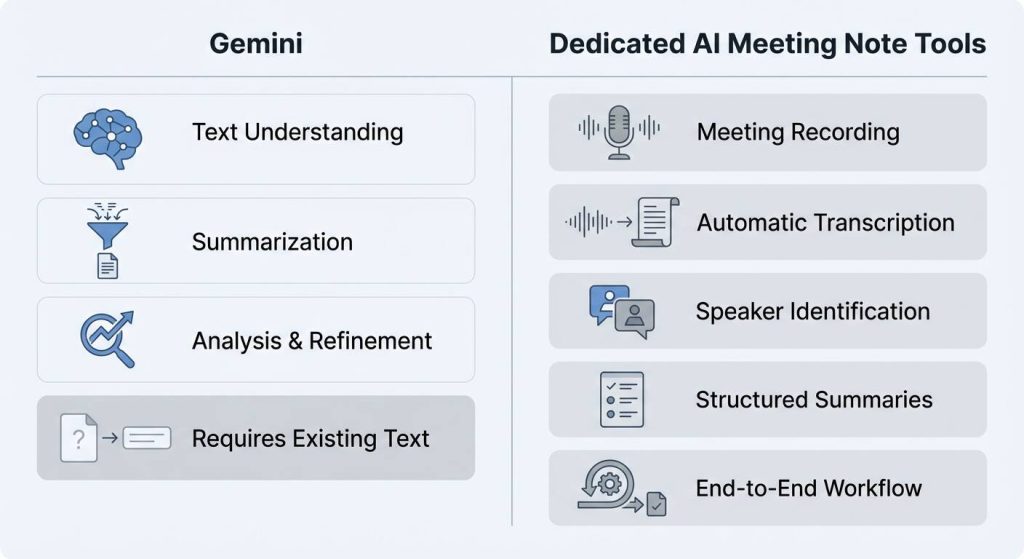
Gemini is a general-purpose AI model, while dedicated AI meeting note tools are built specifically for meetings. Specialized tools typically handle recording, transcription, speaker identification, and structured summaries automatically in a single workflow. Gemini focuses on understanding and transforming text once it exists, rather than capturing meetings end to end.
Teams often combine the two, using meeting tools for capture and Gemini for refinement and analysis.
How to Get the Best Results With Gemini
To get the most value from Gemini for notas de reunião, provide clear input and specific instructions. Supplying full transcripts or well-organized raw notes improves output quality. Asking Gemini to structure notes by agenda, decisions, and action items also leads to more useful results.
When used thoughtfully, Gemini can help teams create clearer, more consistent meeting documentation with far less manual effort.




