

Como converter WAV em imagem: Melhores métodos gratuitos explicados
A conversão de um ficheiro de áudio WAV numa imagem envolve a transcrição do conteúdo falado para texto e a exportação desse texto para um formato de imagem visual como PNG ou JPG. Ferramentas gratuitas alimentadas por IA, como VOMO tornam este processo rápido, preciso e fácil para os principiantes. Em vez de escrever notas manualmente ou tirar screenshots, pode gerar transcrições visuais profissionais e partilháveis diretamente a partir dos seus ficheiros de áudio WAV.

O que significa converter WAV em imagem
A conversão de WAV para imagem vai para além da criação de uma forma de onda ou de uma representação visual estática do áudio. Ela envolve:
- Extrair palavras faladas do ficheiro WAV
- Converter o áudio em texto (áudio para texto)
- Exportar a transcrição formatada como uma imagem
Esta abordagem é ideal para notas de aula, destaques de podcasts, resumos de reuniões ou citações de redes sociais. A IA garante legibilidade, exatidão e apresentação profissional em comparação com os métodos manuais.
Porque é que as ferramentas de IA são essenciais para a conversão de WAV em imagem
A conversão manual de ficheiros WAV em imagens requer várias etapas: transcrição, formatação e criação de imagens. As ferramentas de IA simplificam este processo ao:
- Transcrição automática de conteúdo falado
- Resumir pontos-chave para facilitar a leitura
- Formatação da transcrição em imagens visualmente apelativas
- Exportar o resultado em formatos de imagem como PNG ou JPG
VOMO é uma das ferramentas gratuitas mais eficazes, fornecendo uma solução tudo-em-um para fluxos de trabalho WAV-para-imagem online e offline.
Passo 1: Carregue o seu ficheiro WAV
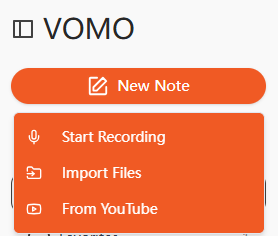
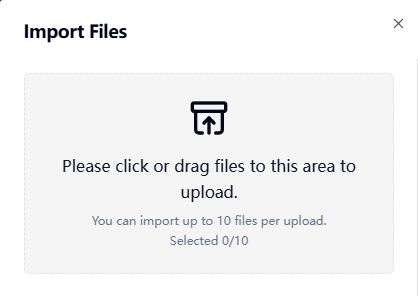
Comece por carregar o seu áudio WAV para uma plataforma de transcrição de IA. A maioria das ferramentas suporta uploads de arrastar e soltar, seleção de ficheiros ou importações de URL. Limpar qualidade áudio garante uma transcrição exacta.
Passo 2: Transcrever o áudio para texto
A IA processa o ficheiro WAV e converte as palavras faladas em texto legível. Isto é essencialmente efetuar vídeo para texto quando aplicada a registos audiovisuais, produzindo transcrições estruturadas e editáveis. Algumas plataformas de IA também resumem automaticamente os pontos-chave, poupando tempo na edição manual.
Passo 3: Exportar a transcrição como uma imagem
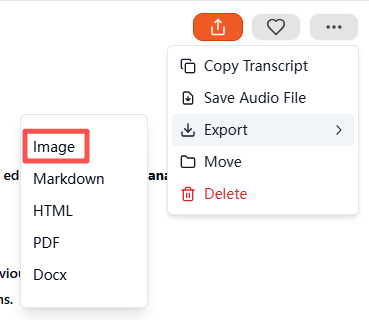
Quando a transcrição estiver concluída, selecione Imagem como formato de exportação. A ferramenta gera um ficheiro ZIP comprimido que contém a transcrição visual. Cada imagem contém uma parte do texto perfeitamente formatada, pronta a ser guardada, partilhada ou arquivada. Isto garante resultados profissionais e visualmente apelativos com um esforço mínimo.
Formatos de áudio e vídeo suportados
Grátis Transcrição de IA suportam geralmente vários formatos:
| Tipo de suporte | Formatos suportados |
|---|---|
| Áudio | WAV, MP3, M4A, AAC |
| Vídeo | MP4, MOV, MKV, AVI, FLV |
Tanto os ficheiros de áudio como os de vídeo podem ser convertidos em imagens de texto visual utilizando o mesmo fluxo de trabalho.
As melhores ferramentas de IA gratuitas para conversão de WAV em imagem
As ferramentas gratuitas recomendadas incluem:
- VOMO - Solução completa de transcrição e exportação de imagens
- Descript - Nível gratuito com transcrição e edição de áudio
- Otter AI - Transcrição colaborativa com plano gratuito
- Notta AI - Suporte multilingue e exportação visual
- Veed.io - A versão gratuita suporta formatação simples e saída de imagem
Entre eles, VOMO destaca-se pela sumarização automática, exportação de imagens ZIP e interface de fácil utilização para principiantes.
Casos práticos de uso para conversão de WAV em imagem
A conversão de áudio WAV em imagens de texto visual é útil para:
| Caso de utilização | Exemplo |
|---|---|
| Educação | Gravações de palestras, notas de estudo |
| Negócios | Resumos áudio de reuniões, entrevistas |
| Criação de conteúdos | Destaques do podcast, imagens das redes sociais |
| Acessibilidade | Transcrições visuais para utilizadores com deficiência auditiva |
| Investigação | Notas com carimbo de data/hora de fontes de áudio |
As transcrições visuais são mais fáceis de partilhar, armazenar e consumir do que o áudio em bruto ou os ficheiros de texto simples.
Dicas para conversão de WAV em imagem de alta qualidade
Para obter os melhores resultados:
- Gravar áudio em ambientes silenciosos com o mínimo de ruído de fundo
- Falar claramente e manter um ritmo consistente
- Utilizar microfones de alta qualidade para as gravações
- Rever a exatidão dos resumos gerados pela IA
- Destacar pontos-chave ou marcas de tempo antes de exportar
Seguir estes passos garante transcrições de imagens profissionais, legíveis e visualmente apelativas.
Conclusão
Converter WAV em imagem é simples com ferramentas de transcrição de IA gratuitas. Ao carregar o seu ficheiro áudio, gerar uma transcrição e exportá-lo como imagem, plataformas como VOMO poupe tempo e produza conteúdos profissionais e partilháveis. Quer se trate de educação, negócios ou criação de conteúdos, a conversão de WAV para imagem baseada em IA proporciona uma forma rápida, eficiente e visualmente apelativa de redirecionar conteúdos de áudio para documentos visuais aperfeiçoados.




