

Generating a Word document from an FLV video is quick and straightforward with modern AI transcription tools. You simply upload the FLV file, let the system extract and transcribe the spoken content, and then export the result as an editable Word document. This approach saves time, eliminates manual typing, and works well for interviews, lectures, meetings, and archived video files.
Tools like VOMO simplify the process by automatically converting video speech into clean, editable Word documents in just a few clicks.

What Does It Mean to Generate a Word Document from an FLV Video?
Generating a Word document from an FLV video means converting the spoken audio inside the video into written text that can be edited in Microsoft Word. Since FLV is a common video format used in online streaming and older video platforms, transcription tools first extract the audio track before processing it.
This conversion relies on advanced áudio para texto technology to recognize speech, apply punctuation, and organize the content into readable paragraphs. The final output is a searchable and editable Word file.
Why Convert FLV Videos into Word Documents?
Converting FLV videos into Word documents offers several practical benefits:
- Makes video content searchable and editable
- Economiza tempo em comparação com a transcrição manual
- Improves accessibility for reading and sharing
- Allows easy reuse of content for reports or articles
- Helps archive spoken content in text form
Once converted, the content becomes easier to manage, review, and repurpose.
Step 1: Upload Your FLV Video to a Transcription Tool
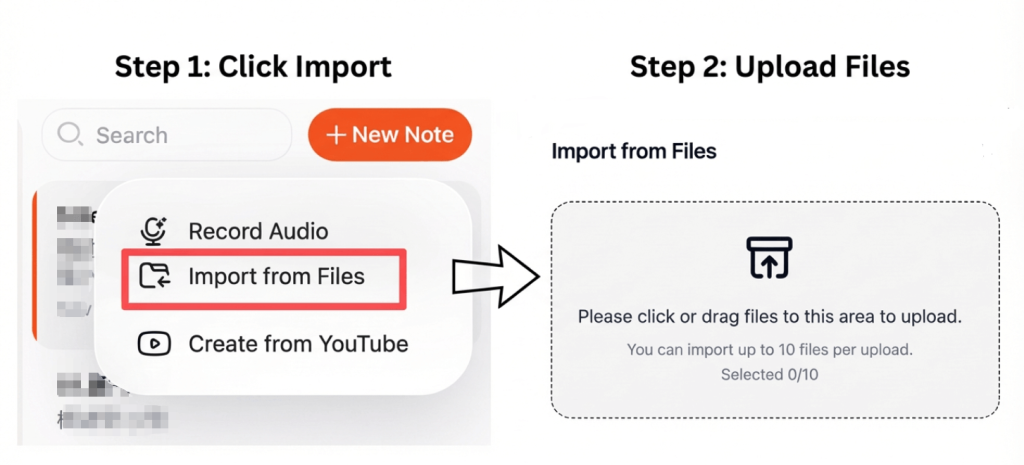
Start by choosing a transcription platform that supports FLV video uploads. Most modern tools allow you to upload files directly from your device or cloud storage.
For better results:
- Use videos with clear audio
- Avoid background noise
- Ensure speakers are easy to hear
Good audio quality directly impacts transcription accuracy.
Step 2: Convert the FLV Video into Text Automatically
After uploading the video, the system processes the audio track and converts spoken words into text using AI-powered vídeo para texto conversão.
Advanced transcription tools can:
- Recognize multiple speakers
- Adicionar pontuação automaticamente
- Structure content into readable sections
This process usually takes only a few minutes, even for long videos.
Step 3: Export the Transcript as a Word Document
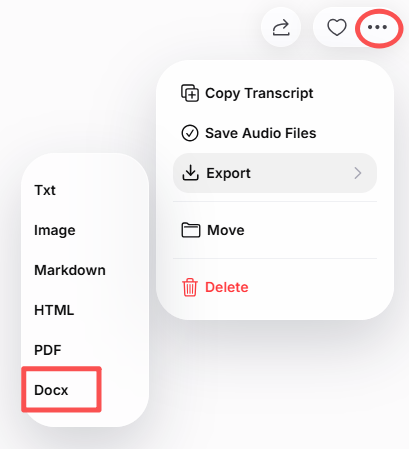
Once the transcription is complete, review the text and make any necessary edits. You can then export the final version as a Word (.docx) file.
With the Word document, you can:
- Edit and format the text
- Add headings or notes
- Share it with others
- Store it for future reference
Some tools also allow exporting to PDF or TXT formats if needed.
Best Tools to Convert FLV to Word
Here are some reliable tools for converting FLV videos into Word documents:
- VOMO – Fast transcription with clean Word export
- IA da lontra – Ideal para reuniões e palestras
- Notta – Supports multiple languages
- Descrição – Useful for creators and editors
- Ferramentas de código aberto – Suitable for advanced users
These tools are designed to deliver accurate transcription with minimal effort.
Tips for Better Transcription Accuracy
Para obter os melhores resultados de transcrição:
- Gravar num ambiente calmo
- Avoid overlapping speech
- Choose the correct language setting
- Review the transcript before exporting
- Use high-quality audio whenever possible
Even small improvements in audio clarity can greatly improve accuracy.
Conclusão
Generating a Word document from an FLV video is a fast and efficient way to turn spoken content into editable text. By uploading your video, letting AI handle the transcription, and exporting the result as a Word file, you can save time and make your content easier to edit, search, and share.
Whether you’re working with interviews, lectures, or archived videos, this method helps you get more value from your media content.




