


To use ChatGPT for notas de reunião,, follow a three-step workflow: registo, transcrevere analyze. Since the standard ChatGPT interface does not capture live audio for long durations, you must first record the session using a separate device or app. Next, convert the áudio para texto using a transcription tool (such as OpenAI’s Whisper). Finally, paste the transcript into ChatGPT and use specific prompts to extract summaries, action items, and key decisions, while being mindful of the model’s context window limits for longer discussions.
However, this manual workflow is fragmented and time-consuming. VOMO.ai streamlines this by integrating the AI analysis directly into the capture process. With 99% exatidão da transcrição and automated speaker identification, you can “chat” with your transcript instantly to generate pontos de ação and summaries without ever leaving the app.

Can ChatGPT Record Meetings? (The “Audio Gap” Explained)
The Reality: ChatGPT is a Text Engine, Not a Recorder
While ChatGPT is powerful at processing text, it cannot natively “listen” to a live meeting and transcribe it in real-time. To use it for notas de reunião, you first need a separate tool to capture the audio. This creates a disconnect: the intelligence is there, but the ears are missing.
The “Whisper” Limit: Why Uploading Huge Files Often Fails
OpenAI offers the “Whisper” model for transcription, but directly uploading large audio files to the standard ChatGPT interface often hits file size limits or token constraints. Long meetings (over 30 minutes) frequently get cut off or require technical API knowledge to process fully.
Privacy Warning: The Risk of Pasting Sensitive Data into Public Bots
A critical consideration is data privacy. Pasting confidential meeting transcripts into public Modelos de IA can expose sensitive business strategies to training data. Enterprise-grade solutions often require specific privacy toggles that standard free versions lack.
Method 1: The “Manual” Copy-Paste Workflow (Free but Flawed)
Step 1: Recording on a Separate Device
The first step is manual recording. You must use your phone’s memorando de voz app or a desktop recorder like QuickTime. This results in a raw audio file that is stuck on your device and not yet searchable.
Step 2: Transcribing Audio (The Hard Part)
Before ChatGPT can help, the audio must be text. You can use free online converters or install Whisper locally, but these often struggle with accents and background noise. The resulting text is frequently a solid block without paragraph breaks.
Step 3: Prompt Engineering for Summaries
Once you paste the text into ChatGPT, you need to prompt it effectively. Common prompts include: “Summarize the following meeting notes into bullet points” or “Extract all action items and assign owners.” The quality of the output depends entirely on the quality of your prompt and how you write effective meeting notes.
The Reddit Verdict: Why Users Abandon This Method
Discussions on productivity forums highlight a major flaw: Hallucinations. Without accurate source text, ChatGPT may invent details. Furthermore, the lack of Identificação do orador means the AI often attributes quotes to the wrong person, making the notes unreliable for professional accountability.
Method 2: The Integrated Solution – VOMO.ai (The “ChatGPT-Inside” App)
Bridging the Gap: 99% Accuracy Meets AI Intelligence
Instead of juggling three apps, VOMO integrates the entire workflow. It records and transcribes with Precisão 99% , ensuring the data fed into the AI is precise. You get the intelligence of ChatGPT without the manual copy-pasting.
Automated Speaker Identification: Solving the “Who Said What?” Problem
Unlike raw text dumps, VOMO automatically identifies and separates speakers . This context is crucial for meeting notes—knowing who promised a deliverable is just as important as o que was promised.
Scenario Templates: Auto-Generating Notes for Project Planning vs. Brainstorming
VOMO uses AI to recognize the type of meeting you are having. It automatically matches scene templates—whether it’s a lecture, a standup, or a brainstorming session—to format the notes appropriately without manual setup.
Advanced Workflow: Chat with Your Transcript Like ChatGPT
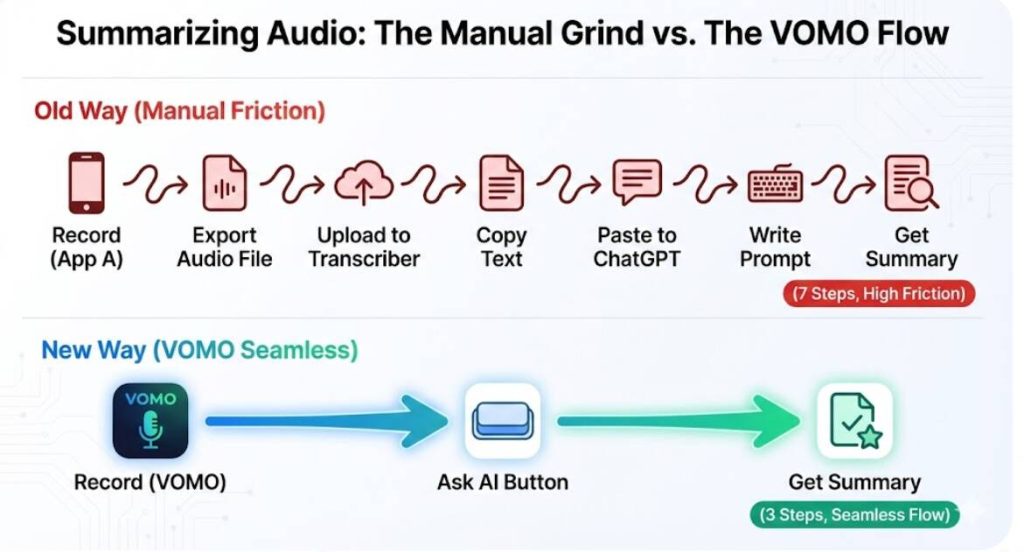
“Ask AI”: The Native Way to Query Your Meeting Data
VOMO features an “Ask AI” button that allows you to “Chat with your transcript like ChatGPT” . You can ask specific questions like “What were the marketing team’s concerns?” ou “List the deadlines mentioned,” and the AI will extract the answers directly from the recording .
Deep Dive: Extracting Action Items & Decisions Instantly
Beyond simple summaries, VOMO allows for deep interrogation of your data. You can generate immediate action items and decision logs , transforming a clear record of conversation into a to-do list instantly.
Handling Long Recordings: No Token Limits or Cutoffs
Standard LLMs often forget the beginning of a long text. VOMO is built to handle unlimited recording lengths , ensuring that even a 3-hour strategy session is fully transcribed and analyzed without losing context.
VOMO.ai vs. Standard ChatGPT Plus: A Value Comparison
| Caraterística | Standard ChatGPT (Manual Method) | VOMO.ai (Integrated Solution) |
| Gravação de áudio | ❌ No (Requires separate app) | ✅ Built-in (Unlimited Length) |
| Transcrição | ⚠️ Limited by file size/tokens | ✅ 99% Accuracy (Standard) |
| Identificação do orador | ❌ None (Text block only) | ✅ Automated Speaker Roles |
| Workflow Friction | High (Record -> Export -> Upload) | Zero (Tap & Chat) |
| Privacidade dos dados | ⚠️ Public Training (Default) | ✅ Enterprise-Grade Security |
| Meeting Analysis | Resumos básicos | “Ask AI” Deep Query |
Multi-Language Support: 50+ Languages vs. Standard English Models
While ChatGPT supports many languages, VOMO is optimized for transcription in over 50 línguas . This ensures high fidelity for international teams where accents and dialects might confuse standard models.
Cloud Storage: Unlimited Safe Storage vs. Temporary Chat History
ChatGPT chats can be fleeting or hard to organize. VOMO offers unlimited cloud storage , acting as a permanent, searchable database for your organization’s audio wisdom.
Cost Efficiency: Unlimited Transcription for $1.92/Week
For heavy users, ChatGPT Plus costs $20/month. VOMO’s Pro Plan (Yearly) breaks down to just $1.92/Weekly , offering unlimited transcription and AI analysis at a fraction of the cost of maintaining multiple tools.
Conclusion: Don’t Just Record—Interact with Your Meetings
To effectively use ChatGPT for notas de reunião in 2026, integration is key. While the manual method works for hobbyists, professionals need reliability. By using VOMO, you combine 99% transcription accuracy with the conversational power of Ask AI, turning every meeting into an actionable asset.




