Converting an MKV video to an image involves extracting the spoken content, transcribing it into text, and exporting the transcript as a visual image format like PNG or JPG. Using AI-powered tools such as VOMO, this process becomes quick and seamless. Instead of manually typing captions or taking screenshots, you can generate accurate, visually formatted transcripts directly from your MKV files.

What It Means to Convert MKV to Image
Converting MKV to image doesn’t just capture video frames. It means:
- Extracting audio from the MKV file
- Transcribing the speech into readable text (ビデオからテキストへ)
- Exporting the transcript as a visually formatted image
This method is ideal for creating study notes, social media content, meeting summaries, or shareable quotes from your video content. Unlike manual methods, AI ensures accuracy, consistency, and readability.
Why AI Tools Are Essential for MKV-to-Image Conversion
Manual conversion involves multiple steps and tools: extracting audio, transcribing, formatting, and creating an image. AI tools simplify this by:
- Automatically transcribing video content
- Formatting text into image-ready layouts
- Supporting multiple video and audio formats
- Allowing quick export as images
VOMO is especially useful for beginners, providing an end-to-end workflow with minimal manual input.
Step 1: Upload Your MKV File
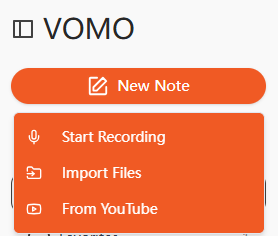
Begin by uploading your MKV file to an AI transcription platform. Many tools also support drag-and-drop upload or importing from online sources such as YouTube or Google Drive. Make sure your video has clear audio for the best transcription results.
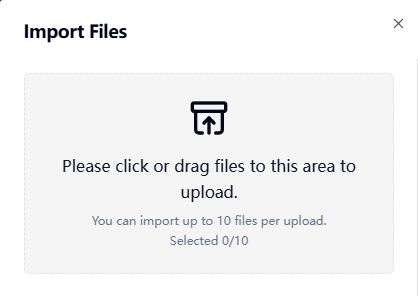
Step 2: Transcribe the MKV Video
The AI will process the video’s audio track and convert spoken words into text. This process is similar to performing 音声からテキストへ, but the output is tied to the video’s content. Advanced AI tools can also summarize key points automatically, saving time on editing and structuring the transcript.
Step 3: Export the Transcript as an Image
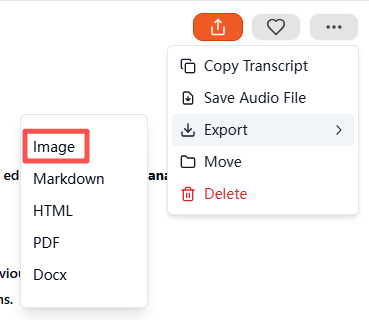
After the transcription is complete, select the Image output format in the export menu. The tool will automatically generate a compressed ZIP file containing the transcript in visual format. Each image file is ready to save, share, or archive. This step transforms your text transcript into a professional, easily consumable visual document.
Supported MKV and Other File Formats
AI transcription tools generally support a wide range of formats:
| Media Type | 対応フォーマット |
|---|---|
| ビデオ | MKV, MP4, MOV, AVI, FLV |
| オーディオ | MP3, WAV, M4A, AAC |
You can also directly convert audio files into images using the same workflow if needed.
Top AI Tools for MKV-to-Image Conversion
Recommended tools include:
- VOMO – Full-featured AI transcription and image export
- Descript – Video editing and transcription combined
- Otter AI – Collaborative notes and transcription
- Notta AI – Multi-language support and visual exports
- Veed.io – Simplified layout and social media-friendly image outputs
そのうちのひとつだ、 VOMO stands out due to automated summarization, ZIP image export, and beginner-friendly interface.
Practical Use Cases for MKV-to-Image Conversion
This method is highly versatile:
| ユースケース | 例 |
|---|---|
| 教育 | Convert recorded lectures into study notes |
| ビジネス | Archive meeting recordings with visual summaries |
| コンテンツ制作 | Create podcast or tutorial quote images |
| アクセシビリティ | Provide visual transcripts for hearing-impaired users |
| リサーチ | Timestamped notes for video research projects |
Visual transcripts are easier to share, store, and consume than raw video files or plain text.
Tips for Accurate and Clear MKV-to-Image Conversion
最適な結果を得るために:
- Use videos with minimal background noise
- Ensure speakers talk clearly and at a steady pace
- Use a high-quality microphone if recording new content
- Review automatically summarized key points
- Highlight important phrases before exporting
Following these tips ensures professional, readable, and high-quality image transcripts.
結論
Converting MKV to image is now straightforward with AI-powered transcription tools. By uploading an MKV file, generating a transcript, and exporting it as an image, platforms like VOMO save time, improve accessibility, and produce visually appealing, shareable content. Whether for education, business, or content creation, AI-driven MKV-to-image conversion is the most efficient way to repurpose your video content into professional visual documents.