


へ get meeting notes in Google Meet in 2026, you can either use the built-in Gemini AI “Take notes for me” feature in Google Workspace or choose a professional third-party tool like VOMO.ai for higher accuracy. Native notes generate basic summaries saved to Google Drive, while advanced AI tools deliver more detailed and reliable results.
Struggling with messy, inaccurate グーグルミーティング notes that miss key details? VOMO.ai delivers 99% accuracy and polished summaries in seconds, even for hours-long recordings. Stop manual editing and let VOMO turn your audio into structured insights instantly.

What are Google Meet Meeting Notes and Why Do You Need Them?
会議メモ are structured records of discussions, decisions, and action items captured during a virtual session. In 2026, relying on memory is a productivity bottleneck. Digital meeting notes ensure that every stakeholder is aligned, project timelines are clear, and no critical detail is lost in transition.
Method 1: Using Native Google Workspace AI (Gemini)
Requirements: Subscriptions & Admin Permissions
To use native note-taking, you must have an active Google Workspace subscription that includes Gemini (such as Business, Enterprise, or Education tiers). Additionally, your organization’s administrator must enable “AI features” in the Google Admin Console.
Step-by-Step: Enabling “Take notes for me” in Real-Time
Once in a Google Meet call, click on the Gemini icon (star shape) in the top right corner. Select “Take notes for me” to start the automated process. The AI will listen to the audio and begin drafting a summary in the background.
Finding and Editing Your Notes in Google Drive
After the meeting ends, Google automatically generates a document containing the summary and a link to the transcript. This file is saved in the “Meeting Recordings” folder in your Google Drive, where you can edit or share it like any other Google Doc.
Method 2: Professional Transcription with VOMO.ai (The 99% Accuracy Path)
Solving the “Inaccuracy” Problem: Why 99% Precision Matters
While native tools provide a general overview, VOMO.ai offers up to 99%精度 in its transcriptions. This high precision ensures that technical terms, specific dates, and complex instructions are recorded correctly, eliminating the need for manual editing.
Automated Speaker Identification: Knowing Who Said What
VOMO.ai excels at capturing the roles of different participants. It utilizes advanced speaker identification to label exactly who said what, which is crucial for accountability and clear action item assignment.
Recording and Uploading: How to Import Google Meet Audio to VOMO
You can easily bring your Google Meet sessions into VOMO by recording the audio directly or uploading a saved meeting file. Once the file is uploaded, VOMO delivers polished notes in seconds.
How to Handle Complex Meetings with AI
Dealing with Cross-talk and Background Noise
Modern meeting environments are often noisy. VOMO AI is built to handle long recordings and complex audio environments without limits on length, ensuring a smooth transcription even when multiple people are speaking.
Beyond Transcription: Using “Ask AI” to Interrogate Your Meetings
One of the most powerful features is “Ask AI”, which allows you to chat with your transcript like ChatGPT. You can ask deep follow-up questions about the discussion and integrate those answers directly into your 会議メモ.
From Audio to Action: Using Scene Templates for Project Planning
VOMO automatically matches the best scene template for your meeting, whether it is for project planning or brainstorming. These carefully designed templates ensure that your notes are organized for maximum productivity with minimal effort.
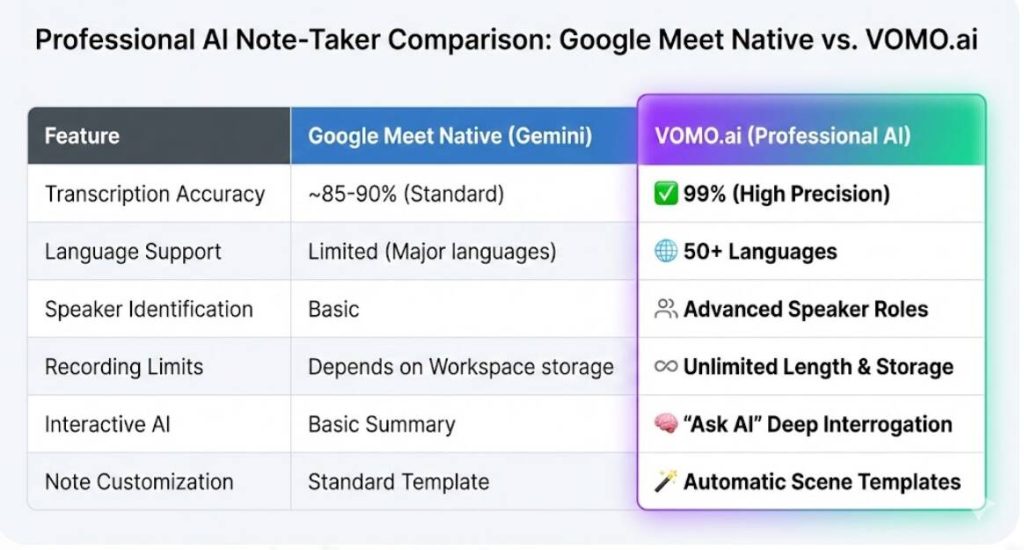
VOMO.ai vs. Native Google Meet Notes: A Side-by-Side Comparison
| 特徴 | Google Meet Native (Gemini) | VOMO.ai (Professional AI) |
| テープ起こしの精度 | ~85-90% (Standard) | 99% (High Precision) |
| 言語サポート | Limited (Major languages) | 50+ Languages |
| スピーカーの識別 | Basic | Advanced Speaker Roles |
| Recording Limits | Depends on Workspace storage | Unlimited Length & Storage |
| Interactive AI | Basic Summary | “Ask AI” Deep Interrogation |
| ノートのカスタマイズ | Standard Template | Automatic Scene Templates |
Language Versatility: Supporting 50+ Languages vs. Basic English
While native tools have limited scope, VOMO AI supports transcription in over 50ヶ国語. This makes it the ideal choice for international teams and multilingual environments.
Long-Form Meetings: Handling Hours of Recording Without Limits
Native tools can sometimes struggle with stability during extended sessions. VOMO AI is designed to handle long recordings without any restrictions on duration, providing consistent results every time.
Storage & Organization: Unlimited Cloud Storage for Your Knowledge Base
VOMO provides unlimited cloud storage, ensuring your notes are never lost and are accessible from anywhere. You can organize these records into folders to keep your project plans and meeting records easily searchable.
How to Share and Export Your Meeting Insights Instantly
Once your Smart Note is generated, you can share it with team members in multiple formats with just one click. This ensures that action plans reach the right people immediately, facilitating efficient collaboration across the board.
Conclusion: Choosing the Right Tool for Your Meeting Workflow
In 2026, getting meeting notes in Google Meet is simpler than ever. Native Gemini features are useful for basic summaries, but for those requiring 99% accuracy, automated speaker identification, and the ability to interact with transcripts, VOMO.ai is the superior choice. With its support for 50+ languages and unlimited storage, VOMO ensures that your meeting insights are not just recorded, but transformed into actionable knowledge.




