


そうだ、 Notion can 会議のメモを取る using its native AI features to summarize text or by embedding audio recordings directly into a page. However, native transcription capabilities are often limited in accuracy and lack advanced features like 自動スピーカー識別.
Tired of frantically typing while trying to listen? Native Notion notes often miss context and speaker identities. VOMO.ai records with 99% accuracy and identifies speakers automatically. Get polished, structured transcripts in seconds to drop straight into your Notion workspace instantly.

Notion Can Take Meeting Notes, But It’s Complicated
Native Capability: What Notion’s /meet Command Actually Does
Notion offers built-in features to handle 会議メモ, often triggered through specific commands or templates. However, these native tools typically focus on text organization rather than audio intelligence. While you can type notes directly or embed audio files, the system lacks the advanced automated processing found in dedicated transcription tools.
The “Text Dump” Problem: Why Native Summaries Feel Incomplete
A common issue with using standard note-taking tools is that they often result in unstructured blocks of text. Without specialized AI, you miss out on the ability to automatically identify speaker roles or extract key insights efficiently. This manual process can lead to crucial details being lost in the noise of a “text dump.”
The “Workflow Gap”: Why Reddit Users Are Switching Tools
The Speaker ID Struggle: “Who Said What?” in Notion
One of the biggest pain points discussed in productivity communities is the lack of speaker differentiation in basic transcription. VOMO addresses this by offering up to 99% accuracy with speaker identification. This ensures that every action item is correctly attributed to the right person, a feature often missing in native Notion workflows.
Mobile vs. Desktop: The Limitation of Recording on the Go
Notion’s mobile experience is powerful for reading, but capturing audio on the fly can be cumbersome. In contrast, VOMO is designed to be “easy to use – simply tap and go” . This mobile-first approach ensures you can capture ideas or meetings anywhere without navigating complex menus.
Token Limits & Cutoffs: Dealing with 3-Hour+ Meetings
Many AI tools struggle with long durations due to context window limits. VOMO AI specifically handles long recordings without any limits on length. This is critical for quarterly reviews or deep-dive strategy sessions that exceed standard time caps.
The Ultimate Workflow: VOMO (Capture) + Notion (Storage)
Step 1: Record with 99% Accuracy Using VOMO
Start your workflow by capturing the audio where precision matters most. VOMO delivers 99% accuracy with no editing required . By using VOMO as your capture engine, you ensure the raw data feeding into your Notion database is flawless.
Step 2: Use “Ask AI” to Extract Action Items & Decisions
Before moving data to Notion, interact with it. VOMO allows you to “Chat with your transcript like ChatGPT” . You can ask the AI to identify specific project risks or decision points , refining the content so only high-value information makes it to your permanent notes.
Step 3: One-Click Export to Your Notion Database
Once your notes are polished, sharing them is seamless. You can share notes and transcripts with one click, allowing you to move finalized summaries, action plans, and key discussion points directly into your Notion workspace for long-term storage and team access.
Deep Dive: Why VOMO Is the Best “Notion Plugin” That Isn’t One
50+ Languages: Breaking the English-Only Barrier
Global teams often find native tools restrictive regarding language support. VOMO AI supports transcription in over 50 languages , making it an essential companion for international business meetings that need to be documented in Notion.
Scene Templates: Auto-Matching Brainstorming vs. Standups
VOMO automatically identifies and matches scene templates without manual settings. Whether it is 会議メモ, project planning, or brainstorming, the AI organizes the content logically. This pre-structured data is far easier to manage once imported into Notion than raw text.
Unlimited Cloud Storage: Never Delete a Recording Again
Storing heavy audio files in Notion can eat up storage limits or slow down pages. VOMO offers unlimited cloud storage, so your notes will never be lost . You can keep the heavy audio files in VOMO while keeping your Notion pages lightweight and text-focused.
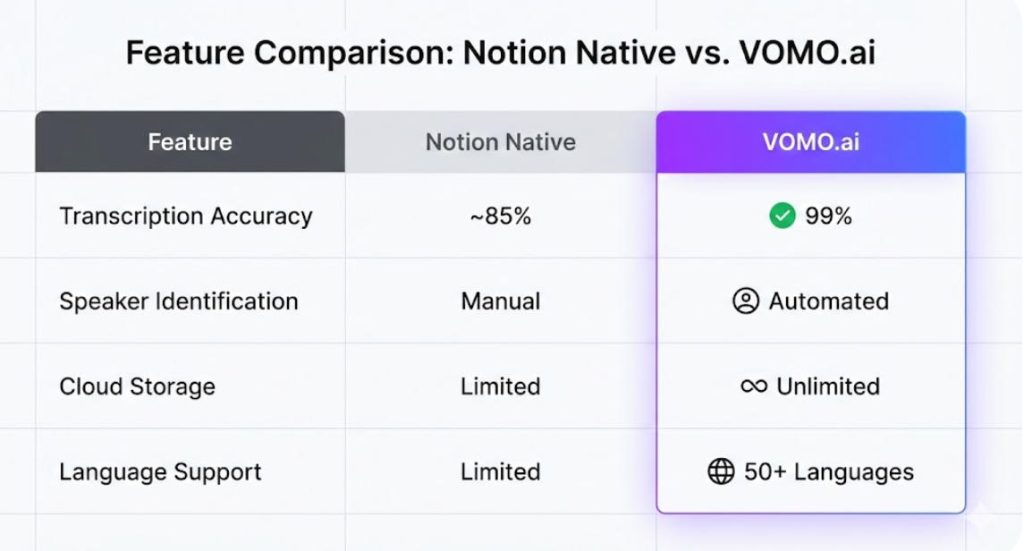
VOMO.ai vs. Notion AI: A Feature-by-Feature Showdown
| 特徴 | Notion Native (Built-in) | VOMO.ai (Pro Integration) |
| テープ起こしの精度 | Variable (Standard AI) | 99% 精度 |
| スピーカーの識別 | Manual / Limited | Automated & Precise |
| Interaction Mode | Static Summary | “Chat with Transcript” (Ask AI) |
| クラウドストレージ | Limited by File Size | Unlimited Cloud Storage |
| Recording Limits | Platform Dependent | 録音時間無制限 |
| Template Matching | Manual Selection | Auto-Match Scene Templates |
Accuracy Test: 99% Precision vs. General Transcription
The core difference lies in the engine. VOMO is built for “Fast and reliable meeting transcription and dictation with extremely high accuracy”. This 99% precision ensures that complex technical terms are captured correctly, whereas generalist AI tools often hallucinate or mishear details.
File Imports: Handling YouTube Videos & Uploads
Notion primarily deals with text and embedded links. VOMO expands your input options by supporting file uploads and YouTube video imports to easily generate SmartNotes . This allows you to turn external video content into Notion-ready summaries instantly.
Pricing Value: $10/mo Add-on vs. $1.92/week Pro
Cost efficiency is key. While add-on AI services can add up, VOMO’s Pro plan (paid yearly) costs just $1.92/Weekly . This tier includes unlimited transcription minutes , making it a highly cost-effective solution for heavy users compared to other subscription models.
How to Set Up the “VOMO to Notion” Pipeline Today
To achieve the best results, use VOMO to handle the heavy lifting of processing. Simply record or upload audio to generate summaries , use “Ask AI” to refine the content , and then copy the structured output into your Notion pages. This gives you the best of both worlds: VOMO’s processing power and Notion’s organizational structure.
Conclusion: Don’t Settle for Messy Notes in 2026
Can Notion take meeting notes? Yes, but for professional results, it needs help. By pairing Notion with VOMO, you overcome the limitations of accuracy and formatting. With VOMO’s 99% accuracy , automated speaker identification , and unlimited cloud storage , you transform your meeting records from simple text into a powerful, searchable knowledge base.




