


Turning audio into an HTML document means converting spoken content into editable, web-ready text using AI transcription tools. You upload an audio file, the system automatically transcribes the speech into text, and then exports it as an HTML file that can be edited, styled, and published online. The entire process takes only a few minutes and requires no manual typing.
VOMO makes this process especially simple. You can upload common audio files, get accurate transcripts powered by AI, and export clean HTML that’s ready for publishing. It works well for long recordings like meetings, interviews, and lectures, without requiring technical skills.

What Does It Mean to Convert Audio into an HTML Document?
Converting audio into an HTML document involves transforming spoken words into structured text formatted with HTML tags such as headings, paragraphs, and lists. Instead of receiving plain text or a PDF, you get a file that can be directly used on websites, blogs, or content management systems.
Most modern tools rely on AI-based audio to text technology to recognize speech, apply punctuation, and organize content into readable sections. This makes the final output both human-friendly and search-engine friendly.
Why Use HTML Format for Audio Transcripts?
HTML is one of the most flexible formats for written content. Compared to Word or PDF files, HTML documents are easier to publish, customize, and optimize for search engines.
Key benefits include:
- Direct publishing on websites without reformatting
- Easy styling with CSS
- Better SEO and indexing by search engines
- Simple integration with blogs and documentation platforms
- Lightweight files that load quickly
For creators, educators, and businesses, HTML transcripts make spoken content more accessible and reusable.
Step 1: Prepare and Upload Your Audio File
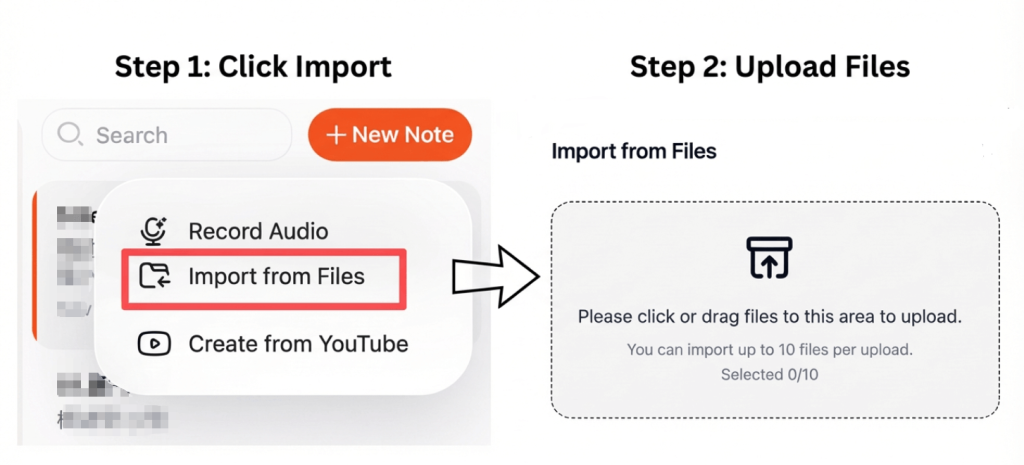
Start by selecting a transcription tool that supports common audio formats such as MP3, WAV, or M4A. Most platforms allow direct uploads from your device or cloud storage.
最良の結果を得るために:
- 静かな環境で録音する
- Use a clear microphone
- Ensure speakers talk at a natural pace
- 正しい言語とアクセントを選択してください
Clean input audio significantly improves transcription accuracy.
Step 2: Automatically Convert Speech into Structured Text
After uploading, the tool processes the file and converts spoken language into text using AI speech recognition. Advanced platforms can automatically add punctuation, break content into paragraphs, and detect different speakers.
Many tools also support video to text conversion, allowing you to extract dialogue from video files and generate HTML transcripts using the same workflow.
この手順は通常、長時間の録音であっても数分で完了します。.
Step 3: Export the Transcript as an Editable HTML File
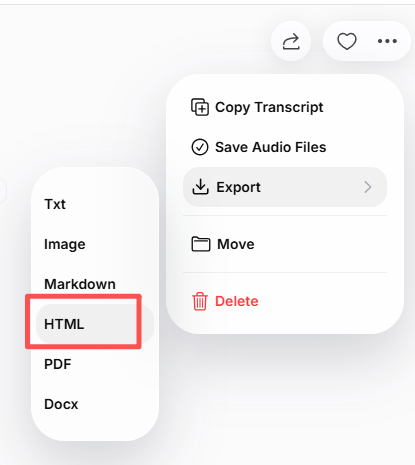
Once the transcript is ready, you can export it as an HTML document. Most transcription tools allow you to:
- Review and edit text before export
- Add headings and sections
- Include timestamps or speaker labels
- Maintain clean and readable HTML structure
The exported file can be opened in any code editor, website builder, or CMS and edited as needed.
Best Use Cases for Audio to HTML Conversion
Converting audio into HTML documents is commonly used for:
- Publishing podcast transcripts on websites
- Turning interviews into blog posts
- Creating searchable lecture notes
- Documenting meetings and discussions
- Building knowledge bases and help centers
HTML transcripts improve accessibility, readability, and content reach across platforms.
Tips to Improve Transcription Accuracy and HTML Quality
To get the best results from your transcription:
- 高品質な録音を使用する
- 発言の重複を避ける
- Review and proofread the transcript
- Clean up headings and paragraph breaks
- Optimize the HTML structure for readability
Small refinements can significantly improve both user experience and SEO performance.
結論
Turning audio into an HTML document is a fast and efficient way to convert spoken content into editable, web-ready text. With AI transcription tools, you can upload an audio file, generate accurate text automatically, and export it as HTML for immediate publishing.
This approach saves time, improves accessibility, and helps your content perform better in search results, making it ideal for modern websites and content strategies.




