


Converting M4A to PDF means turning spoken content from an M4A audio file into written text and exporting it as a clean, well-formatted PDF document. With AI-powered transcription tools, you can upload an M4A recording, let the system automatically transcribe the speech, and download a searchable PDF in just minutes—fast, accurate, and effortless.
Among many available solutions, VOMO stands out for its reliable transcription quality and intuitive interface. Even long M4A recordings or files with multiple speakers can be converted into structured text and exported as professional PDF documents with minimal manual editing.

What Does M4A-to-PDF Conversion Mean?
M4A is a popular audio format known for its high quality and efficient compression. While M4A files are easy to store and share, their spoken content cannot be searched or edited easily. M4A-to-PDF conversion involves transcribing audio into text and formatting that text into a fixed document layout.
AI transcription platforms rely on advanced 오디오를 텍스트로 변환 technology to recognize speech, apply punctuation, and organize sentences into readable paragraphs ready for PDF export.
Why Convert M4A Files to PDF?
Transforming M4A recordings into PDF documents offers several advantages:
- Creates searchable transcripts of interviews, lectures, and podcasts
- Improves accessibility for text-based reading
- Simplifies sharing, printing, and long-term archiving
- Enables content reuse for reports, blogs, or study notes
- Saves time compared to manual transcription
PDF format ensures your content remains consistent across different devices and platforms.
Step 1: Upload Your M4A Audio File

Start by selecting an AI-powered transcription tool that supports M4A uploads. Upload your file directly from your device or import it from cloud storage services like Google Drive or Dropbox.
For best accuracy, ensure your audio recording has clear speech and minimal background noise, as sound quality plays a critical role in transcription precision.
Step 2: Automatically Transcribe M4A Audio Using AI
Once uploaded, the AI system analyzes the audio and converts spoken language into written text. Advanced tools can identify multiple speakers, insert punctuation, and structure content into readable sections automatically.
Many platforms also support multimedia workflows — if your content originates from video, the same 비디오를 텍스트로 변환 technology can extract dialogue and produce consistent transcripts across formats.
Step 3: Export the Transcript as a PDF
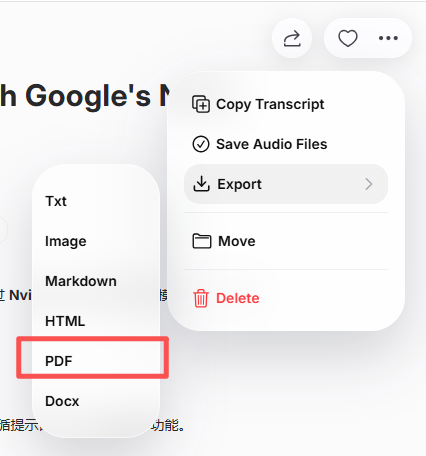
After reviewing and editing the transcript, export it as a PDF file. Most transcription tools allow you to adjust formatting options such as headings, spacing, timestamps, and speaker labels before downloading.
The final PDF transforms your M4A audio into a professional, searchable document ready for sharing or archiving.
Best AI Tools to Convert M4A to PDF
Several AI-powered transcription tools offer reliable M4A-to-PDF conversion:
- VOMO – Accurate transcription with clean PDF export
- 오터 AI – Ideal for meetings and lectures
- 인공지능 없음 – Fast transcription with multilingual support
- 설명 – Combines transcription with audio editing
- Open-source ASR 도구 – Flexible options for developers
Each tool varies in features and pricing, but all streamline the M4A-to-PDF workflow.
AI-Powered Tips for Accurate M4A-to-PDF Conversion
To ensure high-quality PDF transcripts:
- Use noise-free, high-quality M4A recordings
- 명확하고 일정한 속도로 말하기
- Select the correct language and accent settings
- Review names and technical terms before exporting
- Optimize PDF formatting for readability
Following these tips helps produce professional and accurate PDF documents.
결론
Converting M4A to PDF is fast and efficient with AI-powered transcription tools. By uploading your audio file, letting the system transcribe the speech, and exporting the result as a PDF, you can transform M4A recordings into accessible, reusable documents in minutes.
M4A-to-PDF conversion makes audio content easier to manage, share, and repurpose across platforms.




