


Converting MKV to PDF means extracting spoken content from an MKV video file, transforming that speech into written text, and exporting it as a structured PDF document. With modern AI 전사 tools, you can upload an MKV video, let the system automatically transcribe the audio, and download a clean, searchable PDF in just a few minutes.
Among many available solutions, VOMO stands out for its reliable 전사 정확도 and easy-to-use interface. Even long MKV videos or files with multiple speakers can be converted into well-formatted text and exported as professional PDF documents with minimal manual editing.

What Does MKV-to-PDF Conversion Mean?
MKV (Matroska Video) is a flexible container format that can store high-quality video, audio, and subtitles. However, the spoken content inside MKV files is not searchable or editable. MKV-to-PDF conversion involves transcribing the audio track into text and organizing that text into a fixed document layout.
AI transcription platforms rely on advanced 오디오를 텍스트로 변환 technology to recognize speech, apply punctuation, and structure paragraphs automatically, preparing the transcript for PDF export.
Why Convert MKV Files to PDF?
Turning MKV videos into PDF documents offers several practical benefits:
- Creates searchable records of movies, lectures, or webinars
- Improves accessibility for text-based consumption
- Simplifies sharing, printing, and long-term archiving
- Supports documentation for education, training, or research
- Saves time compared to manual transcription
PDF format ensures your content remains consistent across different devices and platforms.
Step 1: Upload Your MKV Video File

Begin by choosing an AI-powered transcription tool that supports MKV uploads or automatically extracts audio from video files. Upload your MKV file from your device or import it from cloud storage services.
For best results, ensure the audio is clear and free from excessive background noise, as audio quality directly impacts transcription accuracy.
Step 2: Automatically Transcribe MKV Video Speech
Once the file is uploaded, the AI system analyzes the audio track and converts spoken language into written text. Advanced tools can detect multiple speakers, insert punctuation, and structure content into readable sections automatically.
The same technology used for 비디오를 텍스트로 변환 conversion ensures fast processing and reliable results, even for long or complex MKV recordings.
Step 3: Export the Transcript as a PDF
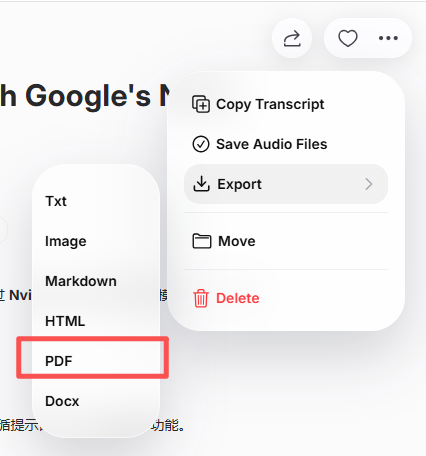
After reviewing and editing the transcript, export it as a PDF file. Most transcription platforms allow you to customize formatting options such as headings, spacing, timestamps, and speaker labels before downloading.
The final PDF turns your MKV video into a professional, searchable document ready for sharing or archiving.
Best Tools to Convert MKV to PDF
Several AI transcription tools support efficient MKV-to-PDF conversion:
- VOMO – Accurate transcription with clean PDF formatting
- 오터 AI – Ideal for meetings, lectures, and collaboration
- 설명 – Combines transcription with video editing
- 인공지능 없음 – Fast transcription with multilingual support
- Open-source ASR 도구 – Flexible solutions for developers
Each tool offers different features, but all simplify the MKV-to-PDF workflow.
Tips for Accurate MKV-to-PDF Transcription
To achieve high-quality transcription results:
- Use MKV files with clear and balanced audio
- 가능하면 중복되는 말을 피하세요.
- Select the correct language and accent settings
- Review names and technical terms before export
- Adjust PDF formatting for readability
Following these tips helps ensure your final PDF is accurate and professional.
결론
Converting MKV to PDF is fast and straightforward with AI transcription technology. By uploading your MKV file, letting the system transcribe the speech, and exporting the result as a PDF, you can transform video content into accessible, reusable documents in minutes.
MKV-to-PDF conversion makes complex video files easier to search, store, and share across platforms.




