

Ja, ChatGPT kan notities maken van vergaderingen, maar met belangrijke beperkingen. Op zichzelf kan ChatGPT niet naar live vergaderingen luisteren of audio opnemen. Maar in combinatie met transcripties van vergaderingen of AI-vergadertools die gesprekken omzetten in tekst, kan ChatGPT effectief vergadernotities, beslissingen en actiepunten organiseren, samenvatten en structureren. Op de juiste manier gebruikt, wordt het een krachtige assistent om onbewerkte vergaderinhoud om te zetten in duidelijke, bruikbare documentatie.
Voor teams die dit proces automatisch willen laten verlopen, hulpmiddelen zoals VOMO ga een stap verder door te fungeren als een volledige AI-vergadering notulist, opname, transcriptie, gestructureerde samenvattingen en actie-items in één workflow afhandelen zonder handmatig kopiëren-plakken.

Hoe ChatGPT helpt met vergadernotities
ChatGPT blinkt uit in het verwerken van tekst en het omzetten ervan in gestructureerde informatie. Zodra u vergaderinhoud levert, kan het discussies samenvatten, kernpunten eruit halen, en notities herschrijven in een strakke, professionele opmaak. Teams gebruiken het vaak om ruwe notities om te zetten in gepolijste samenvattingen, beslissingen te markeren en duidelijke actielijsten te genereren die gemakkelijk te delen en later opnieuw te bekijken zijn.
Wat ChatGPT niet zelf kan doen
ChatGPT kan niet zelf vergaderingen opnemen of gesprekken in realtime vastleggen. Het kan niet deelnemen aan gesprekken, luisteren naar deelnemers of automatisch sprekers detecteren. Om met vergaderingen te kunnen werken, heeft het input in tekstvorm nodig, of die nu afkomstig is van handmatige notities, transcripties of tools die audio naar tekst voordat de inhoud wordt verwerkt.
ChatGPT gebruiken met transcripties van vergaderingen
In combinatie met transcriptie vergaderings wordt ChatGPT veel effectiever. Je kunt volledige transcripties in ChatGPT plakken en het vragen om samenvattingen, notulen van vergaderingen of gestructureerde notities te genereren. Het kan sneller thema's, beslissingen en follow-ups identificeren dan handmatige controle, wat veel tijd bespaart na lange of complexe vergaderingen.
Kan ChatGPT werken met videovergaderingen?
ChatGPT kan videobestanden niet rechtstreeks verwerken. Voor videovergaderingen moet de inhoud eerst worden omgezet in tekst. Zodra er een transcript beschikbaar is via video naar tekst conversie kan ChatGPT de discussie analyseren net zoals elke andere schriftelijke input en georganiseerde notities of samenvattingen van de vergadering produceren.
Best Use Cases voor ChatGPT-vergadernotities
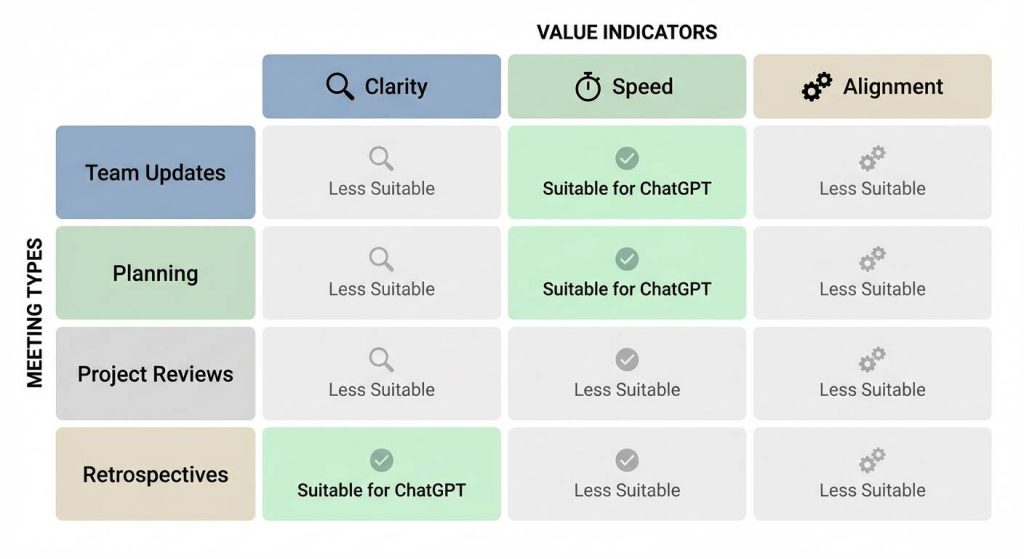
ChatGPT werkt vooral goed voor interne teamvergaderingen, planningssessies, projectupdates en evaluatievergaderingen waar structuur en duidelijkheid belangrijker zijn dan juridische formaliteiten. Het helpt teams vervolgvergaderingen te verminderen, afstemming te verbeteren en ervoor te zorgen dat beslissingen en verantwoordelijkheden duidelijk worden gedocumenteerd.
Beperkingen voor formele of bestuursvergaderingen
Voor bestuursvergaderingen of juridische omgevingen moet ChatGPT voorzichtig worden gebruikt. Hoewel het kan helpen om discussies samen te vatten, vereisen officiële notulen vaak strikte formats, goedkeuringsworkflows en nalevingsnormen. In deze gevallen kan ChatGPT het beste worden gebruikt als assistent bij het opstellen en niet als uiteindelijke autoriteit.
ChatGPT vs Toegewijde AI-vergadernotitietools
ChatGPT is een AI voor algemene doeleinden, terwijl speciale Notitie AI-vergadering tools zijn speciaal ontworpen voor het vastleggen, transcriberen en automatisch organiseren van vergaderingen. Deze tools verwerken vaak opname, transcriptie, sprekeridentificatie en gestructureerde samenvattingen in één workflow, en gebruiken dan optioneel ChatGPT-achtige modellen om de output te verfijnen.
Hoe krijg je de beste resultaten met ChatGPT?
Om hoogwaardige vergadernotities van ChatGPT te ontvangen:
- Zorg voor duidelijke transcripties of onbewerkte notities
- Vraag om een specifieke structuur zoals agenda, besluiten en actiepunten
- Nauwkeurigheid van outputs controleren en aanpassen
- Gebruik het als onderdeel van een breder documentatieproces voor vergaderingen
Bij doordacht gebruik kan ChatGPT de kwaliteit en consistentie van vergadernotities aanzienlijk verbeteren.
Eindoordeel: Is ChatGPT goed voor vergadernotities?
ChatGPT is een sterke tool voor het organiseren en samenvatten van vergaderinhoud, maar het werkt het beste als onderdeel van een systeem in plaats van een standalone oplossing. Als je doel duidelijkheid, snelheid en een betere opvolging is, dan kan ChatGPT een waardevolle rol spelen, vooral in combinatie met tools die automatisch de opname en transcriptie afhandelen.




