

Converting MP4 files into an HTML transcript means extracting the spoken content from an MP4 video, transcribing it automatically using AI, and exporting the result as an editable HTML document. You upload the MP4 file, the system converts speech into text, and outputs clean, structured HTML that can be published or edited online within minutes.
VOMO makes this process easy and reliable. You can upload MP4 videos directly, generate accurate transcripts with AI, and export well-structured HTML ready for blogs, websites, or documentation. It works smoothly for long videos such as lectures, meetings, and interviews.

What Is an HTML Transcript for MP4 Videos?
An HTML transcript is a written version of the dialogue in an MP4 file, formatted using HTML elements like headings, paragraphs, and lists. Unlike plain text or PDF files, HTML transcripts are designed for online use and can be embedded directly into web pages.
Most modern tools rely on audio naar tekst technology to analyze the audio track inside MP4 videos, recognize speech, and organize the content into readable sections suitable for both users and search engines.
Why Convert MP4 Files into HTML Transcripts?
Turning MP4 files into HTML transcripts offers several important benefits:
- Improves SEO by making video content searchable
- Enhances accessibility for users who prefer reading
- Enables easy content reuse across websites and blogs
- Allows flexible formatting and styling
- Reduces reliance on video-only communication
HTML transcripts help maximize the value of MP4 videos beyond playback.
Stap 1: Upload uw MP4-bestand naar een transcriptietool
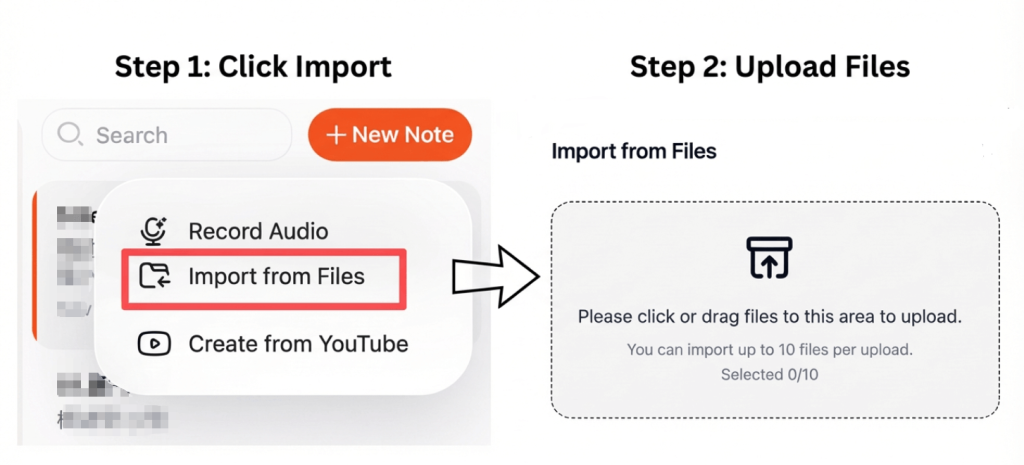
Start by selecting a transcription tool that supports MP4 video uploads. Most platforms allow you to upload files directly from your computer or cloud storage.
Voor betere resultaten:
- Ensure clear audio with minimal background noise
- Use videos with distinct speakers
- Select the correct language settings
- Avoid overlapping dialogue
High-quality video audio leads to more accurate transcripts.
Step 2: Convert MP4 Video Speech into Text Automatically
Once uploaded, the transcription tool extracts the audio track and converts spoken language into text using AI speech recognition. Advanced tools can automatically add punctuation, structure paragraphs, and identify different speakers.
This process is commonly referred to as video naar tekst conversion and typically takes only a few minutes, even for longer MP4 files.
Step 3: Export the MP4 Transcript as an HTML Document
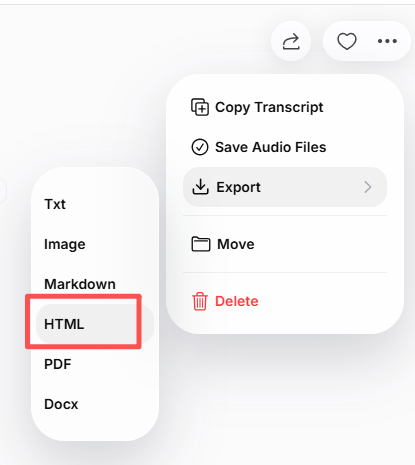
After reviewing the transcript, you can export it as an HTML file. Most transcription tools allow you to:
- Edit text before exporting
- Add headings and structured sections
- Include timestamps or speaker labels
- Maintain clean, readable HTML output
The exported HTML transcript can be edited in any CMS, code editor, or website builder.
Common Use Cases for MP4 to HTML Transcripts
MP4 to HTML transcripts are widely used for:
- Publishing video transcripts on blogs
- Creating written versions of online courses
- Turning interviews into articles
- Improving accessibility for video content
- Building searchable content libraries
HTML transcripts make MP4 videos more versatile and easier to repurpose.
Tips to Improve MP4 Transcription Accuracy
Om de beste transcriptieresultaten te behalen:
- Video's opnemen in stille omgevingen
- Use external microphones when possible
- Spreek duidelijk en in een rustig tempo
- Review and proofread the transcript
- Organize content with clear headings
These steps help ensure a high-quality HTML transcript.
Conclusie
Converting MP4 files into an HTML transcript is a practical way to transform video content into editable, web-ready text. By uploading an MP4 file, letting AI handle transcription, and exporting the result as HTML, you can improve accessibility, boost SEO, and extend the reach of your video content.
This approach saves time while making MP4 videos easier to publish, search, and reuse online.




