


Till föra anteckningar under ett möte som sekreterare effektivt, måste du fokusera på att fånga viktiga beslut, åtgärdspunkter och förslag till beslut snarare än att transkribera varje ord ordagrant. Ett professionellt tillvägagångssätt omfattar tre steg: förberedelse (genomgång av dagordningen), aktiv inspelning (identifiering av talare och uppföljning av resultat), och slutförande (sammanfattning av anteckningar i ett strukturerat format). Framgångsrik dokumentation säkerställer att alla deltagare har en tydlig förteckning över ansvarsområden och tidsfrister, vilket ger en juridisk och administrativ grund för organisationens nästa steg.
Administrativa medarbetare har ofta svårt att hålla jämna steg med snabbt talande chefer, vilket leder till missade detaljer och timmar av manuell transkribering. VOMO AI eliminerar denna stress med 99%-noggrannhet och supersnabb bearbetning. Fånga sömlöst upp timmar av ljud och få polerade, strukturerade anteckningar på några sekunder

Att bemästra sekreterarens roll i modern mötesdokumentation
Officiella protokoll kontra tillfälliga mötesanteckningar: Att känna till standarden
En sekreterare måste skilja mellan formella protokoll och informella anteckningar. Officiella protokoll fungerar som en juridisk uppteckning av beslut och motioner. Tillfälligt mötesanteckningar är mer flexibla och fokuserar på allmänna diskussioner och brainstorming. Genom att förstå denna skillnad säkerställer man att dokumentationen uppfyller de administrativa standarder som krävs.
De viktigaste ansvarsområdena: Förberedelse, insamling och distribution
I rollen ingår att fånga upp alla detaljer, från talarnas roller till viktiga insikter. En sekreterare ser till att viktiga mötesprotokoll nå teammedlemmar direkt för att underlätta effektivt samarbete. I denna livscykel ingår att förbereda dagordningen, spela in under sessionen och distribuera de färdiga anteckningarna efteråt.
Viktigt arbetsflöde före mötet: Att skapa förutsättningar för framgång
Anpassning till agendan och kartläggning av deltagarna
Innan mötet börjar bör sekreteraren gå igenom dagordningen för att förutse hur diskussionen kommer att flyta. Att identifiera deltagarna i förväg hjälper till att tilldela talarna korrekta roller under livesessionen. Denna förberedelse minskar behovet av manuella inställningar eller korrigeringar under själva inspelningen.
Att välja rätt verktyg: Varför digital transkription är standarden för 2026
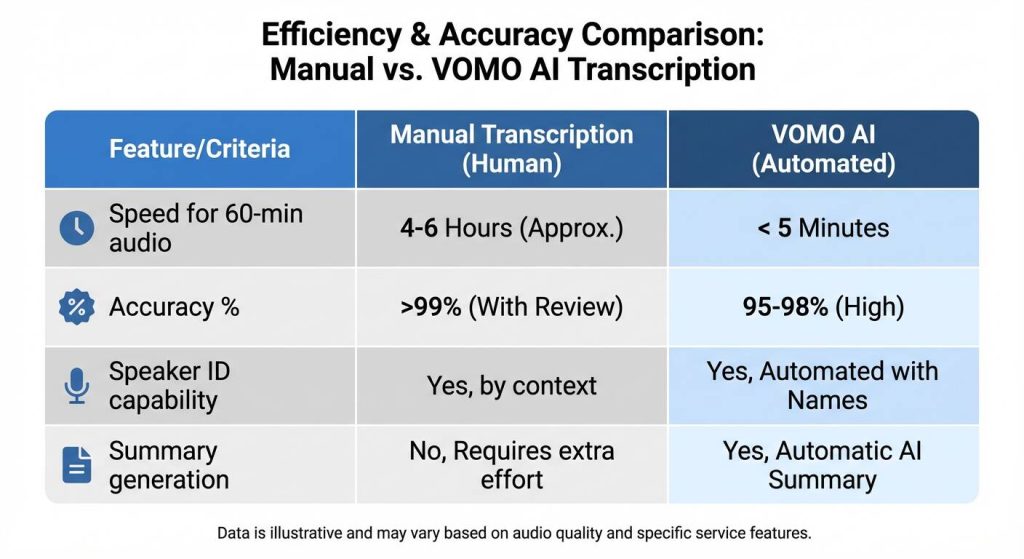
Moderna sekreterare förlitar sig på AI-drivna verktyg som förvandlar timmar av ljud till text på några minuter. Digitala lösningar ger 99%-noggrannhet, vilket avsevärt minskar den tid som läggs på manuell redigering. Funktioner som obegränsad molnlagring säkerställer att dokument aldrig går förlorade och förblir tillgängliga var som helst.
Upprätta strukturerade mallar för olika mötesscenarier
Med hjälp av fördesignade mallar kan du organisera innehåll för projektplanering, brainstorming eller ledningsgrupper. AI kan automatiskt matcha den bästa mallen för ett visst scenario, vilket säkerställer en välorganiserad produktion. Dessa mallar kan användas med ett klick och anpassas för att passa unika organisatoriska behov.
| Funktion | Manuell Penna & Papper | Standard digital maskinskrivning | VOMO AI arbetsflöde |
| Transkriptionshastighet | Realtid (partiell) | Realtid (partiell) | Minuter för timmar av ljud |
| Noggrannhetsnivå | Hög (benägen för mänskliga fel) | Hög (benägen för mänskliga fel) | 99% Precision |
| Högtalar-ID | Manuell notation | Manuell notation | Automatisk identifiering |
| Förberedelser efter mötet | 2-4 timmar | 1-2 timmar | Sekunder (polerade noter) |
Beprövade metoder för anteckningar för chefsassistenter
Cornell-metoden: Idealisk för strategiska sammanfattningar
Cornell-metoden innebär att anteckningarna delas upp i ledtrådar, anteckningar och sammanfattningar. Detta strukturerade tillvägagångssätt hjälper till med generera AI-sammanfattningar som lyfter fram viktiga punkter för att öka produktiviteten. Det är särskilt effektivt för möten där strategiska beslut måste isoleras från den allmänna diskussionen.
Den översiktliga metoden: Bäst för tekniskt och logiskt flöde
Outline-metoden använder punktlistor för att skapa en hierarki av information. Denna metod fungerar sömlöst med AI som automatiskt extraherar nyckelpunkter och sammanfattningar. Det säkerställer att tekniska detaljer och logiska förlopp är lätta att följa och söka senare.
Kvadrantmetoden: Effektivisering av åtgärder och beslut
Denna metod kategoriserar anteckningar i fyra områden: Allmänna anteckningar, åtgärder, frågor och beslut. Genom att använda detta ramverk kan en sekreterare se till att varje Åtgärdsplan når ut till teammedlemmarna direkt. Det passar perfekt ihop med AI-verktyg som fokuserar på mötesanteckningar och teamsamarbete.
| Metod | Bäst för... | Motsvarande VOMO AI-mall |
| Cornell-metoden | Strategiska insikter | Mötesanteckningar (Fokuserade nyckelinsikter) |
| Översiktlig metod | Tekniskt flöde | Projektplanering (Strukturerade steg) |
| Kvadrantmetoden | Handlingsorienterad | Brainstorming (Extrahering av uppgifter och beslut) |
Den “hemliga såsen” för 99%-noggrannhet: Hantering av utmaningar i den verkliga världen
Identifiering av talare: Hur man särskiljer flera roller i ett styrelserum
Att fånga upp talarnas roller är avgörande för ett korrekt mötesprotokoll. Avancerade system ger upp till 99% noggrannhet vid identifiering av talare, även i fullsatta styrelserum. Detta gör det möjligt för sekreteraren att se exakt vem som gjorde ett visst förslag eller beslut.
Att hantera långa inspelningar: Hantera flertimmarssessioner utan trötthet
Administrativa medarbetare ställs ofta inför utmaningen att hålla möten som tar flera timmar. AI-verktyg hanterar långa inspelningar utan några begränsningar i längd, vilket säkerställer att ingen detalj missas. Detta förhindrar “trötthetsgapet” där kvaliteten på de manuella anteckningarna sjunker i takt med att mötet fortskrider.
Flerspråkigt stöd: Transkribering av globala möten på över 50 språk
I en globaliserad affärsmiljö kan sekreterare behöva dokumentera möten som hålls på olika språk. Stöd för transkribering på över 50 språk säkerställer att internationella team kan samarbeta effektivt. Denna funktion gör det möjligt att skapa smarta anteckningar oavsett vilket språk som talas.
Steg-för-steg-guide: Fånga felfria mötesinsikter
Steg 1: Starta inspelning och transkribering i realtid
Tryck bara på och kör för att börja spela in sessionen. Systemet fångar upp varje detalj i realtid och ger en ljudinspelning med hög kvalitet tillsammans med utskriften. Detta eliminerar stressen med att försöka skriva lika snabbt som människor talar.
Steg 2: Använda AI-scenmallar för automatisk organisering
Under eller efter inspelningen matchar AI automatiskt scenmallen. Oavsett om det handlar om projektplanering eller brainstorming organiseras anteckningarna i den mest effektiva strukturen. Detta steg säkerställer att utmatningen är polerad på några sekunder.
Steg 3: Lyfta fram viktiga beslut och åtgärder i realtid
AI:n extraherar viktiga punkter för att öka mötesproduktiviteten medan sekreteraren fokuserar på diskussionen. Smart Notes extraherar automatiskt åtgärdspunkter, vilket gör det enkelt att organisera mötesinformation utan manuell sökning.
Effektivitet efter mötet: Från rått ljud till polerat protokoll på några sekunder
Fråga AI: Använda samtalsintelligens för att ta fram dolda mötesdetaljer
Sekreterare kan “chatta” med sina utskrifter som ChattGPT för att hitta specifik information. Funktionen “Ask AI” hjälper till att gräva djupare i mötesinformationen och svara på specifika frågor från ledningsgruppen. Svaren kan integreras direkt i de slutliga anteckningarna.
Sammanfattning med ett klick: Automatisk generering av strukturerade anteckningar
Skapa strukturerade anteckningar för alla scenarier med ett enda klick. Denna process levererar polerade anteckningar på några sekunder och omvandlar rått ljud till användbar dokumentation. Det säkerställer att sekreteraren kan tillhandahålla en sammanfattning nästan omedelbart efter det att mötet har avslutats..
Säker delning och molnlagring: Säkerställa datasekretess och teamåtkomst
Alla inspelningar och transkriptioner skyddas med stark kryptering och sekretessåtgärder. Anteckningarna kan organiseras i mappar och delas med teamet i flera olika format. Obegränsad molnlagring säkerställer att alla historiska dokument är sökbara och säkert lagrade.
Vanliga fallgropar i mötesprotokoll och hur man undviker dem
Faran med överinspelning: Fokus på effekt framför ordagrann information
Ett vanligt misstag är att försöka registrera varje ord, vilket gör att de viktigaste poängerna försvinner. Genom att använda AI-sammanfattningar kan man lyfta fram viktiga punkter så att det slutliga dokumentet förblir fokuserat på effekten. Polerade anteckningar bör prioritera viktiga insikter framför onödig utfyllnad.
Saknad kontext: Hur man rekonstruerar tvetydiga beslut i efterhand
Om ett beslut var oklart kan en sekreterare använda verktyget “Ask AI” för att fokusera på specifika mötessegment för att få klarhet. Integrering av externa källor som YouTube-videoimport eller uppladdade filer kan också ge ytterligare sammanhang för mötesanteckningarna.
Slutsats: Framtidssäkra din administrativa karriär med AI
Att ta anteckningar som sekreterare är inte längre en manuell börda utan en strömlinjeformad AI-driven process. Genom att utnyttja 99% noggrannhet i transkriptionen, med automatisk identifiering av talare och smart sammanfattning kan sekreterare leverera högkvalitativa protokoll på några sekunder. Dessa verktyg gör det möjligt för administrativa medarbetare att fokusera på organisation och samarbete på hög nivå, vilket säkerställer att varje möte leder till tydliga åtgärder och långsiktig framgång.
