

Downloading audio from YouTube videos is useful for offline listening, research, and content repurposing. However, in 2026, the process is still more complicated than most people expect.
After testing multiple tools and workflows, the biggest challenge is not whether you can extract audio—but how to do it easily, safely, and without losing quality.
In this guide, we break down the best methods, common mistakes, and smarter alternatives depending on your goal.
If your goal is downloading visuals as well, you might also want to learn 如何儲存 YouTube 影片.

The Real Workflow: YouTube → Audio Extraction → Format
No matter which tool you use, the process always follows the same structure:
- 複製 YouTube 視訊連結
- Extract the audio stream
- Convert or save it in a usable format
Understanding this helps avoid confusion when comparing tools.
Command Line vs Online vs AI: Which Is the Best Way to Download YouTube Audio?
| 方法 | 工作流程 | 易用性 | 速度 | 音訊品質 | 安全性 | 擴充性 | 最適合 | 限制條件 |
|---|---|---|---|---|---|---|---|---|
| Command Line (yt-dlp) | Paste URL → Run command → Extract audio | ❌ Hard | ⚡ Fast | ✅ Highest (original format) | ✅ Safe (local) | ✅ High (batch & playlists) | Advanced users, bulk downloads | Requires technical knowledge |
| Online Converters | Paste URL → Click download | ✅ 非常容易 | ⚡ Fast | ⚠️ Medium (often compressed) | ❌ Risky (ads, malware) | ❌ 低 | Quick one-time downloads | Unstable, security concerns |
| AI Tools (Transcription / Processing) | Paste URL → Auto process → Get text/audio insights | ✅ 非常容易 | ⚡ Very Fast | ⚠️ Not focused on audio files | ✅ Safe | ✅ 高 | Learning, research, content repurposing | Not designed for MP3 downloads |
主要心得
- Command line tools provide the best quality and control but have a steep learning curve
- Online tools are the fastest to start but come with safety and reliability risks
- AI 工具 shift the workflow from downloading audio → extracting insights
Pro Insight (Based on Real Workflow Testing)
In real scenarios, the biggest difference is not speed—it’s efficiency and usability:
- Command line = powerful but complex
- Online tools = simple but unreliable
- AI tools = most efficient for content understanding
👉 If your goal is listening, download audio
👉 If your goal is learning, skip downloads and extract insights directly
Can You Legally Download Audio from YouTube?
Before choosing a method, it’s important to understand what’s allowed.
✔ Legal options include:
- YouTube Premium (offline playback only)
- YouTube Audio Library (royalty-free downloads)
- Content you own or have permission to use
🚫 Risks:
- Downloading copyrighted content without permission may violate YouTube policies
💡 If your goal is learning or analysis, 將音訊轉換為文字 (instead of downloading files) is often a safer alternative.
Official Methods: YouTube Premium & YouTube Music
YouTube Premium (最適合離線播放)
🔹 A 付費訂閱服務 可讓使用者 下載影片供離線觀賞但不是獨立的音訊檔案。
適用於 音樂、播客和教育內容.
🔹 不允許 在 YouTube 應用程式外匯出檔案。
YouTube Music (最適合下載歌曲)
🔹 如果您需要音樂、 YouTube Music Premium 允許 下載歌曲和播放清單 離線收聽。
音訊檔案會保留在應用程式中,並且不會被刪除。 無法輸出為 MP3.
Method 1: Command-Line Tools (Best for Advanced Users)
Tools like yt-dlp offer the most control.
範例:
yt-dlp -x --audio-format mp3 URL
優點
- High reliability
- Supports playlists
- Flexible formats
弊端:
- Requires technical knowledge
- Not beginner-friendly
This is the most powerful—but least accessible—method.
Method 2: Online Converters (Fast but Risky)
Online tools allow quick conversion:
- Paste link
- Download MP3
優點
- Very easy
- No installation
弊端:
- Security risks (ads, malware)
- Often unreliable
- Quality inconsistencies
From testing, this method works—but is not dependable long term.
Method 3: Desktop Apps (Best Balance for Frequent Use)
Apps like 4K Video Downloader provide a middle ground.
優點
- Stable performance
- Supports playlists
- Easy UI
弊端:
- Requires installation
- Still limited by YouTube restrictions
This is ideal for users who frequently download content.
VOMO AI: The Smarter Alternative to Downloading YouTube Audio
如果您的目標是 從 YouTube 影片中提取洞察力 而不只是下載 MP3 檔案、 VOMO AI 提供合法且有效率的替代方案.
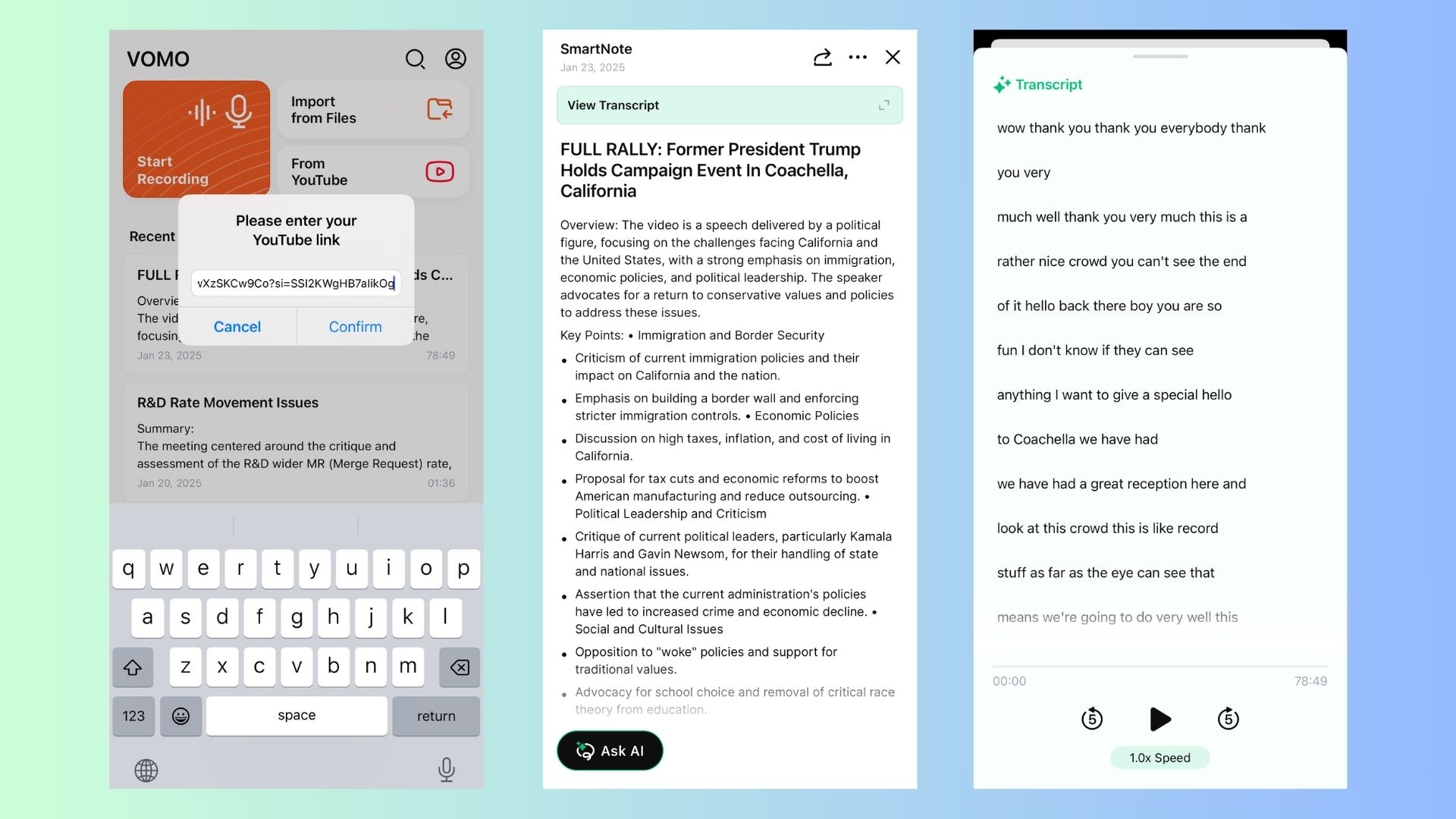
為什麼使用 VOMO AI 而不是下載音訊?
✔ 轉錄 YouTube 影片 directly from URLs – No need for manual downloads. It’s the most effective way to 取得 YouTube 謄本 即刻
✔ AI 驅動的摘要 –Extracts key takeaways without listening to full videos, letting you summarize YouTube videos with AI in minutes.
✔ 多語言支援 – Transcribes and translates content on YouTube in 50+ languages. If you’ve ever asked, “is there something that will translate YouTube videos to English?”, this is your solution.
✔ 適用於任何 YouTube 內容 - 訪談、演講、播客、會議。
✔ 可分享的筆記頁連結 - 立即建立 文字式摘要 合作。
💡 IInstead of cluttering your storage with audio files, use VOMO AI to turn video into a document to get searchable, shareable text.
🎯想要毫不費力地轉錄 YouTube 影片嗎? 點選此處,利用 VOMO AI 獲得精確的謄本和 AI 驅動的摘要!
YouTube’s Free Audio Library (For Royalty-Free Music)
如果您正在尋找 背景音樂或音效,YouTube 提供了 合法、免費 下載音訊的方式:
🔹 如何存取:
1️⃣ 前往 YouTube 工作室.
2️⃣點擊 「音訊圖書館」 從左側功能表。
3️⃣ 瀏覽和 下載免版稅曲目 免費。
💡 非常適合需要免費音樂來製作影片、播客或簡報的創作者。
Third-Party Tools to Extract Audio from YouTube
如果您需要 來自 YouTube 視訊的 MP3 檔案,第三方工具提供解決方案。但是,請務必確保您已獲得下載受版權保護內容的許可。
線上 YouTube 音訊轉換器
1️⃣ Y2Mate (快速且免費)
✔ 皈依者 將 YouTube 影片轉換為 MP3 或 MP4.
✔ 無需安裝軟體。
✔ 步驟: 複製視訊 URL → 貼入 Y2Mate → 選擇 MP3 → 下載.
2️⃣ AISEO (高品質 MP3 轉換)
✔ 由 AI 驅動 無須註冊即可轉換 MP3.
✔ 快速且 高品質 音訊擷取。
✔ 步驟: 貼上 YouTube 連結 → 轉換 → 下載 MP3.
🔗 試試 AISEO
適用於 YouTube 音訊下載的桌面應用程式
對於經常下載 YouTube 音訊的使用者,桌上型電腦軟體提供更多 控制與品質選項.
3️⃣ 4K 影片下載器 (最適合高品質下載)
✔ 下載 整個播放清單和頻道.
✔ 支援 MP3、M4A 和 OGG 格式.
✔ 步驟: 安裝應用程式 → 貼上 YouTube 連結 → 選擇「擷取音訊」 → 下載.
4️⃣ youtube-dl (最適合進階使用者)
✔ 命令列工具,可 下載並擷取音訊.
✔ 需要 基本技術知識.
✔ 步驟: 執行指令 → youtube-dl -x -audio-format mp3 [YouTube URL].
💡 這些工具很有用,但只能用於 個人、非商業用途 以避免侵犯版權。
The Biggest Mistake: Converting to MP3 Always Improves Quality
One of the most common misunderstandings is audio quality.
In reality:
- YouTube audio is already compressed (~256 kbps max)
- Converting to MP3 can reduce quality further
👉 Better approach:
- Keep original format (M4A / Opus) when possible
MP3 vs M4A vs Opus: Which Format Should You Choose?
From testing different formats:
- MP3: Best compatibility
- M4A: Better quality at smaller size. (Learn how to transcribe M4A files to text if you work with this format often.)
- Opus: Highest efficiency (less widely supported)
👉 Recommendation:
- Use M4A for best balance
- Use MP3 only if compatibility is required
Why Most Tools Break or Stop Working Over Time
Many tools become unreliable due to:
- YouTube backend updates
- Legal pressure
- Maintenance issues
This explains why:
👉 “working today” tools often fail later
Batch Downloading: How to Extract Audio from Playlists
For large-scale usage:
- Command-line tools support playlists
- Some desktop apps allow bulk downloads, similar to how professionals 批量轉錄音訊檔案 以節省時間。
If you often work with captions, finding a reliable YouTube subtitle downloader is another great way to process content in bulk.
然而:
- Setup is more complex
- Processing time increases
Batch workflows are powerful—but not beginner-friendly.
Why Simplicity Matters More Than Power
After comparing all methods, the biggest difference is usability:
- Command-line tools = powerful but complex
- Online tools = simple but risky
- Desktop apps = balanced but limited
👉 The best solution depends on your workflow, not just features.
When You Should Use Transcription Instead of Downloading
From practical use, transcription is better when:
- You need notes from lectures
- You want to extract insights from podcasts
- You’re doing research or content analysis
Instead of listening to a 1-hour video, you can:
👉 read → 搜尋 YouTube 謄本 → summarize
法律與道德考量
下載 YouTube 內容 擅自 可以 違反著作權法和 YouTube 的服務條款.
✔ 在下列情況下,您可以合法下載音訊
✅ 您有一個 訂閱 YouTube Premium 或 YouTube Music.
✅ 內容是 永久 (YouTube 音訊庫)。
✅ 您有 創作者的明確許可.
🚫 您不能合法下載受版權保護的內容 未經許可不得分發、轉售或再利用。
💡 VOMO AI 提供 符合道德規範的替代方案 透過提供 以文字為基礎的轉錄和摘要 而不是直接下載音訊。
When You Should Use Transcription Instead of Downloading
From practical use, transcription is better when:
- You need notes from lectures
- You want to extract insights from podcasts
- You’re doing research or content analysis
Instead of listening to a 1-hour video, you can:
👉 read → search → summarize
