

如果您想知道 如何上傳演講至 AI, 簡短的答案是:您不能直接上傳視訊或音訊講義檔案到 ChatGPT。但是,有專門的 AI 轉錄 工具 那 讓您輕鬆將講義轉成文字, 、摘要和可搜尋的筆記。.
這些工具不僅能節省時間,還能幫助學生和教育工作者更有效地管理學習材料。讓我們來探索使用 AI 處理講義錄音的最佳方法。.

為什麼不能直接上傳演講至 ChatGPT
目前、, ChatGPT 不允許直接上傳演講錄音-無論是視訊或音訊檔案。AI 是針對以文字為基礎的輸入而設計,這表示它無法自動處理原始媒體檔案。.
如果您希望 ChatGPT(或任何人工智能聊天機器人)協助總結或分析演講,您首先需要 將您的錄音轉換成文字. .這就是 AI 轉錄平台的用武之地 - 它們是您錄製的內容與 AI 驅動的學習工具之間的橋梁。.
Why Uploading Lectures to AI Still Feels Complicated
After testing multiple tools for lecture transcription and note generation, one issue becomes clear:
The workflow is still fragmented.
在實際使用中:
- One tool is used for transcription
- Another for summarization
- A third for organizing notes
This multi-step process slows down learning and creates unnecessary friction.
The Real Workflow: Upload → Transcript → Structured Notes
The most reliable workflow follows three steps:
- Upload lecture audio or video
- Generate a clean transcript
- Convert the transcript into structured notes
Skipping transcription often leads to poor summaries and missing key concepts. This step is essential for accurate and useful results.
使用 AI 轉錄工具轉換講義
至 使用 AI 上傳和處理講義、, 首先將它們轉錄為文字。專業 AI 謄寫工具 可自動辨識語音、識別講話者,並產生高度精確的謄本。.
在這些工具中、 VOMO AI 本書以其精確性、聰明的總結和以章節為基礎的謄本組織而著稱,是學生和教育工作者的理想選擇。.
方法如下:
- 前往 VOMO.ai.
- 上傳您的演講錄音(音訊或視訊)。.
- 等待幾分鐘,當 AI 將您的 音訊轉文字 自動。
- 使用內建的 Smart Notes 和章節分割功能檢閱、編輯和整理您的筆記本。.
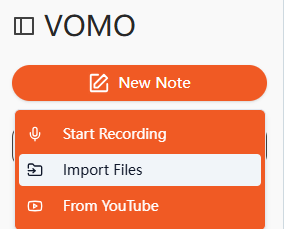
此結構可幫助學生有效率地瀏覽冗長的講義,並專注於學習重點。.
將演講影片轉換成文字
如果您的 講座會錄製成視訊、, you can still process it using AI transcription tools that 支援 視訊轉文字 轉換. These platforms extract both the spoken content and contextual cues (like slide changes or speaker transitions) from your video.
VOMO AI, for example, allows you to upload an MP4 file or paste a YouTube lecture link. The AI then generates a full transcript, complete with summaries and topic divisions for improved readability.
這種方法讓我們更容易:
- 稍後檢視錄製的課程,無需重新觀看整個視訊。.
- 建立可搜尋的備考筆記。.
- 與同學分享總結的資料。.
Why Raw Transcripts Are Not Enough for Learning
Many users assume transcripts alone are sufficient—but this is rarely the case.
實際上:
- Transcripts are long and unstructured
- Filled with filler words and repetition
- Difficult to scan quickly
Without processing, transcripts become:
👉 hard to read
👉 inefficient for studying
Cleaning Transcripts: The Step Most People Skip
Before turning transcripts into notes, cleaning is essential.
常見問題包括
- Filler words (“um”, “uh”)
- Repeated phrases
- Misheard words
Cleaning improves:
- Readability
- Summary quality
- Overall learning efficiency
The Biggest Challenge: Handling Long Lectures (1–3 Hours)
Long lectures introduce serious usability problems.
在真實情境中:
- Transcripts can exceed 10,000–20,000 words
- Editing becomes overwhelming
- Finding key points is 耗時
This is why structuring and summarization are critical steps.
Why AI-Generated Notes Often Miss Important Concepts
AI summaries are not always reliable.
From testing different tools:
- Key ideas may be skipped
- 可能會遺失上下文
- Notes can feel too generic
This often happens when:
- 謄本不準確
- Prompts lack structure
- Content is too long or complex
From Transcript to Study Notes: What Actually Works
Effective study notes require structure.
The most useful notes include:
- Key concepts
- 精要摘要
- Clear topic organization
- 可行的洞察力
This transforms transcripts into:
👉 usable study material
instead of
👉 raw text
Transcript + Slides: Why Context Improves Note Quality
Lecture content often includes visual elements.
實際上:
- Slides contain key definitions
- Diagrams provide context
- Audio alone may miss important details
Combining transcripts with slides leads to more complete and accurate notes.
Transcript + Slides: Why Context Improves Note Quality
Lecture content often includes visual elements.
實際上:
- Slides contain key definitions
- Diagrams provide context
- Audio alone may miss important details
Combining transcripts with slides leads to more complete and accurate notes.
A Smarter Workflow: All-in-One Lecture Processing
The most efficient setup combines:
- 上傳
- 轉錄
- Note generation
- AI Q&A
Instead of switching between multiple tools, an integrated workflow saves time and effort.
Tools like VOMO AI bring all of these steps into one place.
將講義上傳至 AI 工具的好處
使用 VOMO AI 等人工智能工具進行講義轉錄具有多項關鍵優勢:
- 節省時間: 自動將數小時的錄音轉換成可閱讀的摘要。.
- 更好的組織: 將筆錄分成章節,以符合邏輯流程。.
- 無障礙: 幫助有聽力障礙或缺課的學生。.
- 生產力提升: 讓學習、引用和參考毫不費力。.
By transforming spoken lectures into text, you make your academic materials smarter, more searchable, and easier to retain.
Accuracy Still Matters: Why Good Audio Improves Results
音訊品質 directly affects transcription quality.
在實際使用中:
- Background noise reduces accuracy
- Multiple speakers increase complexity
- Poor recordings lead to errors
Improving audio quality significantly improves results.
Accuracy Still Matters: Why Good Audio Improves Results
Audio quality directly affects transcription quality.
在實際使用中:
- Background noise reduces accuracy
- Multiple speakers increase complexity
- Poor recordings lead to errors
Improving audio quality significantly improves results.
最終想法
You can’t upload lectures directly to ChatGPT—but you can still use AI effectively by pairing it with 謄寫工具. Platforms like VOMO AI let you upload lectures, transcribe them, and even summarize the key points instantly.
取得文字後,您可以將文字帶入 ChatGPT (或其他 AI 助理) 以提出後續問題、建立快閃卡或產生摘要。.
簡而言之,將講義上傳至 AI 始於 先將其轉錄以及 VOMO AI 提供最有效、最精確的方式來實現這一目標。.
