


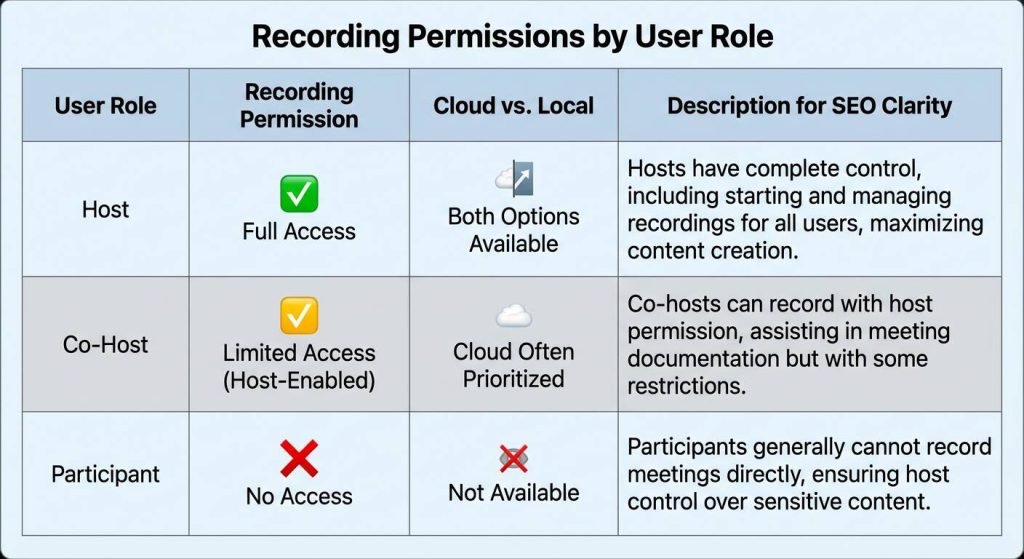
To record a Zoom meeting as a participant, you must either be granted “Allow to Record” permissions by the host or be assigned as a Co-host. Many users find themselves stuck when the host forgets to enable these settings, leading to lost information and the stress of manual note-taking. Instead of relying on restricted native buttons, modern professionals are turning to AI-driven capture methods to ensure no detail is missed.
VOMO empowers you to capture meetings with 99% 精度 even when you aren’t the host. By focusing on high-fidelity transcription rather than just video, VOMO 自動 generates actionable AI meeting notes including key decisions and tasks in minutes. It is the elite choice for those who need reliable documentation without the technical hurdles of Zoom’s native permission system.

Native Zoom Recording for Participants
Understanding Participant Recording Restrictions in 2026
By default, Zoom restricts the ability to record meetings to the host to protect privacy and data integrity. If you are a participant, the “Record” button in your meeting toolbar will be disabled or will prompt you to “Ask the host for permission”. As of 2026, these security protocols remain a standard feature of the Zoom ecosystem, often leaving users wondering how to get meeting notes from Zoom effectively.
How to Ask the Host for “Allow to Record” Permissions
The most direct way to record is to have the host hover over your name in the 參與者 list, click 更多資訊, 並選擇 Allow to Record. Once granted, you can record the session locally to your computer.
The Co-Host Method: Gaining Full Recording Control
If the host assigns you as a Co-host, you automatically gain the privilege to start a cloud or local recording. This is ideal for designated note-takers or project managers who need to ensure the session is documented as meeting minutes without the host’s constant intervention.
3 Official Ways to Access Meeting Data Without Local Recording
Zoom AI Companion: Getting Summaries via Email
Even if you cannot record the video, the host can enable the AI 伴侶. Once the meeting ends, Zoom generates an automatic summary with action items that is emailed to the host and can be shared with all participants.
Live In-Meeting Notes: Collaborating in Real-Time
Participants can click the Notes button on the bottom toolbar to create and edit shared notes during the session. These notes are accessible later via the Zoom web portal’s “Notes” dashboard, providing a text-based alternative to a full video recording for those learning how to take good meeting notes.
Downloading Cloud Transcripts from the Web Portal
If the host records the meeting to the cloud, Zoom generates a VTT transcript file. Participants with the correct sharing link can access the web portal to download these transcripts, allowing them to review the dialogue without needing the original video file.
Why Video Recording Isn’t Always the Answer
The “Hidden Cost” of Video: Storage and Review Fatigue
Common feedback on platforms like Reddit highlights that video recordings are often cumbersome. A 60-minute meeting results in a large file that requires significant storage and, more importantly, another 60 minutes to re-watch if you are looking for a specific detail. This is why many ask, “What are meeting notes supposed to provide?”—the answer is quick, scannable insights.
Privacy and Notification Hurdles in 2026
In 2026, privacy regulations often require “Recording in Progress” announcements that can disrupt the flow of a meeting. Many professionals now prefer discrete, text-focused capture methods that prioritize insights over raw footage.
From Recording to Action: The VOMO Intelligent Advantage
99% Transcription Accuracy with Advanced Speaker Identification
VOMO delivers a massive upgrade over standard transcripts by offering 99% accuracy. Unlike basic tools that struggle with accents or overlapping voices, VOMO accurately identifies different speakers, ensuring your meeting notes are ready to use immediately without heavy editing.
Converting Audio/Video into Structured Meeting Notes Automatically
Beyond simple text, VOMO uses AI to transform recordings into structured 會議記錄. It automatically extracts key points, final decisions, and specific action items, turning a long audio file into a clear roadmap for your team. This proves that AI can indeed take meeting notes 高精度。.
Smart Templates: Adapting to Your Meeting Context
VOMO is designed for efficiency; it automatically detects the meeting context and applies the correct template. Whether it is a creative brainstorm or a formal board meeting, VOMO formats the output with no manual setup required from the user.
AI Q&A: Chatting with Your Transcript to Find Instant Answers
A standout feature is the AI Q&A, which allows you to “ask” your meeting recordings questions. If you need to know “What was the budget mentioned?” or “Who is responsible for the design?”, the AI provides the answer instantly based on the transcript, demonstrating how an AI note taker improves follow-ups.
Step-by-Step: How to Capture Zoom Content Efficiently (Non-Host)
Strategy 1: Using Official Post-Meeting Summaries
- Request the host to start the AI 伴侶 summary.
- Check your email or the Zoom portal after the meeting for the generated recap.
- Manually copy action items into your task manager.
Strategy 2: AI Meeting Assistants for Independent High-Accuracy Notes
For a more powerful, host-independent approach using the best free AI meeting note taker options:
- 使用 VOMO to record the audio or upload the Zoom audio file.
- Let the AI process the transcription in minutes, even for long sessions.
- Utilize Smart Templates to organize your meeting notes and generate a professional report instantly.
Manual Recording vs. AI Automation
Comparison Table: Zoom Native vs. VOMO AI
| 特點 | Zoom Native (Participant) | VOMO AI (Advanced) |
| Permission Needed | Yes (Host must grant) | No (Independent upload/record) |
| 精確度 | 視情況而定 | 99% Guaranteed |
| Structuring | Basic Summaries | Action Items & Templates |
| AI 互動 | 有限責任 | Full AI Q&A Chat |
Frequently Asked Questions (People Also Ask)
Can the host see if I am recording with a third-party tool?
If you use system-level screen recording (like OBS), Zoom generally cannot detect it, but you should always respect privacy and local laws regarding consent.
How do I get a transcript if the host didn’t enable AI Companion?
您可以使用 VOMO to record the meeting audio locally. Once the meeting ends, simply upload the file to VOMO to receive a 99%-accurate transcript and a structured summary within minutes.




