


To remove AI 會議記錄 from Zoom, you must log into the Zoom web portal, navigate to the “AI Companion” or “Meeting Summary” section under your recordings, and select the specific summary you wish to delete. Many users struggle with inaccurate, cluttered summaries that are automatically emailed to participants, creating a privacy and editing nightmare. Instead of settling for messy, hard-to-manage notes, professionals in 2026 are shifting toward more precise, autonomous documentation tools.
VOMO eliminates the “delete and redo” cycle with 99%‑accurate transcription and automatically generated, actionable meeting notes—giving you fully structured insights while keeping complete control over your data.

Quick Tutorial: Deleting AI Meeting Summaries via Zoom Web Portal
Locating the “AI Companion” Tab in Your Account Settings
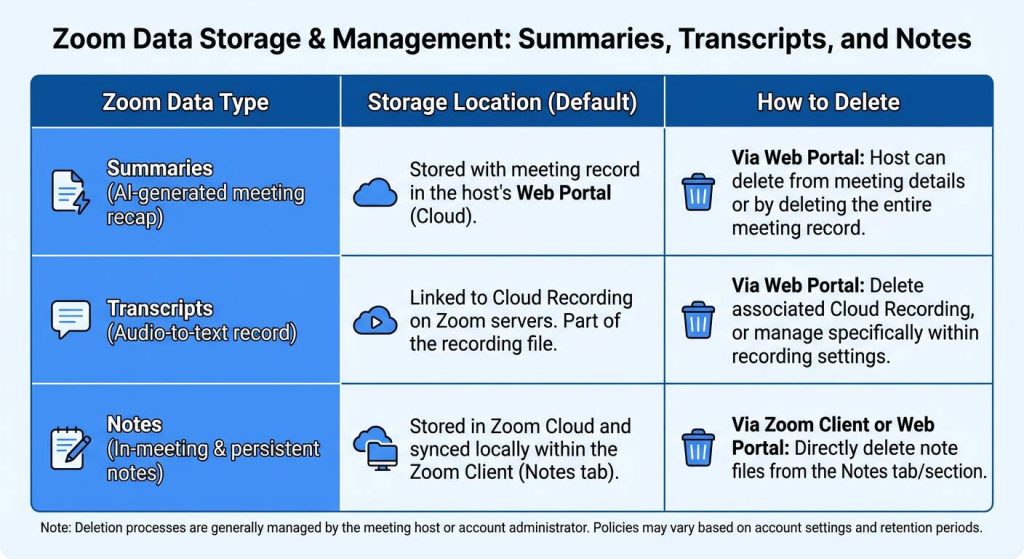
To manage your AI-generated data, you must log into the Zoom web portal via a browser. Direct management of these summaries is typically handled under the “Summaries” or “AI Companion” section of the web dashboard, where you can see what are meeting notes currently stored in your history.
Step-by-Step: Deleting or Editing Existing Summaries
- Sign in to the Zoom web portal.
- 導覽到 AI 伴侶 或 摘要 節。
- Find the specific meeting recap you wish to remove.
- 按一下 刪除 icon or select the meeting to edit the content before it is shared further.
How to Disable AI Companion to Prevent Future Auto-Summaries
If you wish to stop Zoom from generating notes entirely, the host must click Stop Summary in the meeting toolbar during the session. Alternatively, you can disable the AI Companion feature globally in your Zoom account settings. If you still need a record but want more control, you might wonder can you record a Zoom meeting if you’re not the host to maintain your own private documentation.
Managing Shared Access: Who Can See and Delete Zoom Notes?
Host vs. Participant Permissions for Data Deletion
Typically, only the meeting host has the authority to delete or edit AI Companion summaries. Participants can view summaries if the host shares them, but they generally cannot remove them from the host’s web portal, making it difficult to organize meeting notes if you aren’t the owner.
Stopping Automatic Email Summaries to Participants
Zoom AI Companion often emails summaries to the host and participants automatically. To stop this, the host must adjust the “AI Companion” settings in the web portal to restrict distribution and ensure only effective meeting notes reach the intended audience.
Why You Might Be Deleting Your Notes (And How to Fix It)
Solving Accuracy Issues: The 99% Precision Standard
Many users delete Zoom notes because the default AI struggles with speaker identification or technical jargon. VOMO provides 99% accurate transcription, meaning you spend less time deleting errors and more time learning how to summarize meeting notes effectively.
Tired of Manual Editing? Using Smart Templates for Instant Structure
Instead of raw, unformatted summaries, VOMO uses Smart Templates that adapt to your meeting context automatically. This eliminates the need to delete and rewrite notes, as they are already structured with action items, much like a professional board meeting structure.
VOMO: The Secure, High-Accuracy Alternative to Native AI
99% Accuracy: Transcription You Can Trust Immediately
VOMO delivers high-fidelity results with clear speaker identification. This level of precision ensures that the notes you keep are a reliable record, similar to how an AI note taker improves follow-ups by providing usable data right away.
Absolute Data Autonomy: Full Control Over Your Meeting History
Unlike built-in platform tools that may have rigid storage policies, VOMO offers unlimited transcription minutes for Pro users and complete control over your files. You can upload audio or video and delete records permanently whenever you choose, which is why it’s often cited as the best free AI meeting note taker for flexible use.
AI Q&A: Query Your Meeting Without Keeping Clunky Summaries
VOMO features an AI Q&A tool that allows you to “Chat with your transcript”. This means you can find specific answers—like a mentioned deadline—without having to keep or read through long summaries, proving that AI can take meeting notes that are actually interactive.
Privacy-First Meeting Documentation in 2026
The Risk of “Cloud-Only” AI Summaries
On platforms like Reddit, many users express concern that Zoom AI Companion summaries are stored in the cloud and often distributed automatically. This “cloud-only” approach can lead to privacy leaks, making users seek ways to get meeting notes from Zoom without the automatic sharing risks.
Why Professionals are Switching to Dedicated AI Agents
In 2026, privacy-conscious professionals are moving away from built-in platform summaries toward dedicated AI agents. These tools offer better data autonomy, allowing you to choose exactly how to take meeting notes for any meeting and where to store your 99%-accurate transcripts.
Comparison Table: Native Zoom Summaries vs. VOMO Intelligent Notes
| 特點 | Zoom AI 伴侶 | VOMO Intelligent Notes |
| 精確度 | Varies by meeting quality | 99% Guaranteed Precision |
| Speaker ID | Basic identification | Advanced Speaker Detection |
| 範本 | Generic summaries | Context-Aware Smart Templates |
| Data Control | Host-centric / Auto-share | User-Led / Total Autonomy |
| Interaction | Basic recap | Full AI Q&A Chat with Data |
Frequently Asked Questions (PAA)
If I delete the AI summary, is the cloud recording still safe?
Yes, deleting an AI summary usually does not affect the video recording file, which is stored separately. However, if you are looking to create formal meeting minutes, you should ensure you have a text backup before deleting.
How do I stop Zoom from saving my meeting notes to the web portal?
You must disable the AI 伴侶 和 注意事項 features in your account settings. If you need notes without cloud-portal storage, using an external tool like VOMO allows you to record locally and manage data on your own terms.
Conclusion: Better Notes, Better Privacy
VOMO is the premier ai meeting nota taker, providing 99% transciption accuracy and super fast processing to ensure your meeting documentation is private, accurate, and actionable.




