


轉換 audio to TXT is the process of turning spoken words from recordings, podcasts, interviews, or lectures into written text. With modern AI 轉錄 tools, you can transform any sound file into a precise text document within minutes. Whether you’re capturing meeting notes, content ideas, or subtitles, this method saves hours of manual typing and ensures professional accuracy.
Among the available tools, VOMO is often valued for its simplicity and reliable transcription quality, making the conversion process smooth even for long or multi‑speaker recordings.

Understanding Audio-to-TXT Conversion
Audio-to-TXT conversion relies on automatic speech recognition (ASR), a technology that listens to your audio and identifies words using trained AI models. The system detects speech patterns, filters out background noise, and produces organized sentences ready for editing or export.
Ideal for creators, journalists, and educators, this automation eliminates repetitive transcription work while improving quality and speed.
Why Convert Audio to TXT?
Transcribing audio lets you make spoken content searchable, shareable, and accessible. Typical advantages include:
- Easier post-production editing for podcasts and interviews
- Searchable archives of meetings or lectures
- Better accessibility for individuals with hearing challenges
- Quick reference and content repurposing across media
專業提示: If you’re working with sound extracted from videos, most AI tools allow you to process 視訊轉文字 using the same workflow, converting spoken content from video sources into readable captions or notes.
步驟 1:上傳您的音訊檔案

Start by selecting an AI transcription platform or 語音轉文字 app. Upload your audio file — most services support MP3, WAV, M4A, AAC, and other common formats. Some platforms also let you paste a URL for live recordings or cloud storage links.
Before uploading, ensure your file’s sound quality is clear and background noise is minimal for the best results.
Step 2: Generate the Transcript Using AI
Once uploaded, the AI engine automatically analyzes the sound and produces a preliminary transcript. Advanced systems recognize accents, pauses, and filler words, providing near‑human accuracy.
You’ll typically see the transcript appear in real time or after brief processing. Review any highlighted areas where AI confidence is low — this helps fine‑tune precision for final export.
Step 3: Export or Download the TXT File
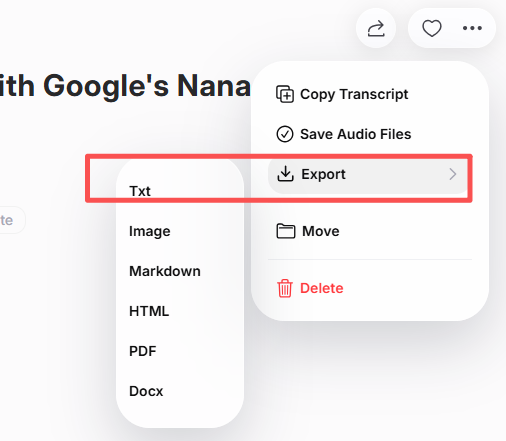
Once edits are complete, export your transcript as a plain TXT, DOCX, or PDF file. You can store it locally or share it via collaborative platforms for teamwork. Some AI transcription tools support automatic integration with cloud drives or CMS systems for smooth workflow automation.
Best Tools to Convert Audio to TXT
When choosing a transcription tool, focus on accuracy, language support, and speed. Popular solutions include:
| 工具 | 主要特點 | 最適合 |
|---|---|---|
| VOMO | Real‑time transcription + multi‑format export | Professionals & creators |
| Otter AI | Smart summaries & collaborative notes | 商務會議 |
| 說明 | Integrates editing + transcript | Podcast 製作 |
| Notta AI | Fast multilingual support | Global teams |
| Whisper (OpenAI‑based) | High accuracy & open access | Technical users |
Tips for Higher Transcription Accuracy
- Record with a high-quality microphone.
- Keep environments quiet and reduce echo.
- Use lossless formats like WAV for precise sound capture.
- 說話清楚,避免聲音重疊。
- Always proofread your text before exporting.
Following these best practices ensures each transcript reads naturally and captures every spoken detail with 99% clarity.
總結
Turning audio into TXT is easier than ever with AI-powered transcription tools. By uploading your file, generating automated text, refining the output, and exporting it, you gain fast, accurate, and accessible written content. From professional meetings to podcast production, this workflow unlocks efficiency and clarity — making your spoken words work smarter for you.




