

Creating a Word transcript from MP3 audio is fast and easy using AI transcription tools. Simply upload your MP3 file, let the system convert the spoken content into text, and export the result as an editable Word document. This method saves time, improves accuracy, and produces a professional transcript suitable for lectures, interviews, meetings, or podcasts.
工具如 VOMO simplify the process by automatically converting audio speech into clean, editable Word documents in just a few clicks.

What Does It Mean to Create a Word Transcript from MP3 Audio?
Creating a Word transcript from MP3 audio means transforming spoken words from an audio file into written text that can be edited in Microsoft Word. MP3 files are widely used for high-quality audio recordings, making them perfect for transcription purposes.
The process relies on AI-powered 音訊轉文字 technology to detect speech, add punctuation, and structure content into readable paragraphs ready for editing and sharing.
Why Convert MP3 Audio into Word Documents?
Turning MP3 recordings into Word transcripts offers several benefits:
- Saves hours compared to manual typing
- Makes audio content searchable and editable
- Improves accessibility for reading and sharing
- Enables easy reuse for reports, blogs, or training
- Simplifies documentation and archiving
Word transcripts make your audio content flexible and easy to work with in both professional and academic contexts.
Step 1: Upload Your MP3 File to a Transcription Tool
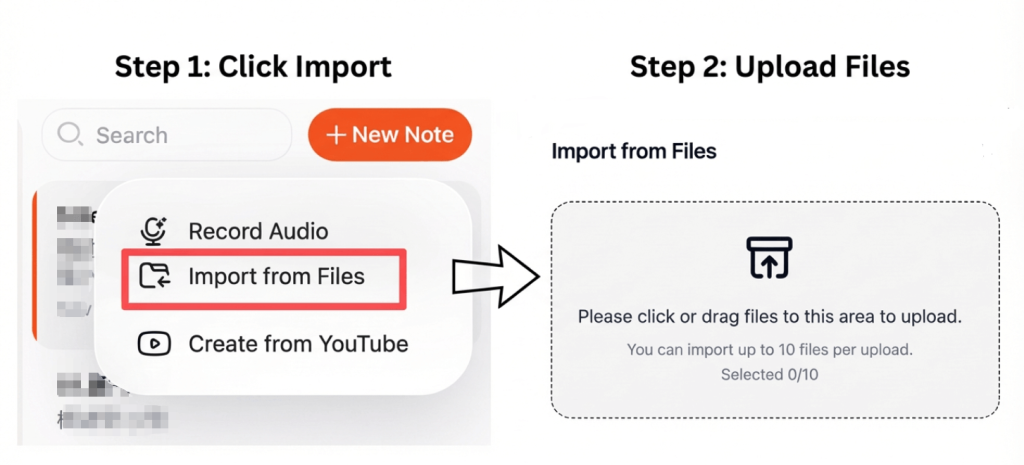
Select a transcription platform that supports MP3 uploads. Most modern tools allow you to upload files directly from your device or from cloud storage.
For best results:
- Use clear, high-quality recordings
- 將背景噪音降至最低
- Ensure speakers are easy to understand
High-quality audio ensures better transcription accuracy.
Step 2: Convert MP3 Audio into Text Automatically
Once uploaded, the AI system analyzes the audio and converts speech into written text. Advanced tools can detect multiple speakers, punctuate sentences, and organize the transcript into readable paragraphs.
Some platforms also support 視訊轉文字 conversion, allowing you to transcribe audio extracted from video files with the same accuracy and workflow.
Step 3: Export the Transcript as a Word Document
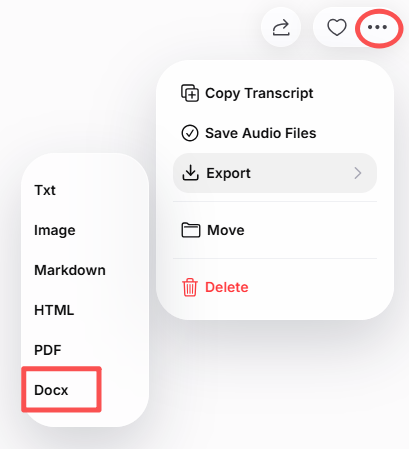
After transcription, review and edit the text if necessary. Then export the result as a Word (.docx) file.
With the Word document, you can:
- Edit and format the text easily
- Add headings, bullet points, or speaker labels
- Share with colleagues or students
- Store for future reference
Many tools also allow exporting in PDF or TXT formats for additional flexibility.
Best Tools to Convert MP3 to Word
Here are some reliable tools for converting MP3 audio into Word documents:
- VOMO – Fast, accurate transcription with clean Word export
- Otter AI – Great for meetings, lectures, and interviews
- 諾塔 – Supports multiple languages and accents
- 說明 – Ideal for podcasters and content creators
- Open-source transcription tools – 適用於開發人員與研究人員
These platforms use advanced 音訊轉文字 algorithms to produce accurate and editable transcripts.
Tips for High-Quality Transcription
To maximize transcription accuracy:
- 在安靜的環境中錄製
- 說話清晰,步伐穩定
- Avoid overlapping speech
- Choose the correct language and accent
- Proofread the transcript before exporting
Even minor improvements in audio clarity can significantly improve the final transcript.
總結
Creating a Word transcript from MP3 audio using AI is fast, accurate, and practical. By uploading your audio, letting AI handle the transcription, and exporting the result as a Word document, you can produce clean, editable, and searchable transcripts in minutes.
This method makes lectures, meetings, interviews, and podcasts easier to manage, edit, and share.




