


Can AI Take Meeting Notes?
نعم, AI can now take meeting notes efficiently and accurately, capturing key points, action items, and decisions without requiring manual typing. By using AI-powered tools, meetings can be transcribed in real time or after the fact, creating structured summaries that save time, reduce errors, and improve team accountability. With AI handling note-taking, participants can focus fully on the discussion while ensuring every important detail is recorded.
أدوات مثل فومو enhance this process by automatically transcribing conversations and summarizing action items directly into Google Docs, making post-meeting follow-ups seamless.

How AI Transcribes Meetings from Audio to Text
One of the core capabilities of AI note-taking is converting spoken content into text. By recording meetings via platforms like Zoom or Google Meet, AI transcription tools can automatically process تحويل الصوت إلى نص, accurately capturing dialogue from multiple speakers.
For example, a team meeting discussing a quarterly marketing plan can be recorded, and AI tools will create a verbatim transcript. The transcript can then be formatted with timestamps, speaker labels, and key points, ensuring nothing gets missed. This approach is particularly useful for long or detailed meetings where manual note-taking would be cumbersome.
Turning Video to Text for Comprehensive Meeting Notes
AI doesn’t just handle audio—it can also extract text from تحويل الفيديو إلى نص. Video meetings often include visual cues, slides, and demonstrations that are critical to document. AI tools can combine audio transcription with video analysis, capturing spoken content and summarizing visual elements into clear notes.
For instance, during a product demo, AI can identify slide titles, key figures, and speaker commentary, compiling all of this into a structured Google Doc. This allows teams to review the discussion even if they couldn’t attend live.
Best AI Meeting Noters

Choosing the right AI meeting noter can make a significant difference in productivity and accuracy. Here are some of the top AI tools for taking ملاحظات الاجتماع:
- فومو - Automatically transcribes meetings, summarizes key points, and integrates directly with Google Docs. It supports both تحويل الصوت إلى نص و تحويل الفيديو إلى نص, making it ideal for teams who want fully automated, accurate, and shareable notes.
- Otter.ai – Provides real-time transcription and highlights action items. Works well with Zoom and other video conferencing platforms.
- Fireflies.ai – Records, transcribes, and generates summaries from meetings across multiple platforms. Offers integrations with popular project management and collaboration tools.
- فاثوم – Focuses on meeting highlights and summaries, helping teams quickly identify decisions and action items.
- سونيكس – A transcription-first tool that converts audio and video recordings into structured notes, with multilingual support.
Using these AI meeting noters ensures accurate documentation, reduces administrative overhead, and allows participants to focus fully on discussions.
Benefits of AI Meeting Notes
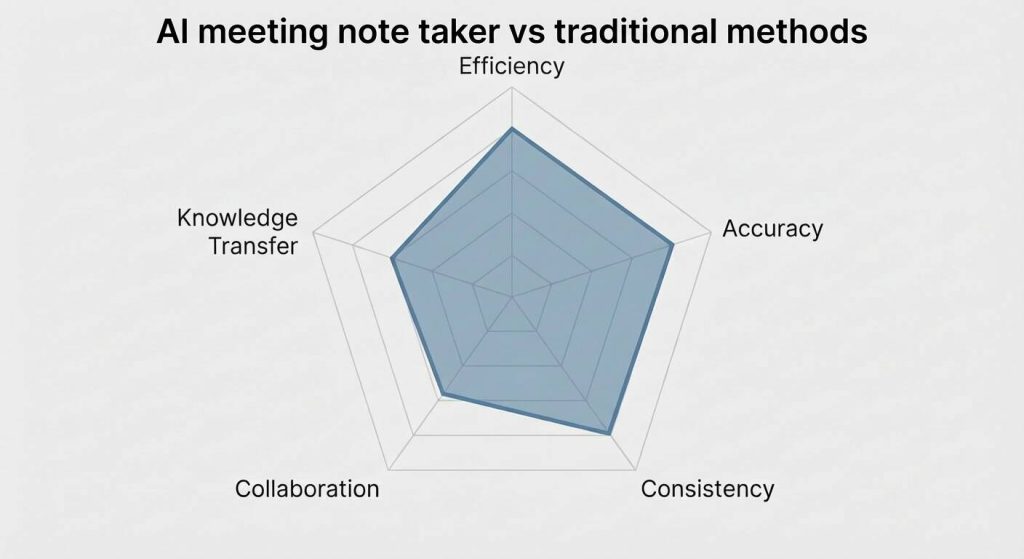
AI-powered meeting notes offer several advantages over traditional methods:
- الكفاءة: Notes are generated automatically, reducing the time spent typing.
- الدقة: AI minimizes errors in recording and ensures that all discussion points are captured.
- Consistency: Structured summaries follow a standard format, making it easy to track tasks.
- التعاون: Notes can be shared instantly with attendees or linked to project management tools.
These benefits translate into faster decision-making, improved accountability, and better knowledge transfer across teams.
Choosing the Right AI Tool for Meeting Notes
When selecting an AI note-taking solution, consider the following:
- Real-time vs post-meeting transcription: Some tools transcribe live, while others process recordings afterward.
- Integration with Google Docs or other platforms: Direct integration saves time and reduces manual steps.
- Support for audio and video inputs: Tools that handle both تحويل الصوت إلى نص و تحويل الفيديو إلى نص provide more comprehensive coverage.
- Summarization capabilities: Look for AI that can highlight action items and key decisions automatically.
For example, using a tool like VOMO allows you to automate transcription, summarization, and sharing in one workflow, reducing administrative overhead significantly.
How to Share and Use AI-Generated Meeting Notes
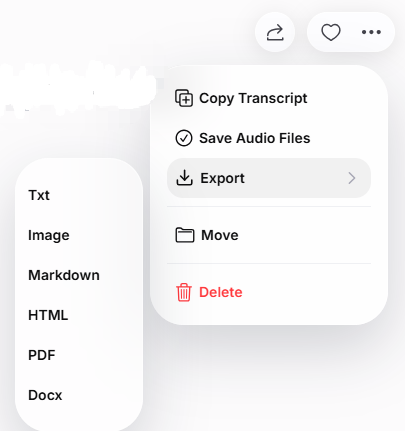
باستخدام AI meeting note taker like VOMO, sharing your meeting notes is simple and versatile. You can directly copy the text to share with your team, send a link to the transcribed notes, or export the notes in multiple formats such as TXT, Image, Markdown, HTML, or PDF. This flexibility ensures that all stakeholders can access the notes in the format that works best for them, whether for quick reference, detailed review, or integration with other tools.
- Direct sharing: Export the notes to Google Docs or PDFs for easy access.
- Attach to calendar events: Ensure attendees can access the notes directly from the meeting invite.
- Team collaboration platforms: Post summaries to Slack, Microsoft Teams, or project management tools for instant visibility.
Prompt sharing ensures that all stakeholders are aligned and can act on decisions immediately, improving productivity and follow-through.
الخاتمة
AI can take meeting notes reliably, turning both audio and video content into structured, actionable documents. By leveraging AI transcription and summarization tools, teams can focus on discussions instead of typing, maintain accurate records, and ensure accountability. Whether using AI for live meetings, recorded sessions, or video presentations, adopting these tools is becoming essential for efficient collaboration in modern workplaces.
FAQ: AI Meeting Notes
Can ChatGPT Take Meeting Notes?
نعم, ChatGPT can assist in taking meeting notes by generating structured summaries from transcripts or prompts. While it cannot join live meetings on its own, you can provide it with text from تحويل الصوت إلى نص or meeting transcripts, and it can quickly organize key points, action items, and decisions into a clear, professional format ready for Google Docs or other document platforms.
Can Gemini Take Meeting Notes?
Gemini can take meeting notes by analyzing conversation transcripts and summarizing them into actionable items. It works well with recorded meetings and can process both text and تحويل الفيديو إلى نص inputs, making it a useful tool for teams that want quick summaries without manually reviewing long discussions.
Can Microsoft Copilot Take Meeting Notes?
نعم, Microsoft Copilot can take meeting notes directly within Microsoft 365 apps like Teams and Word. It can capture key points, decisions, and tasks from live meetings or recorded sessions, and automatically organize them into structured notes. This integration allows seamless sharing and collaboration across Microsoft tools, reducing the effort needed for post-meeting documentation.
Can AI listen to a meeting and take notes?
Yes, AI note-taking tools can actively listen to live meetings on platforms like Microsoft Teams or Zoom, transcribe spoken content in real-time, and generate structured notes. Advanced AI can also highlight key points, identify action items, and summarize discussions, helping teams stay focused during the meeting while ensuring nothing important is missed. Some tools, like فومو AI Meeting Note Taker, can even automatically share these organized notes with participants immediately after the meeting.




