

Ein Video in ein Dokument umwandeln ist einfacher als die meisten Leute denken. Meiner Erfahrung nach können Sie entweder AI-Transkription Tools zur Umwandlung von Sprache in Text oder zur manuellen Transkription wichtiger Abschnitte, die dann als Word- oder PDF-Dateien gespeichert werden können. Neben Text lassen sich durch die Kombination von Standbildern aus Videos mit Transkripten auch visuell ansprechende Dokumente erstellen. Wenn Sie ein Video nur in ein Dokument einfügen möchten, können Sie es auch direkt verlinken.
Im Folgenden finden Sie eine praktische Übersicht darüber, wie ich persönlich die Konvertierung von Videos in Dokumente handhabe. Die beste Methode ist immer noch die KI-Transkription - sie kann ein Video in nur wenigen Minuten in Text umwandeln.

Was ist die Konvertierung von Videos in Textdokumente?
Umwandlung von Video- in Textdokumente ist der Prozess der Extraktion der gesprochenen Worte aus einer Videodatei und deren Umwandlung in lesbaren Text. Dieser Prozess verwandelt sperrige Multimediadateien in leicht zu scannende und durchsuchbare Dokumente.
Durch den Einsatz von KI-Technologie geht diese Konvertierung über einfache Rohtranskripte hinaus. Moderne Tools können erkennen, wer spricht, Zeitstempel hinzufügen und den Text in formatierte Absätze einteilen, so dass die Endausgabe wie ein professionell getipptes Dokument aussieht.
Die wichtigsten Vorteile der Umwandlung von Videos in schriftliche Inhalte
Verbessern Sie SEO-Rankings und Webzugänglichkeit mit Videotranskripten
Suchmaschinen wie Google können Videos nicht “sehen”, aber sie können Text crawlen und indexieren. Indem Sie Ihre Videos in Dokumente umwandeln, stellen Sie Suchmaschinen folgende Informationen zur Verfügung stichwortreicher Inhalt, Dadurch verbessert sich das SEO-Ranking Ihrer Seite drastisch.
Zusätzlich verbessern Textdokumente und Abschriften Barrierefreiheit im Internet. Sie ermöglichen es gehörlosen oder schwerhörigen Nutzern, Ihre Inhalte zu konsumieren, und stellen sicher, dass Sie die Compliance-Standards einhalten und ein größeres Publikum erreichen.
Nahtlose Wiederverwendung von Video-Assets (Blogs, soziale Medien, SOPs)
Ein einziges einstündiges Video kann eine wahre Fundgrube an Inhalten sein. Die Umwandlung dieses Videos in ein Dokument ermöglicht es Ihnen die Kernbotschaft neu ausrichten sofort.
Sie können das Textdokument in wöchentliche Blogbeiträge, LinkedIn-Updates, E-Mail-Newsletter oder strukturierte Standardarbeitsanweisungen (SOPs) für Ihr Team aufteilen. So maximieren Sie den ROI Ihrer ursprünglichen Videoaufzeichnung.
3 Wege zur Transkription von Video in Text
Der schnellste Weg, ein Video in ein Dokument umzuwandeln, ist die Erstellung eines Transkripts. Je nach Länge und Komplexität des Videos verwende ich entweder KI-Tools oder führe eine manuelle Transkription durch.
Methode 1: Nutzung eines KI-Transkriptionsdienstes
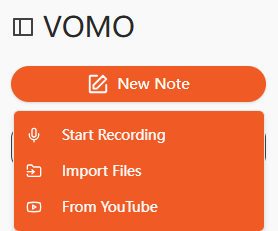
Ich lade meine Videos normalerweise auf VOMO.aimit dem ich MP4-Dateien innerhalb weniger Minuten in bearbeitbaren Text umwandeln kann. Andere Tools, die ich ausprobiert habe, sind HappyScribe und Go Transcribe. Diese Plattformen sind besonders praktisch für längere Webinare oder Vorlesungen, da sie im Vergleich zum manuellen Abtippen Stunden sparen.
Methode 2: Manuelle Transkription bei Bedarf
Bei sensiblen Inhalten oder Videos mit mehreren Sprechern spiele ich das Video in kurzen Abschnitten ab und gebe den Ton direkt in Microsoft Word oder Google Docs ein. Das ist zwar langsamer, gibt mir aber die volle Kontrolle und gewährleistet die Genauigkeit der Fachbegriffe.
Methode 3: Integrierte Tools in Word verwenden
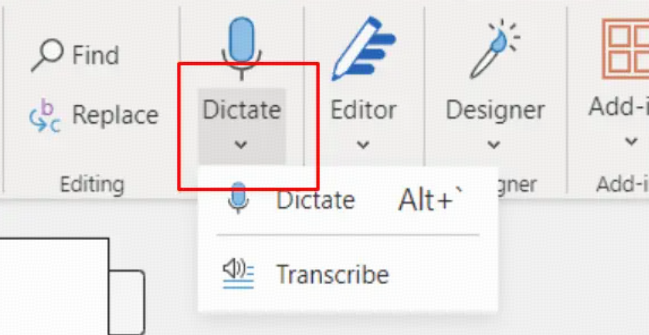
Ich habe auch mit der Funktion "Transkribieren" von Microsoft Word auf der Registerkarte Start experimentiert. Wenn Sie eine Videodatei hochladen, kann Word den Ton direkt im Dokument in Text umwandeln. Bei kürzeren Dateien geht das erstaunlich schnell und erfordert nur minimale Einstellungen.
| Merkmal | Manuelles Tippen | AI Transkriptionssoftware |
| Geschwindigkeit | Es dauert 3-4 Stunden pro Stunde Video. | Wandelt stundenlanges Audiomaterial in Minutenschnelle in Text um. |
| Genauigkeit | Anfällig für menschliche Ermüdung und Tippfehler. | Bis zu 99% Genauigkeit mit fortschrittlichen Modellen. |
| Kosten | Teuer, wenn man einen menschlichen Transkriptionisten einstellt. | Äußerst kostengünstig oder sogar kostenlos. |
Schritt-für-Schritt-Anleitung: Schnelles Konvertieren von Videos in Dokumente
Schritt 1: Lokale Videodateien hochladen oder YouTube-URLs direkt importieren
Die ersten Schritte sind einfach. Sie können Smart Notes ganz einfach erstellen, indem Sie lokale Videodateien hochladen oder die YouTube-Videoimportfunktion verwenden.
Damit entfällt die Notwendigkeit, umfangreiche Videos erst aus dem Internet herunterzuladen. Fügen Sie einfach den Link ein, und die KI beginnt sofort mit der Verarbeitung des Inhalts.
Schritt 2: Automatische Transkription mit 99%-Genauigkeit und Sprecheridentifizierung
Nach dem Hochladen erfasst VOMO jedes Detail und liefert automatisch in Sekundenschnelle ausgefeilte Notizen.. Die KI bietet eine Genauigkeit von bis zu 99% bei der Sprecheridentifizierung und erfordert keine manuelle Bearbeitung..
Es unterstützt die Transkription in über 50 Sprachen und eignet sich damit perfekt für internationale Teams oder fremdsprachige Videos..
Schritt 3: Szenenvorlagen für die sofortige Formatierung von Dokumenten anwenden
Nach der Transkription extrahiert die Smart-Note-Funktion von VOMO automatisch die wichtigsten Punkte und Zusammenfassungen, damit Sie die Informationen schnell organisieren können..
Diese Funktion generiert automatisch strukturierte Notizen für jedes Szenario und wandelt rohe Dialoge sofort in ein lesbares, professionelles Format um..
Schritt 4: Export in Word, PDF oder Freigabe über Cloud Link
Wenn Ihr Dokument fertig ist, können Sie Aufzeichnungen, Smart Notes und Erkenntnisse ganz einfach in verschiedenen Formaten mit Ihrem Team teilen.
VOMO bietet außerdem unbegrenzten Cloud-Speicher, der sicherstellt, dass Ihre Notizen nie verloren gehen und jederzeit und überall sicher abgerufen werden können..
Häufige Probleme bei der Umwandlung von Videos in Dokumente (basierend auf Benutzerforschung)
Aus der Nutzerforschung ergibt sich ein einheitliches Muster: Bei der Umwandlung eines Videos in ein Dokument geht es nicht nur um die Transkription, sondern auch um die Benutzerfreundlichkeit.
Viele Benutzer stellen fest, dass eine Rohabschrift allein oft nicht ausreicht. Statt eines sauberen, strukturierten Dokuments erhalten sie einen unformatierten Text, der eine umfangreiche manuelle Bearbeitung erfordert.
1. Abschriften sind keine gebrauchsfertigen Dokumente
Eine der häufigsten Frustrationen ist, dass Abschriften schwer zu lesen und noch schwerer wiederzuverwenden sind.
Die Nutzer berichten häufig, dass:
- Es gibt keine klare Struktur
- Die wichtigsten Punkte sind in langen Absätzen versteckt
- Der Inhalt ist nicht logisch aufgebaut
Infolgedessen wird eine Abschrift nur zu einer Zwischendatei und nicht zu einem fertigen Dokument.
2. Schlechte Formatierung macht den Inhalt schwer lesbar
Ein weiteres großes Problem ist die Formatierung.
Rohprotokolle enthalten häufig:
- Übermäßige Zeitstempel
- Gebrochene Sätze
- Keine Überschriften oder Abschnitte
Dadurch entsteht das, was viele als “Wall of Text” bezeichnen, was das Überfliegen und die Entnahme nützlicher Informationen erschwert.
👉 Was die Nutzer wirklich wollen:
- Klare Überschriften
- Aufzählungspunkte
- Gut gegliederte Absätze
3. Lange Videos sind schwer zu verarbeiten
Der Umgang mit langen Inhalten (30-60 Minuten oder mehr) ist immer noch eine Herausforderung.
Die Benutzer sind häufig betroffen:
- Langsame Verarbeitungsgeschwindigkeiten
- Beschränkungen der Dateigröße
- Die Notwendigkeit, Videos manuell zu teilen
Dadurch wird ein eigentlich einfacher Arbeitsablauf erschwert.
4. Der Arbeitsablauf ist zu kompliziert
Ein weiterer wichtiger Kritikpunkt ist die Anzahl der erforderlichen Schritte.
In vielen Fällen müssen die Nutzer dies tun:
- Das Video herunterladen
- Audio extrahieren
- Hochladen in ein anderes Tool
- Die Abschrift manuell bereinigen
Dieser mehrstufige Prozess verringert die Effizienz und schreckt von einer regelmäßigen Nutzung ab.
👉 Ideale Erwartung:
Arbeitsablauf in einem Schritt: Video → strukturiertes Dokument
5. Genauigkeitsprobleme und Kontextverlust
Selbst mit der KI-Transkription sind die Nutzer immer noch konfrontiert:
- Falsch gehörte Namen oder Fachbegriffe
- Mangelndes Verständnis des Kontextes
- Keine Unterscheidung zwischen wichtigen und unwichtigen Inhalten
Dies macht die Ausgabe für den professionellen Einsatz weniger zuverlässig.
6. Keine Zusammenfassungen oder umsetzbare Erkenntnisse
Die meisten Tools konzentrieren sich nur auf die Transkription, aber die Nutzer brauchen mehr als nur Text.
Sie sind auf der Suche nach:
- Die wichtigsten Erkenntnisse
- Zusammenfassungen
- Aktionspunkte
Ohne diese fehlt es dem Dokument an echtem Wert und Nutzwert.
Der klügere Ansatz: Vom Transkript zum strukturierten Dokument
Das ist der Punkt, an dem sich moderne KI-Tools wie VOMO auszeichnen.
Anstatt sich auf die Transkription zu beschränken, haben sie:
- Automatisches Strukturieren von Inhalten in lesbare Formate
- Extrahieren der wichtigsten Punkte und Zusammenfassungen
- Verwandeln Sie rohe Dialoge in umsetzbare Dokumente
Dadurch entfällt die Notwendigkeit einer manuellen Bereinigung und die Effizienz wird erheblich gesteigert.
Tipps aus meiner Erfahrung
Nach der Umwandlung von Dutzenden von Videos in Dokumente habe ich Folgendes gelernt:
- Audioqualität ist wichtig: Klares Audio garantiert AI Transkriptionsgenauigkeit. Ich empfehle, für die Aufnahme ein externes Mikrofon zu verwenden.
- Lange Videos teilen: Bei Videos, die länger als eine Stunde dauern, unterteile ich die Datei in Abschnitte von 10-15 Minuten. Das verbessert die Verarbeitungsgeschwindigkeit und die Genauigkeit.
- Überprüfen Sie Namen und Begriffe: Da die KI manchmal Fachbegriffe oder Namen falsch versteht, überprüfe ich diese manuell.
- Kombinieren Sie Ansätze: Um die Übersichtlichkeit zu erhöhen, bette ich manchmal wichtige Bilder ein, füge eine Abschrift und einen Videolink hinzu - alles in einem einzigen Dokument.
Mit diesen Strategien können Sie fast jedes Video effizient in ein ausgefeiltes, professionelles Dokument verwandeln.
Preisgestaltung: Wie viel wird Video-to-Document AI im Jahr 2026 kosten?
Ab 2026 bietet VOMO flexible und äußerst wettbewerbsfähige Preise, die sowohl für Privatpersonen als auch für Geschäftsleute geeignet sind.
| Ebene | Preis (wöchentlich) | Wesentliche Merkmale |
| Kostenlos | $0 | 30 Minuten kostenlose Nutzung. |
| Pro (Jährlich) | $1.92 | Unbegrenzte Schreibminuten pro Woche. |
| Pro (Monatlich) | $4.66 | Unbegrenzte Schreibminuten pro Woche. |
| Pro (Wöchentlich) | $7.99 | Unbegrenzte Schreibminuten pro Woche. |
Erweiterte Verwendungsmöglichkeiten für konvertierte Dokumente
Sobald Sie ein Dokument aus Ihrem Video haben, erweitern sich die Möglichkeiten:
- Erstellen Sie durchsuchbare Notizen für Vorträge, Besprechungen oder Webinare.
- Wiederverwendung von Inhalten für Blogs, Beiträge in sozialen Medien oder Newslettern.
- Nutzen Sie KI, um lange Transkripte zusammenzufassen oder wichtige Erkenntnisse zu extrahieren.
- Übersetzen von Dokumenten in mehrere Sprachen für globale Zielgruppen.
Durch die Umwandlung von Videoinhalten in Audio zu Text oder Video zu Text Dokumente kann ich den Wert jedes von mir produzierten Inhalts maximieren.
Schlussfolgerung
Von der KI-Transkription bis hin zur Frame-Extraktion habe ich mehrere Möglichkeiten gefunden, Videos in ein Dokument zu verwandeln, je nach Ihren Zielen. Tools wie VOMO.aiin Kombination mit Word- oder PDF-Workflows ermöglichen mir die schnelle Erstellung professioneller, gemeinsam nutzbarer Dokumente. Ganz gleich, ob Sie ein vollständiges Transkript, ein visuelles PDF oder nur eine Videoreferenz wünschen, mit diesen Methoden wird sichergestellt, dass Ihre Videos umsetzbare, lesbare und wiederverwendbare Inhalte werden.
